Tracking depreciation in Excel helps businesses record how fixed assets lose value over time. A depreciation schedule shows the asset cost, useful life, salvage value, depreciation method, annual depreciation, accumulated depreciation, and net book value.
This guide includes a free depreciation schedule Excel template, a Google Sheets version, formulas for common depreciation methods, and a step-by-step example. You can use it to track laptops, machinery, vehicles, furniture, and other fixed assets.
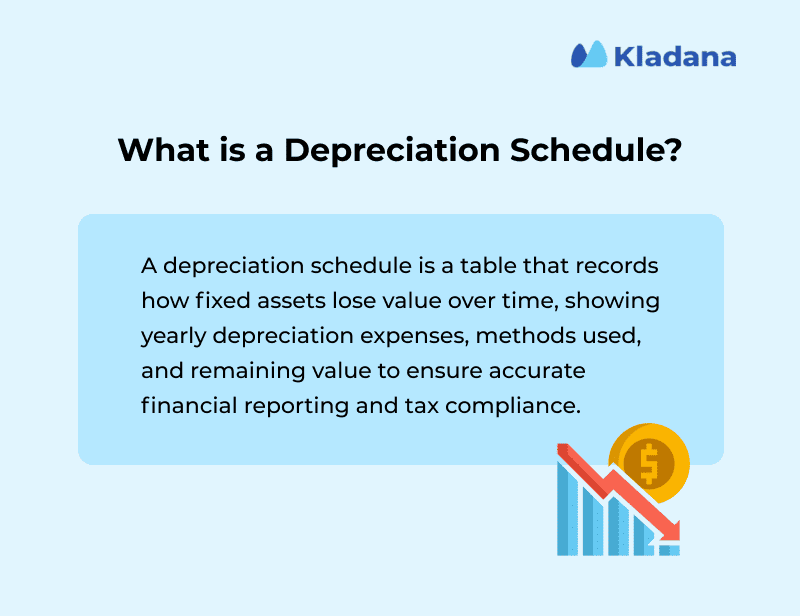
A depreciation schedule in Excel is a table that calculates and records depreciation for fixed assets over time. It usually includes asset name, purchase date, cost, useful life, salvage value, depreciation method, annual depreciation expense, accumulated depreciation, and net book value. Businesses use it for financial reporting, tax preparation, asset planning, and audits.
- Download Free Depreciation Schedule Excel Template
- What Is a Depreciation Schedule?
- Why Use Excel for Depreciation Schedules?
- Key Elements of a Depreciation Schedule
- Types of Depreciation Methods
- How to Create a Depreciation Schedule in Excel
- Depreciation Schedule Example
- Best Practices for Using Depreciation Schedules
- FAQs on Preparing Depreciation Schedule in Excel
Download Free Depreciation Schedule Excel Template
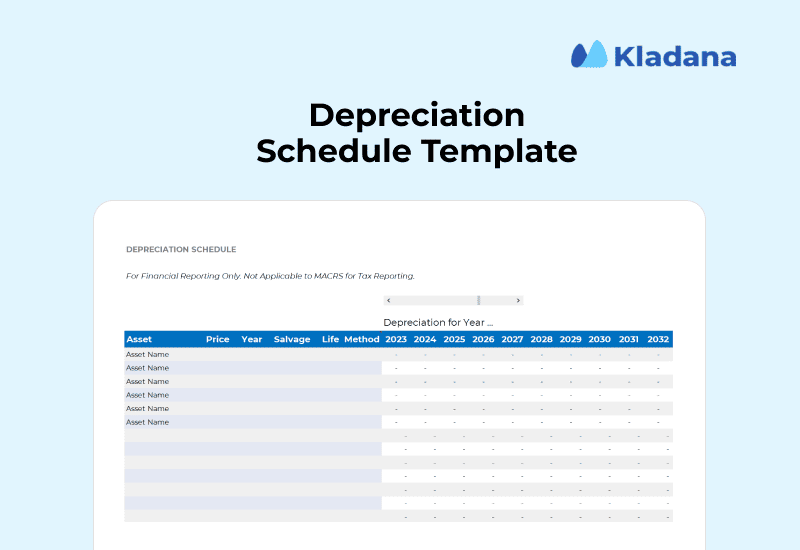
This free depreciation schedule template helps you track fixed assets and calculate depreciation in Excel or Google Sheets. It includes fields for asset details, purchase cost, useful life, salvage value, depreciation method, annual depreciation, accumulated depreciation, and net book value.
| Template section | What it helps you do |
| Asset details | Record asset name, purchase date, cost, useful life, and salvage value |
| Depreciation method | Choose the method used for each asset |
| Annual depreciation | Calculate yearly depreciation expense |
| Accumulated depreciation | Track total depreciation recorded so far |
| Net book value | See the remaining value of each asset |
| Notes / status | Mark assets as active, disposed, sold, or written off |
Or
Who Can Use This Template?
This template is useful for small business owners, accountants, bookkeepers, finance managers, and operations teams that track fixed assets manually. It works best for businesses with a limited number of assets and simple reporting needs.
What Is a Depreciation Schedule?
The primary purpose is to ensure accurate financial reporting and maintain compliance with tax laws. By spreading the cost of an asset across multiple years, a depreciation schedule helps businesses reflect the true value of assets on their balance sheet and claim allowable tax deductions in a timely manner.
It plays a critical role in:
- Financial reporting: Ensures consistent and accurate expense allocation on income statements and balance sheets.
- Tax filings: Supports depreciation claims under tax laws by maintaining a year-wise record.
- Asset management: Tracks each asset’s book value, usage, and replacement timeline.
In simple terms, a depreciation schedule answers three questions:
- How much value has the asset lost?
- How much depreciation should be recorded for the period?
- What is the asset worth in the books now?
One Place to Track All Financial Data
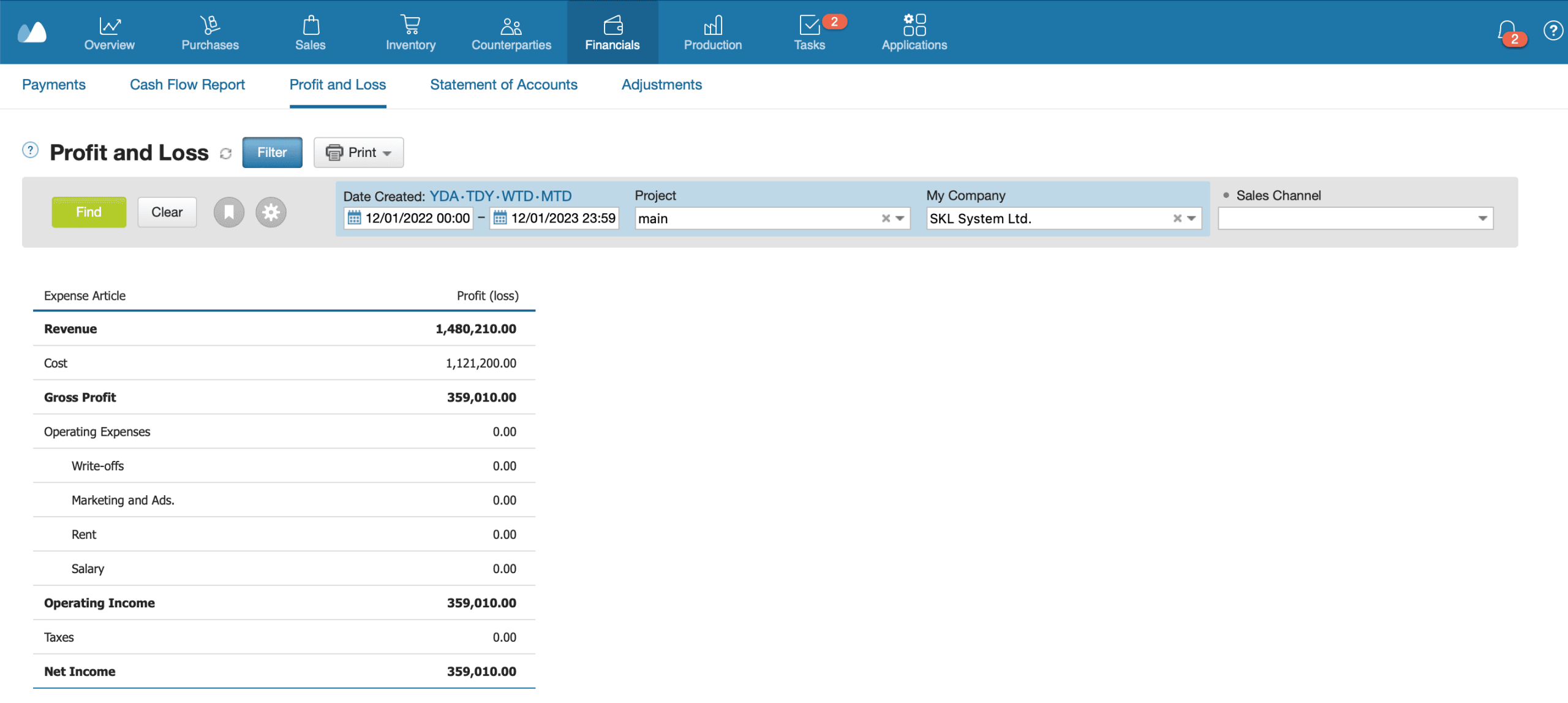
Stop juggling multiple spreadsheets. With Kladana’s Financials, you can track sales, purchases, expenses, and payments — all in real time
- See your full financial picture in one dashboard
- Generate invoices and link them to transactions
- Export data to accounting tools like Tally or Zoho Books
Who Uses a Depreciation Schedule?
Depreciation schedules are used across a range of roles and industries:
- Accountants and bookkeepers: For monthly and annual closing entries and compliance audits.
- CFOs and finance managers: To forecast expenses, plan capital budgets, and monitor asset lifecycle.
- Auditors:To verify asset valuation, depreciation methods, and proper expense recording.
- Founders and business owners: To track large purchases and ensure asset value is reflected accurately.
From small businesses tracking a few laptops to manufacturing firms managing millions in equipment, a depreciation schedule is essential for maintaining financial clarity and regulatory compliance.
Many companies prepare schedules based on IFRS (IAS 16) guidelines, which require the depreciation method, residual value, and useful life to be reviewed at least annually. Differences in local GAAP, such as the use of accelerated depreciation under IRS rules in the US, may affect the method or rate but the structure of the schedule remains largely the same.
Why Use Excel for Depreciation Schedules?
Excel remains one of the most practical tools for managing depreciation schedules, especially for small to mid-sized businesses. It’s accessible, flexible, and doesn’t require expensive software or steep learning curves.
Simple and Widely Accessible
Excel comes pre-installed or cloud-based for most users. Anyone on the finance team can open, edit, and share depreciation schedules easily.
Easy to Customize Formulas for Different Methods
You can use built-in functions like SLN, DDB, SYD, or VDB to handle various depreciation methods. For example, =SLN(50000,5000,5) calculates annual straight-line depreciation on a $50,000 asset with $5,000 salvage value over five years.
Automates Yearly Calculations and Asset Tracking
Once set up, Excel can compute annual depreciation, update book values, and flag fully depreciated assets using formulas and conditional formatting.
Supports Integration With Accounting Systems
Excel files can be imported into tools like QuickBooks, Zoho Books, or Xero. This makes it easier to sync depreciation entries during monthly or annual close.
📘 Recommended Read: Managing assets is just one part of financial reporting. To understand how non-cash expenses like depreciation affect liquidity, explore operating cash flow. It explains how cash inflows and outflows from core operations shape real business performance.
Key Elements of a Depreciation Schedule
A depreciation schedule isn’t just a list of numbers. It’s a structured record that captures the lifecycle of each fixed asset — from acquisition to write-off. These elements make the schedule useful for tax compliance, financial reporting, and internal asset tracking.
Here’s what every depreciation schedule should include:
Asset Name & Description
Identifies the asset clearly for internal tracking and audit purposes. Example: “Dell Latitude 5540 Laptop — Finance Team.”
Purchase Date & Cost
The acquisition date and original purchase price. This forms the basis for all depreciation calculations. Example: Purchased on Jan 10, 2023, for $2,000.
Useful Life of Asset
The number of years the asset is expected to provide economic benefit.
Example: 5 years for computers, 10 years for heavy machinery.
Residual/Salvage Value
The estimated value at the end of the asset’s useful life. This is subtracted from the cost to calculate total depreciable value.
Example: A $2,000 laptop with a $200 salvage value has a depreciable base of $1,800.
Depreciation Method Applied
Specifies the method used: Straight Line (SLN), Double Declining Balance (DDB), or Sum-of-Years’ Digits (SYD) etc. This affects the pattern of depreciation across the years.
Annual Depreciation Expense
How much expense is recorded in each financial year. This figure is based on the method selected and asset specifics.
Accumulated Depreciation
The total depreciation charged so far. It helps track how much of the asset’s cost has already been expensed.
Net Book Value
Represents the asset’s remaining value at a point in time. This is the amount that appears on the balance sheet.
Calculated as:
Net Book Value = Cost − Accumulated Depreciation
Including all these components makes your depreciation schedule audit-ready and provides actionable insights for asset replacement, budgeting, and tax planning.
Types of Depreciation Methods
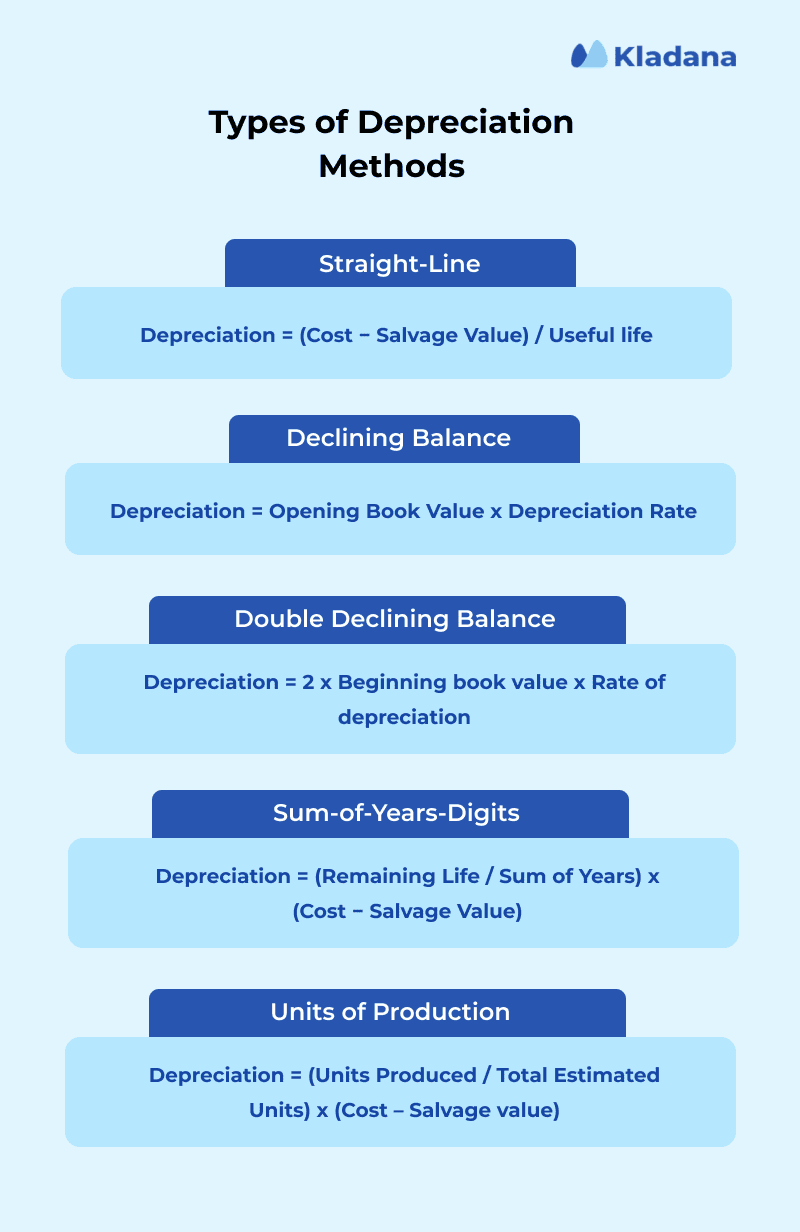
Different assets wear out at different rates. Choosing the right depreciation method ensures your expense recognition aligns with how the asset actually loses value. Below are five most widely used methods:
1. Straight Line Method (SLN)
The simplest and most common approach. Depreciation is charged evenly across the asset’s useful life.
Formula: Depreciation expense = (Cost − Salvage Value) / Useful life
Example: A $25,000 machine with a $1,000 salvage value and a 5-year useful life depreciates by:
(25000−1000)/5 = $4,800 per year
SLM is ideal for assets that lose value uniformly, such as buildings, furniture, or office equipment.
2. Written Down Value (WDV) / Declining Balance
This method applies a fixed percentage rate to the asset’s book value, which declines each year. Depreciation is higher in the early years and smaller later on.
Formula to calculate:
Depreciation Expense = Opening Book Value x Depreciation Rate
Example: For an asset worth $20,000 with a 20% rate, first-year depreciation = $4,000, second-year = $3,200, and so on.
It’s suitable for assets like computers or vehicles that lose most of their value early.
3. Double Declining Balance (DDB)
A more accelerated version of the declining balance method. It doubles the straight-line depreciation rate and applies it to the asset’s beginning book value each year. This allows businesses to recognize higher depreciation expenses in the early years.
The depreciation rate is calculated as follows:
Depreciation Rate = (1 / Useful Life) × 2 × 100
The depreciation expense is calculated as:
Depreciation Expense = Beginning Book Value × Depreciation Rate
Example:
An asset was purchased for $45,000 and has a useful life of 8 years.
Depreciation rate:
(1 / 8) × 2 × 100 = 25%
Depreciation expense:
| Year | Beginning Book Value | Depreciation Rate | Depreciation Expense | Ending Book Value |
| Year 1 | $45,000 | 25% | $11,250 | $33,750 |
| Year 2 | $33,750 | 25% | $8,437.50 | $25,312.50 |
| Year 3 | $25,312.50 | 25% | $6,328.13 | $18,984.37 |
This method can be used for assets with high early productivity or rapid obsolescence, such as technology equipment.
4. Sum-of-Years-Digits (SYD)
Another accelerated method that assigns higher depreciation in early years using a weighted fraction based on remaining life.
Formula:
Depreciation Expense = (Remaining Life / Sum of Years) x (Cost − Salvage Value)
So, for an 8-year asset, the SYD = 1+2+3+4+5+6+7+8 = 36.
Year 1 rate = 8/36, Year 2 = 7/36, and so on.
This method can be applicable for equipment or vehicles where efficiency declines steadily over time.
5. Units of Production
This method links depreciation directly to usage or output instead of time.
Depreciation Expense = (Units Produced / Total Estimated Units) x (Cost — Salvage value)
Example:
A $50,000 machine expected to produce 100,000 units with a $5,000 salvage value will depreciate $450 each time it produces 1,000 units.
Perfect for manufacturing or mining equipment where wear depends on production volume, not age.
Connect Financial Records With Business Operations
Depreciation affects reports, but asset costs often start with purchases, supplier bills, and payments. Kladana helps you keep business records connected, so financial data is easier to review and export.
— track purchases, sales, expenses, and payments;
— view financial reports without collecting data from separate spreadsheets;
— export data to accounting tools when needed.
How to Create a Depreciation Schedule in Excel
A depreciation schedule is a tool to calculate and track how the value of an asset decreases over time. In this example, we will create a depreciation schedule for a CNC machine with a cost of $20,000, a salvage value of $2,000, and a useful life of 5 years.
Step 1: Insert Asset Data
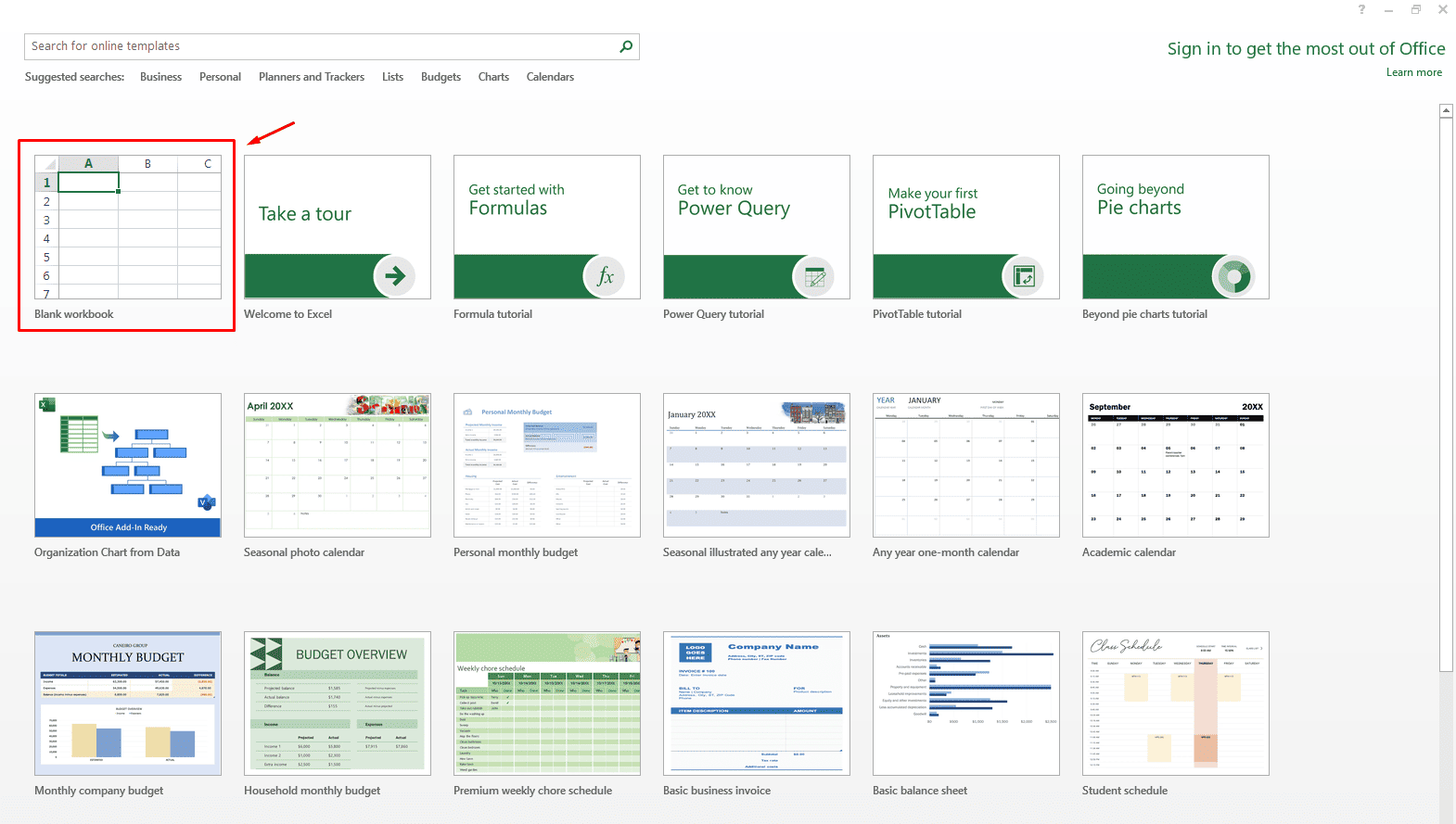
Launch Microsoft Excel and create a new workbook.
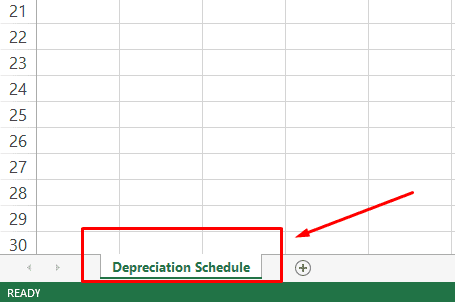
Name your sheet as ‘Depreciation Schedule’
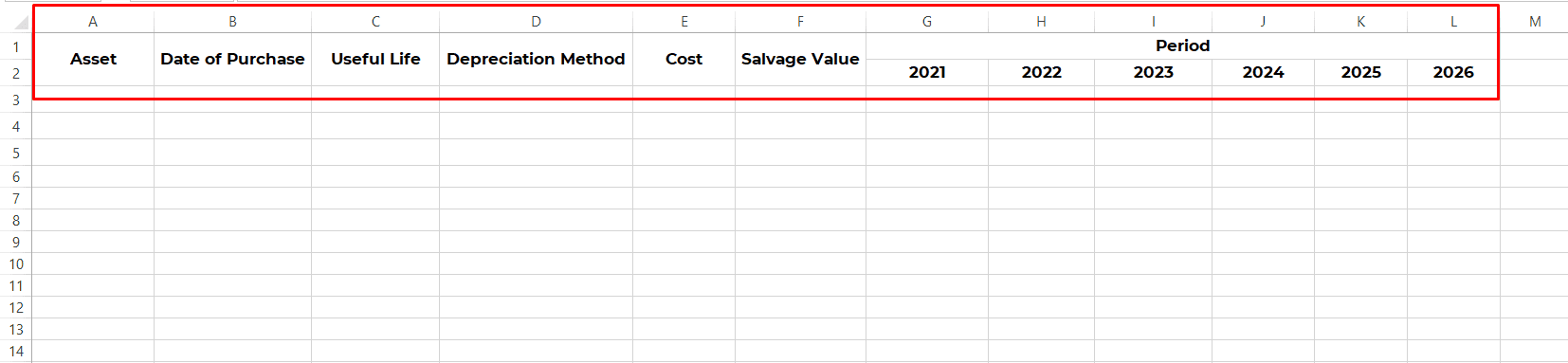
To begin, enter your asset details.
Click the first cell in row 1, column A and type “Asset”
In B1, type “Date of Purchase”
In C1, type “Useful Life”
In D1, type “Depreciation Method”
In E1, type “Cost”
In F1, type “Salvage Value”
In G1, type “Period”
| Column Name | Formatting Tip |
| Asset | General |
| Date of Purchase | Date |
| Useful Life | Number |
| Depreciation Method | General |
| Cost | Currency (USD, GBP, INR etc.) |
| Salvage Value | Currency |
| Period | General |
| Years mentioned in the Period | Currency |
In the next row, add applicable years under Period (From G2): 2021, 2022, 2023, 2024, 2025 and 2026.
Merge cells A1 & A2, B1 & B2, C1 & C2, D1 & D2, E1 & E2, F1 & F2, and G1 to L1.
Result: The headers are set up.
Now enter data in row 3:
A3 “CNC Machine”
B3 “03-Jan-2021”
C3 “5”
D3 “SLN”
E3 “20000”
F3 “$2000”.
Step 2: Calculate Depreciation
To compare methods, copy the same asset data from row 3 to rows 4, 5, and 6. Then set D3: SLN, D4: DB, D5: DDB, D6: SYD.
A. Using Straight-line Method
The straight-line method spreads the cost evenly over the useful life.
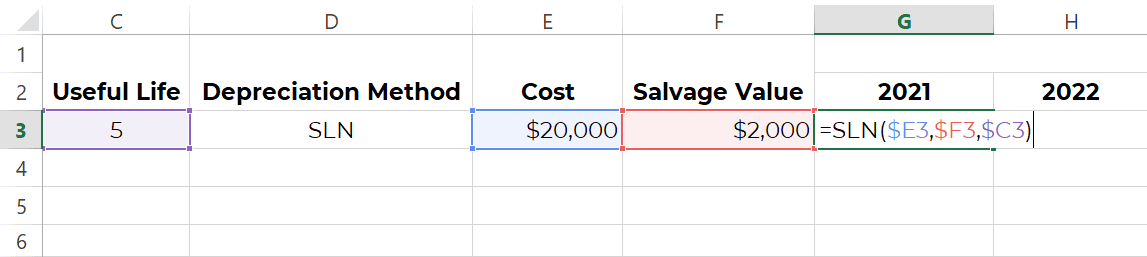
Excel formula is: =SLN(cost,salvage,life)
In G3, type in this formula: =SLN($E3,$F3,$C3).
Press Enter.
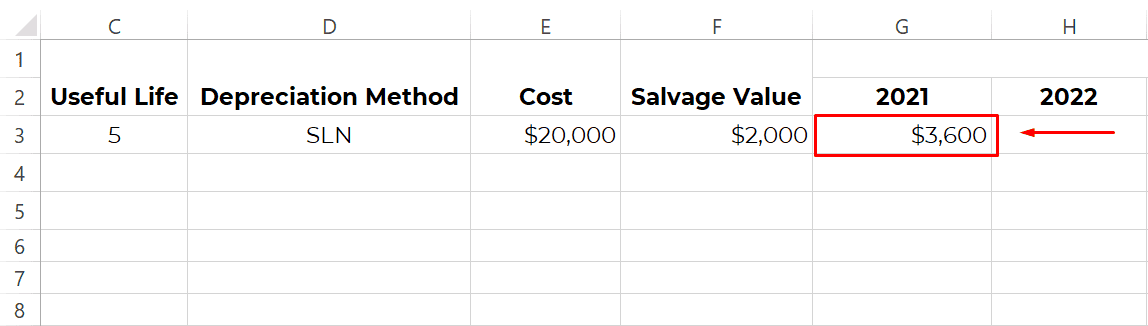
You will get $3,600. That’s how easy straight-line depreciation can be!
Note: If there’s no salvage value, add 0 in D3.
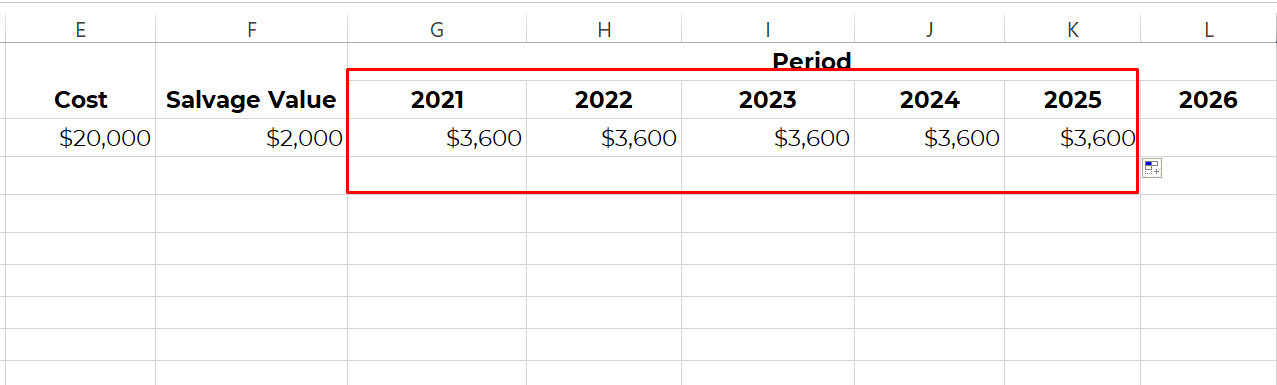
Drag the formula across all the applicable columns till K3. This will add depreciation amount using Straight Line Method for that particular asset.
B. Using Declining Balance Method
The declining balance method calculates depreciation on the asset’s book value at the start of each period. It usually records higher depreciation in the early years and lower depreciation in later years.
The Excel formula is: =DB(cost,salvage,life,period)
Where period represents the sequence of year. For the first year, the value of period will be one. For Year 2, it will be 2, for Year 3, it will be 3, so on and so forth.
In G4 (we are adding a new row for comparison), enter =DB($E4,$F4,$C4,1) for the first year, i.e. 2021.

The depreciation expense will be $7,380.
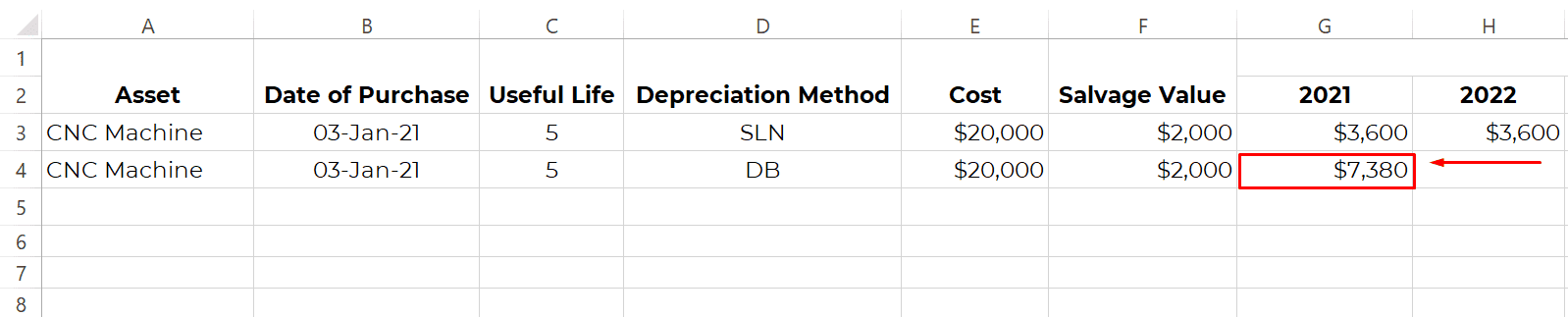
In the adjoining cells, change the formula to reflect the sequence of the period. For example, in 2022, the formula will be =DB($E4,$F4,$C4,2).
By doing so, you will get the depreciation amount for the rest of the years.
C. Using Double-Declining Balance Method
The double-declining balance method accelerates depreciation early on.
The Excel formula is: =DDB(cost,salvage,life,period,[factor])
In G5, enter =DDB($E5,$F5,$C5,1,2) for a 200% factor.
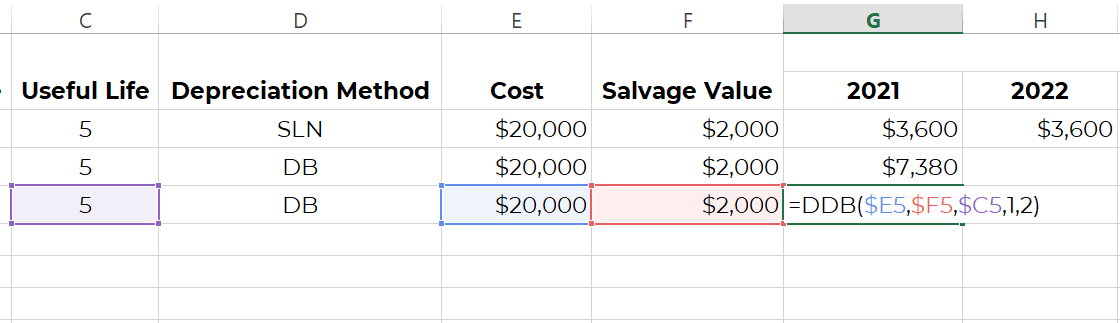
Press Enter.
The depreciation expense will be $8,000.
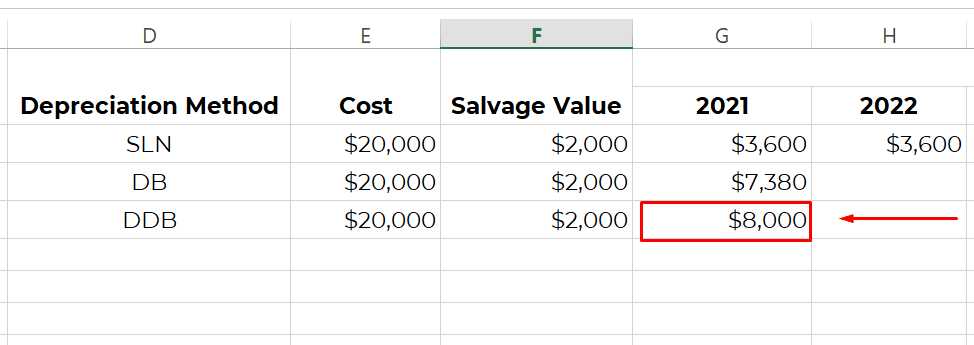
For 150% factor, enter =DDB($E5,$F5,$C5,1,1.5)
Now, use the same technique as explained in the declining balance method to calculate depreciation for the remaining years i.e. change the formula to reflect the sequence of the period. For example, in 2022, the formula will be =DDB($E5,$F5,$C5,2,2).
D. Using Sum-of-Years (SYD) Method
The sum-of-years’ digits method is an accelerated depreciation method. It records higher depreciation in the early years and lower depreciation in later years.
The Excel formula is: =SYD(cost,salvage,life,per)
Where ‘per’ refers to the period, i.e. the sequence of the year. For the first year, the value of ‘per’ will be 1, for second year, it will be 2 and so on.
Now, let’s calculate.
In G6, type =SYD($E6,$F6,$C6,1) for the first year, i.e. 2021.
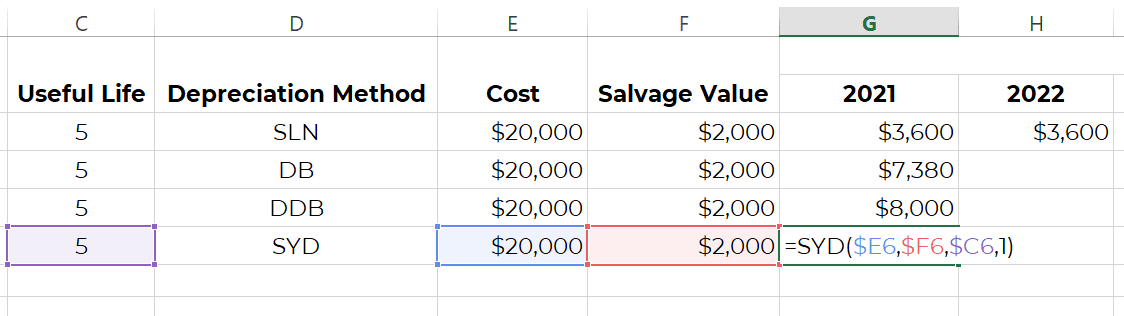
Press Enter.
The depreciation expense will be $6000.
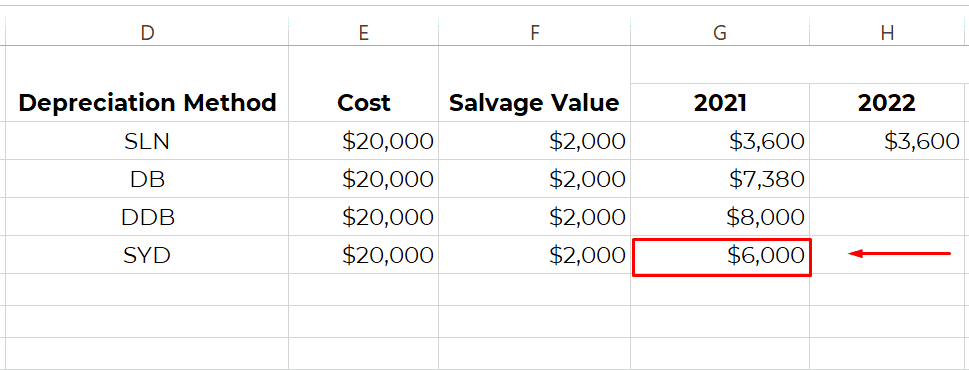
Depreciation Schedule Example
Here is a simple straight-line depreciation schedule for a CNC machine with a cost of $20,000, salvage value of $2,000, and useful life of 5 years.
| Year | Opening book value | Depreciation expense | Accumulated depreciation | Net book value |
| 1 | $20,000 | $3,600 | $3,600 | $16,400 |
| 2 | $16,400 | $3,600 | $7,200 | $12,800 |
| 3 | $12,800 | $3,600 | $10,800 | $9,200 |
| 4 | $9,200 | $3,600 | $14,400 | $5,600 |
| 5 | $5,600 | $3,600 | $18,000 | $2,000 |
The net book value stops at the salvage value of $2,000. This prevents the asset from being depreciated below its estimated residual value.
Best Practices for Using Depreciation Schedules
A depreciation schedule is only as good as the processes that support it. To keep your records accurate and compliant, here are five practical habits that every finance team should adopt — whether you’re managing five assets or five thousand.
Maintain an Updated Fixed Asset Register
Your asset register is the base for accurate depreciation. Record key details like purchase date, cost, department, and status, and keep it synced with your schedule. Update both records immediately when assets are sold, transferred, or scrapped.
Align Methods With Accounting and Tax Regulations
Follow the standards that apply to your reporting. Under IFRS (IAS 16), companies must review depreciation methods and useful lives annually. In the US, IRS MACRS rules allow faster write-offs but differ from financial reporting. Label your methods clearly if multiple books are maintained.
📘 Recommended Read: Tax Invoice Format in Excel: Free Templates & How to Customize Them
Review Salvage Values Periodically
Salvage value is often estimated once and never revisited, but it should be. An outdated residual value can throw off depreciation expense and distort your balance sheet. For instance, a $30,000 truck might have a $5,000 salvage value when purchased, but if resale markets drop or usage patterns change, that value may fall significantly.
Ensure Consistency Across Departments
In multi-location or multi-division businesses, inconsistent asset treatment is a common audit red flag. One team might be using straight-line, another using WDV, or worse, not recording depreciation at all. To avoid this, using standardized formats and adding validation rules in Excel can reduce inconsistencies during consolidation or audits.
Link Depreciation Schedules With Financial Statements
Depreciation impacts both the income statement and balance sheet. Reconcile totals during month- or year-end close and import the figures directly into your accounting software when possible.
FAQs on Preparing Depreciation Schedule in Excel
Here are quick answers to common questions about building and maintaining depreciation schedules in Excel.
Which Excel Function Should I Use for Straight-Line?
For Straight-line depreciation method, use the SLN (cost, salvage, life) function. It calculates equal annual depreciation over the asset’s useful life.
How Do I Model Double-Declining?
Double-declining depreciation can be calculated using DDB (cost, salvage, life, period). This method calculates accelerated depreciation based on a double rate of the straight-line method.
When Should I Use VDB?
Use VDB when you want to calculate variable declining balance with switching to straight-line or limit depreciation by a final book value. It’s useful for more complex asset tracking over time.
How Do I Produce Monthly Depreciation?
Divide the annual depreciation by 12, or adjust your Excel formula using DATEDIF to calculate prorated months for partial years. Monthly tracking is helpful for detailed reporting or lease accounting.
What if Residual Value Changes?
Update the salvage value in your schedule and recalculate future depreciation. Do not retroactively adjust past entries already posted.
How to Handle Disposals?
Remove the asset from the schedule in the disposal period. Record any gain or loss as the difference between sale proceeds and net book value.
Can I Include Revaluations or Impairments?
Yes, but record revaluations separately and adjust the asset’s book value accordingly. For impairments, reduce the asset’s value and recalculate depreciation based on the new balance.
How to Link Schedule to Cash Flow?
Depreciation itself is non-cash, but it adjusts net income in the cash flow from operations section. Link your depreciation total to the indirect cash flow statement as an add-back.
Do I Need Component Depreciation?
Yes, if an asset has parts with different useful lives. Required under IFRS for significant components like HVAC systems in a building.
Any Ready Sample Schedules?
Yes. Download a free Excel template or create your own using functions like SLN, DDB, and VDB for different asset types.
What should a depreciation schedule include?
A depreciation schedule should include asset name, asset ID, purchase date, purchase cost, useful life, salvage value, depreciation method, annual depreciation, accumulated depreciation, net book value, and asset status.
What is the difference between a fixed asset register and a depreciation schedule?
A fixed asset register records the assets a business owns. A depreciation schedule calculates how those assets lose value over time. The register stores asset details, while the schedule supports accounting, tax records, and financial reporting.
How do I calculate net book value in Excel?
Use this formula: Net Book Value = Cost − Accumulated Depreciation. For example, if the asset cost is in E3 and accumulated depreciation is in M3, use =E3-M3.
Can I use one depreciation schedule for accounting and tax reporting?
Not always. Accounting depreciation and tax depreciation may follow different rules. Some businesses keep separate schedules when tax laws require a different useful life, rate, or depreciation method.
Is Excel enough for tracking depreciation?
Excel is enough for a small number of assets and simple depreciation methods. If your business has many assets, multiple locations, frequent transfers, or strict reporting requirements, accounting, ERP, or fixed asset management software is safer.
Read‑alikes
How to Estimate Manufacturing Costs: Methods, Tools, and Best Practices
Direct vs Indirect Expenses: How to Classify Them Correctly in Accounting
Stock-Taking: Step-by-Step Guide to Optimize Your Inventory Counting Procedures
Working Capital Management: Strategies to Keep Your Business Financially Healthy