
Job work bill format in Excel helps small businesses and individual entrepreneurs create clear and reliable bills for fabrication, construction, repair, subcontracting, automotive or any service‑based work. Many SMEs use Excel because it’s simple, free, and flexible. A ready‑made format saves time, prevents calculation mistakes, and brings consistency to your billing.
This guide explains what a job work bill is, what to include, and how to create your own version in Excel. You’ll also find editable templates you can download and use right away.
- What is a Job Work Bill?
- Why Use Excel for Job Work Bills?
- Key Elements of a Job Work Bill
- Types of Job Work Bill Formats
- Excel Templates for Job Work Bills
- How to Create a Job Work Bill in Excel
- Best Practices for Using Excel Job Work Bills
- Download Free Templates
- Frequently Asked Questions on Job Work Bill Format in Excel
What is a Job Work Bill?
A job work bill is a document used to charge for work done on goods, assets, equipment, or materials that belong to a client. It lists the tasks completed, the materials used or supplied, the rates, and the total amount payable. Businesses use it to keep billing clear and to help both sides track costs.
Common examples include fabrication, construction, machining, printing, repair jobs, stitching, assembly, packaging, welding, or any subcontracting activity where the client provides materials and the contractor performs the work.
A job work bill is different from a standard sales invoice. A sales invoice is issued when you sell finished goods. A job work bill is issued when you perform work on someone else’s goods or materials and charge only for the service, labour, or processing. Workshops handling multiple orders sometimes use a job order billing format to track components or batches processed under different work orders.
Why Use Excel for Job Work Bills?
Excel is one of the easiest tools for creating job work bills. It works on almost any computer, doesn’t require paid software, and helps small teams keep their billing routine simple. For service providers, it also works as an Excel billing template for services suitable for repair, fabrication, and subcontracting tasks.
You can customize the sheet to match your industry: fabrication units may add material details, workshops may track labour hours, and subcontractors may include GST or other tax fields. Excel also supports automatic calculations for totals, tax, and balances. This reduces manual errors and provides correct figures.
You can store all bills in one folder, filter them by date or client, and export each one to PDF when needed. Excel is a practical option for small businesses that need a quick and reliable billing format.
Key Elements of a Job Work Bill
A clear and complete job work bill helps avoid confusion between the client and the contractor. It also creates a proper audit trail and supports smooth payments. The format stays simple, but it should always include the main details of the work done.
✔️ Job worker (service provider) and client details
The bill includes the name, address, GSTIN (if applicable), phone number, and email of both parties. This ensures the document is valid, traceable, and easy to verify during audits or vendor checks.
✔️ Job work description
A short explanation of what was done. You can include the work order number, reference ID, or any specifications shared by the client.
✔️ Quantity and rate
These fields define how the bill amount is calculated. Quantity may refer to pieces processed, hours worked, or units completed. The rate shows the charge per unit.
✔️ Material supplied
Some clients provide materials, while others expect the contractor to make ancillary procurements. The bill should show this clearly so both sides know who bears the cost.
✔️ Labour or service charges
If the bill includes labour work, fabrication charges, stitching fees, machining costs, or repair fees, list them separately.
✔️ Tax details
If the business is registered under GST or the works and services are subjected to other taxes, add the applicable tax rate and the tax amount.
✔️ Net payable amount
This is the final amount after applying all taxes and adjustments.
✔️ Payment terms
Include the due date, method of payment, and any special instructions. This helps reduce misunderstanding and delays in settlements.
📖 Recommended Reads: Depreciation Schedule Excel Templates
Spreadsheets that help record asset cost, useful life, and yearly depreciation for accurate accounting.
Types of Job Work Bill Formats
Different businesses follow different billing styles, so the format you choose depends on the type of work and the level of detail required. Here are the most common formats used by small manufacturers, workshops, and subcontractors.
🧾 Simple job work bill (service‑only)
Used when you charge only for labour or service output. Suitable for stitching, machining, polishing, repair work, or any task where the client supplies all materials.
🧾 Job work bill with material and labour details
Useful when both material cost and labour charges need to be shown. Fabrication units, printing jobs, or workshops handling components often rely on this format.
🧾 GST‑compliant job work invoice format
Includes GST percentage, taxable value, and total amount after tax. Required for businesses registered under GST and issuing tax invoices.
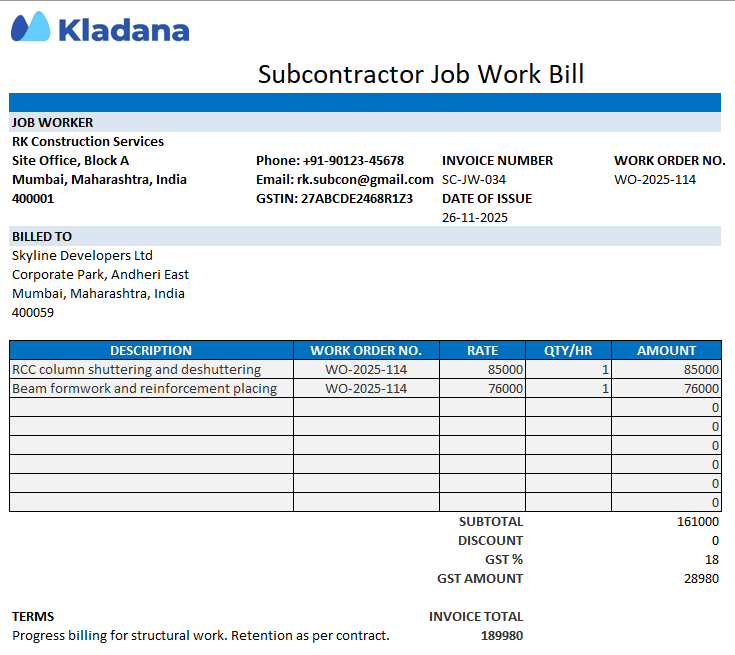
🧾 Subcontractor job work billing format
Designed for contractors who deliver part of a bigger project. The format may include work order references, stage‑wise billing, or milestones.
Excel Templates for Job Work Bills
Excel gives you the flexibility to create job work bills that match your workflow. You can keep the layout simple or add detailed fields based on the type of work you handle. The formats below describe the styles businesses commonly use before downloading the actual files in the next section. They are helpful whether you need a basic layout, a GST‑ready sheet, or a job work invoice template Excel version for detailed billing.
📝 Basic bill template
This version includes job details, quantity, rate, and total amount. It works well for small workshops and service providers who issue straightforward bills without tax components.
📝 GST-enabled job work invoice template
Suitable for businesses registered under GST. It includes fields for taxable value, GST percentage, GST amount, and final payable amount.
📝 Detailed bill with material and labour split
Use this template when a job includes both raw material charges and labour charges. The sheet keeps the two sections separate for clarity.
📝 Subcontractor-style bill
Designed for contractors who work under a work order or project. The format can include stages, work order IDs, and structured descriptions.
These descriptive formats help you understand the options. One of the next sections contains ready‑to‑use Excel files you can download and edit.
How to Create a Job Work Bill in Excel
You can create a job work bill in Excel by setting up a clean table with automatic formulas. This keeps the format consistent and reduces mistakes during billing. Below is a simple step‑by‑step process you can follow for any industry.
1. Add the header details
Enter the job worker’s name, address, GSTIN (if applicable), bill number, bill date, and client details. This helps track every bill easily.
2. Create a table for job descriptions
Use columns such as Description, Quantity, Rate, and Amount. For service‑only jobs, these four fields are usually enough.
3. Insert automatic formulas
For each row, use: =Quantity*Rate
This calculates the row amount without manual work.
To total all job rows: =SUM(D2:D50)
(Adjust the range based on your sheet.)
4. Add GST fields if required
Create three cells for GST % , GST Amount, and Total Bill Value.
Example formula for GST amount: =(Subtotal * GST%) / 100
Example formula for the final total: =Subtotal + GST Amount
5. Add drop‑down options for tax rates
Go to Data → Data Validation, and create a list such as: 0%, 5%, 12%, 18%
This ensures you always pick the correct rate.
6. Use auto‑numbering for bill numbers
If your previous bill number is in cell A1, you can generate the next one with: =A1 + 1
7. Highlight overdue bills automatically
Apply conditional formatting to the Due Date column.
Set a rule: Format cells where the date is before today. This helps track pending payments.
8. Prepare the sheet for printing
Adjust column widths, add borders, and set the print area. This ensures every bill fits on one page. To fit the bill on a single page, open the Page Layout tab (Go to File → Print → Scale) and select “Fit to Page.”
📖 Recommended Reads
Learn how to structure audit findings, risk notes, and compliance checks using a ready‑to‑use report format.
👉 Internal Audit Report Format in Excel: Templates, Guide & Best Practices
Best Practices for Using Excel Job Work Bills
Format consistency makes job work billing easier for both the contractor and the client. These simple practices will help keep your records clean and reduce back‑and‑forth during audits or payments.
Use standardised formats across clients
When all bills follow the same layout, it becomes easier to track work, compare costs, and maintain records.
Ensure tax compliance
If GST applies, include taxable value, percentage, amount, and the final bill value. This helps avoid compliance issues.
Maintain saved versions for each bill
Instead of overwriting the same file, save a new copy for every bill issued. This creates a clear audit trail.
Protect formula cells
Use sheet protection so quantities and client details stay editable, while formulas stay locked. This avoids accidental calculation errors.
Integrate with your accounting system if needed
Some teams export the Excel bill to PDF and then upload it into their accounting or ERP software for tracking, payments, and reconciliation.
Download Free Templates
Here you can download ready‑to‑use Excel templates for different types of job work bills. Each file includes automatic formulas, a clean layout, and a separate instructions tab. All templates are editable, so you can adjust fields to match your workflow.
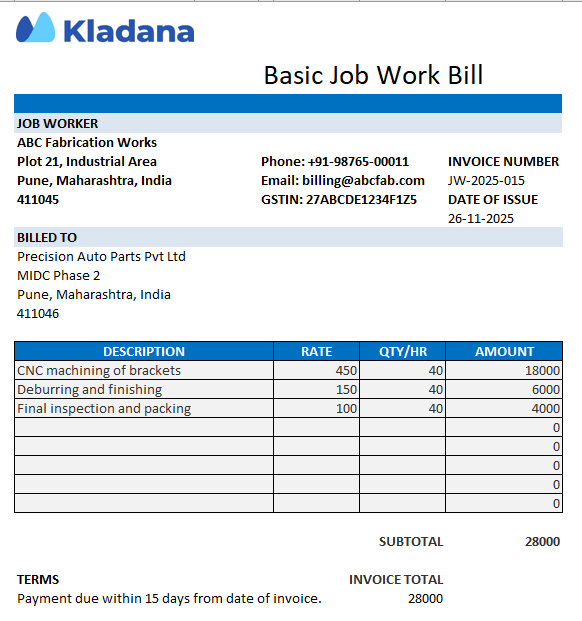
Basic Job Work Bill
This is a simple bill format in Excel free download that works well for small workshops and service‑only providers.
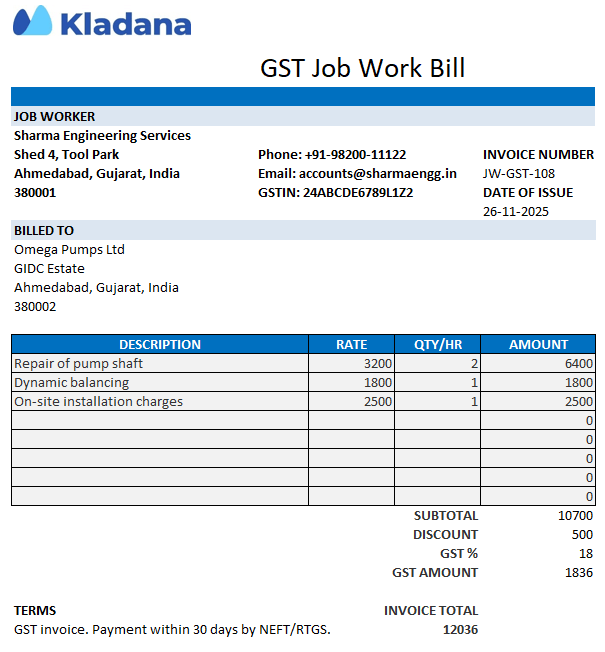
GST Job Work Bill
Businesses looking for a job work invoice template Excel with tax fields will find this format useful. Includes GST percentage, GST amount, and total payable fields.
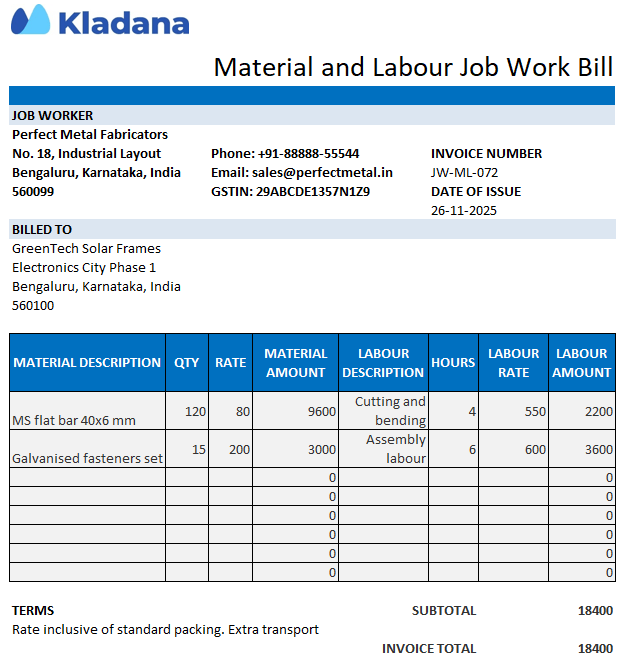
Material + Labour Job Work Bill
Separates material costs and labour charges for better clarity.
Subcontractor Job Work Bill (GST included)
This layout functions as a subcontractor bill format in Excel, especially for teams working under a principal contractor.
🚀 Need Accurate Labour Costing?
Kladana helps track labour time, stage duration, and standard hours directly in the system. This improves visibility across all production tasks 👌
Frequently Asked Questions on Job Work Bill Format in Excel
What is included in a job work bill format?
It includes job details, client and contractor information, quantity, rate, material or labour charges, GST (if applicable), and the final amount payable.
Can Excel be used for GST job work invoices?
Yes. You can add GST percentage, taxable value, GST amount, and total bill value using simple formulas.
Is there a difference between a job work bill and a subcontractor invoice?
Yes. A subcontractor invoice may include project stages, work order references, and milestone‑based billing, while a job work bill focuses on processing or labour done on client‑supplied materials.
How do I customize the template for my industry?
Add or remove columns such as material details, machine hours, labour charges, tax fields, or delivery notes based on the type of work you handle.
What numbering scheme should I use for invoices or job bills?
Businesses often use formats like JW/2025/001 or JW‑BILL‑001, increasing the number with each new bill.
How do I bill partial or progress payments?
Create one bill for each stage and mention the percentage of work completed, reference the work order, and show adjustments if any advance is received.
Can I lock formulas so clients can’t accidentally edit them?
Yes. Protect the sheet and unlock only the cells meant for input, such as description, quantity, and rate.
Which date format works best for international clients?
Use a clear numeric format like DD‑MM‑YYYY or YYYY‑MM‑DD to avoid confusion.
How do I adapt the template for subcontractor billing?
Add work order IDs, stage descriptions, milestone notes, and GST fields if applicable.
How do I convert my Excel invoice to PDF before sending it?
Go to File → Export → Create PDF, or use Save As and choose PDF as the file type.