
A messy SKU system creates daily chaos. You pick the wrong item, ship the wrong size, or order stock you already have. The worst part: you don’t notice the pattern until returns and “where is it?” messages pile up.
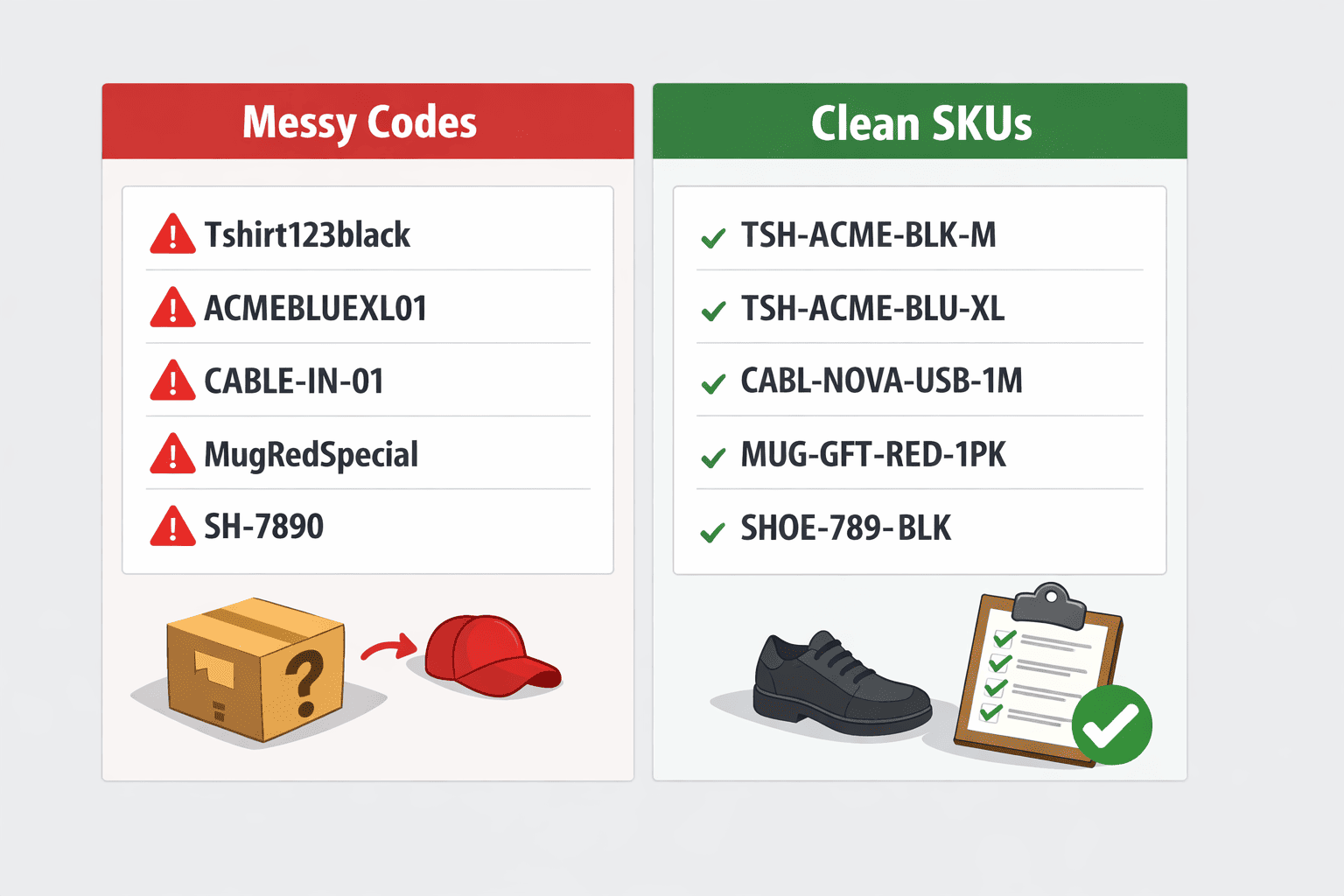
This SKU creation guide shows how to create SKUs that stay readable as you add more products. You’ll set a basic SKU structure, apply clear SKU naming rules, and keep control over variants and bundles.
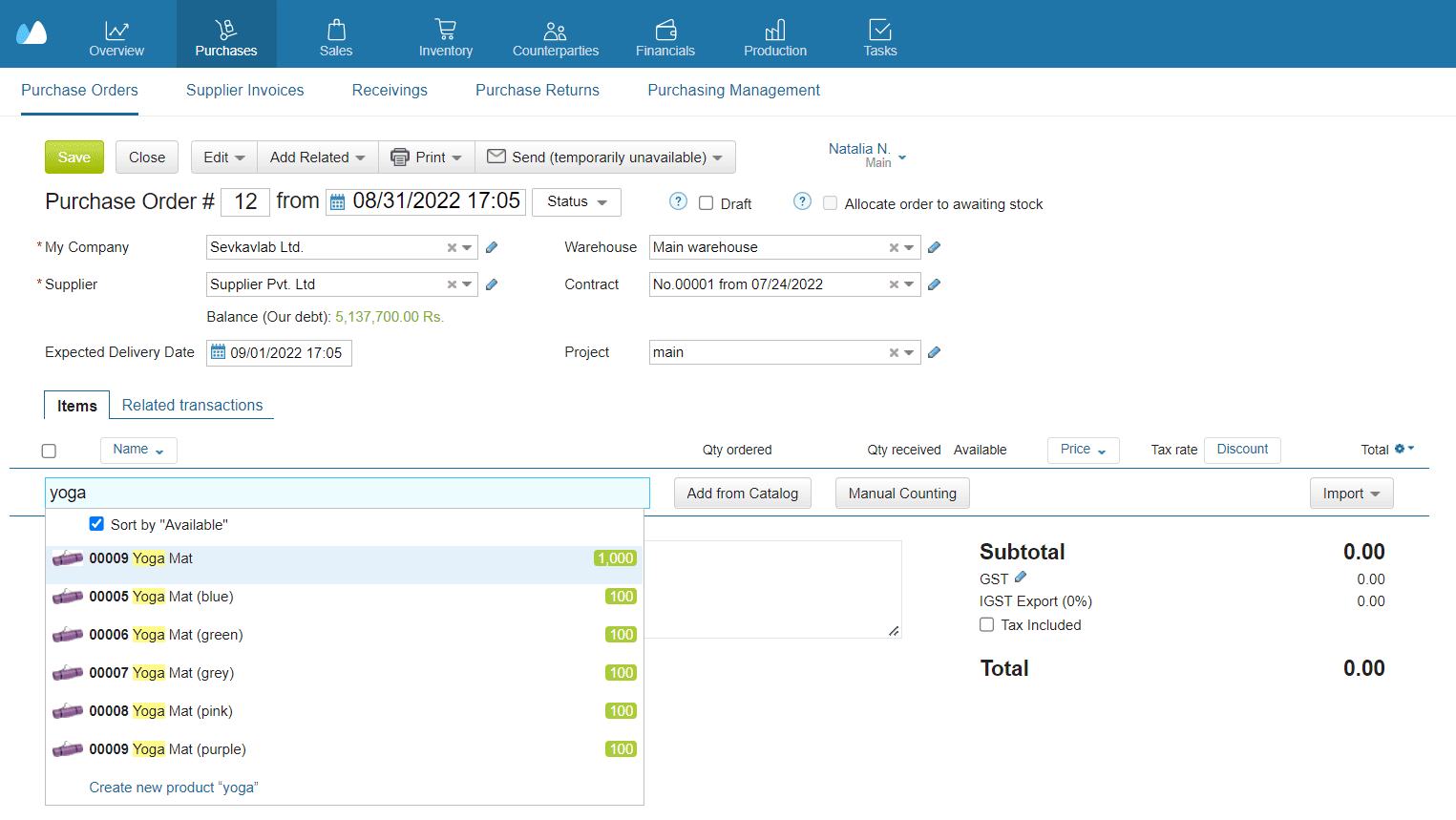
- What Is an SKU & Why It Matters
- Key Principles of a Good SKU System
- Step 1 — Define SKU Format for Your Business
- Step 2 — Generate SKUs for Existing Products
- Step 3 — Use SKUs for Variants & Bundles
- Step 4 — Enforce SKU Discipline Over Time
- How SKUs Help with Searching, Picking & Reporting
- Why Kladana Makes SKU Management Easy
- Frequently Asked Questions on SKU Management for Beginners
What Is an SKU & Why It Matters
An SKU (Stock Keeping Unit) is your internal product code. You create it to identify items in your catalog, warehouse, and reports. A good SKU helps you search, sort, pick, reorder, and track sales without guessing.
Think of an SKU as a “short name” your team can read fast:
- TSH-ACME-M-BLK (T-shirt, brand ACME, size M, black)
- MUG-12OZ-WHT (mug, 12 oz, white)
SKUs matter because product mix-ups usually start with “similar items.” Same model, different color. Same shampoo, different size. If your codes don’t show the difference, your team will miss it during picking.
Definition (what is SKU)
A stock keeping unit is a unique identifier you assign to a product (or variant) for inventory tracking and record-keeping. It does not have to follow a global standard. It just needs to be consistent inside your business.
Difference between SKU and UPC/barcode
A SKU is internal. A GTIN is a global product identifier used in trade, and it is often shown in a barcode. GS1 explains that GTINs are globally unique identifiers for trade items.
UPC and EAN are common barcode formats. In GS1 terms, GTIN-12 is also called UPC, and GTIN-13 is also called EAN.
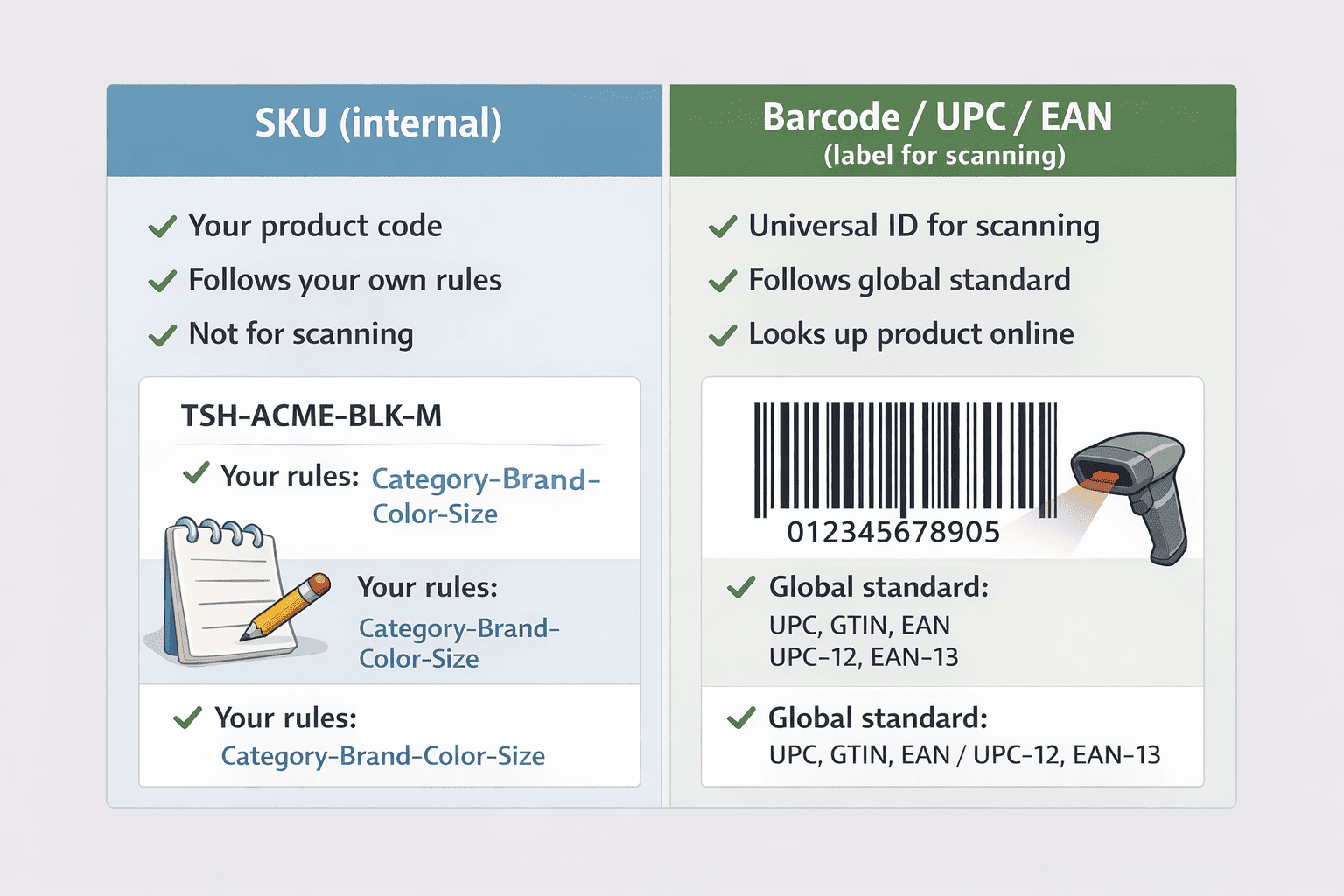
Simple rule:
- Use SKU to run your own inventory and warehouse work.
- Use UPC/EAN (GTIN) when you need a global identifier for marketplaces, retail, or barcodes on packaging.
Key Principles of a Good SKU System
A good SKU system for small business does two jobs. It helps you identify the right product fast, and it stays consistent as your catalog grows. If people can’t read the code, they will ignore it. If the code changes every week, it will break your processes.
Use these principles:
- Unique: one SKU = one sellable item (one exact variant).
- Descriptive: show the difference that matters (size, color, pack, model).
- Short: keep it readable at a glance. Don’t stuff every detail inside.
- Scalable: it should still work when you add 200 more products.
- Consistent: one consistent SKU format across the whole catalog.
Avoid “random” SKUs that look like this:
- productname123, newitem-2, sale-blue, test-01
These change based on mood, not rules.
Use meaningful segments (your SKU structure) instead:
- CAT-BRAND-SIZE-COLOR
- CAT-MODEL-CAPACITY-COLOR
Quick rule:
If two products can be confused in picking, their SKUs must show the difference.
Step 1 — Define SKU Format for Your Business
Start by choosing one SKU structure for your whole catalog. Keep it simple. You can always extend it later. Your goal is not to encode every product detail. You need to stop mix-ups and make inventory easy to search.
Choose 3–5 segments
Pick the smallest set of details that helps your team tell items apart during picking and receiving.
Common segments:
- Category (what it is): TSH, MUG, CAB, CABL
- Brand or line (optional): ACME, NOVA
- Model or style: RND, S123, PRO2
- Variant (size/color/material): M, BLK, STL
- Pack size: 1PK, 6PK, 12PK
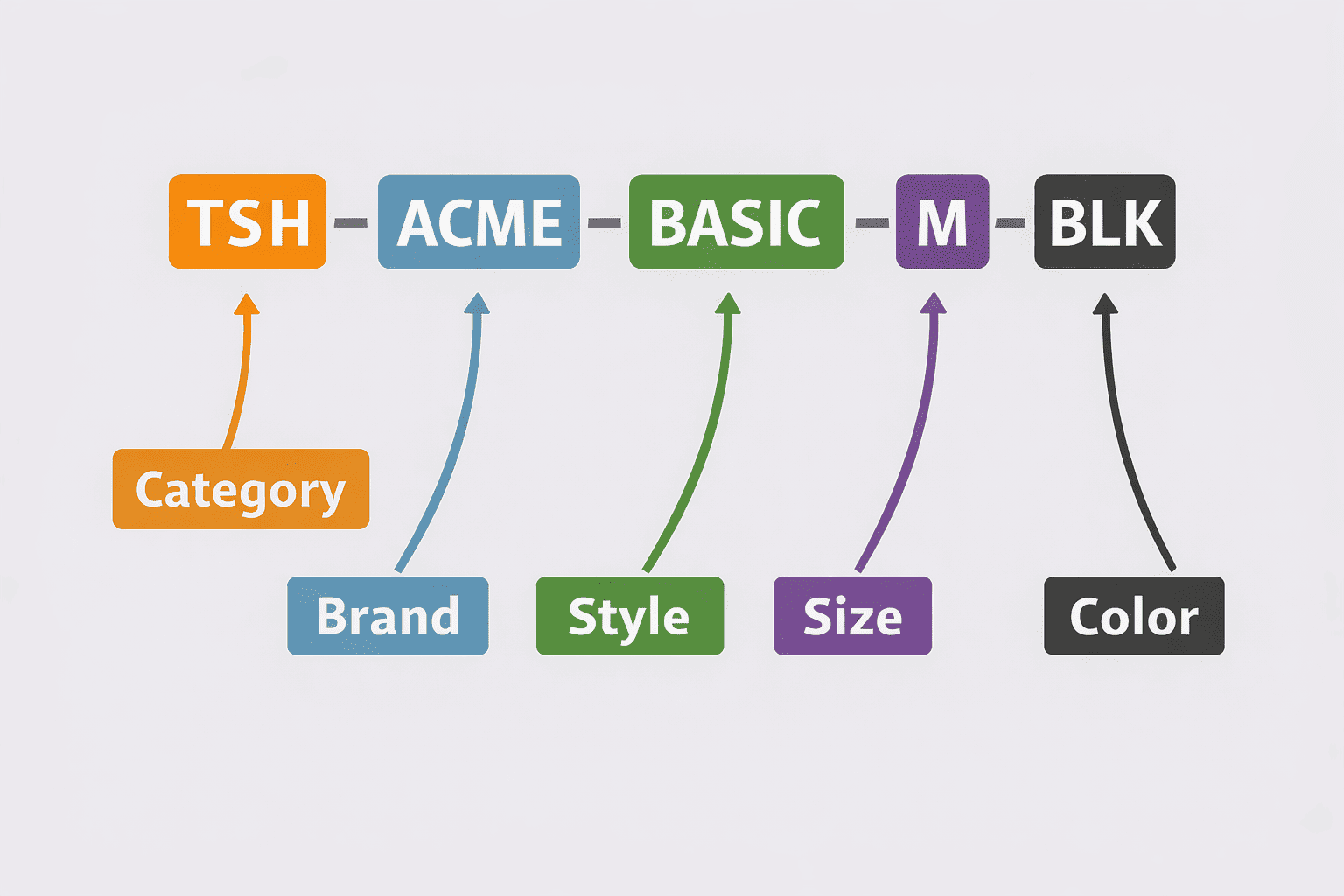
Use one separator everywhere: hyphen is the easiest.
SKU format cheat sheet (copy this)
Choose one base pattern and stick to it:
Retail/simple catalog
- CAT-STYLE-VAR
Example: TSH-BASIC-MBLK
Brand matters
- CAT-BRAND-STYLE-VAR
Example: TSH-ACME-BASIC-MBLK
Electronics/model-driven
- CAT-BRAND-MODEL-SPEC-VAR
Example: CABL-NOVA-USBCA-2M-BLK
Pack-based selling
- CAT-ITEM-PACK
Example: MUG-12OZ-6PK
Rules that prevent mess later
- Use UPPERCASE.
- Avoid spaces and special characters (/ \? % #).
- Keep each segment short and fixed (2–6 characters is a good start).
- Don’t put dates in SKUs (2026, FEB). Dates age fast.
- Don’t put prices in SKUs (1999). Prices change.
Examples by business type
- Base: TSH-ACME-BASIC
Variants:- TSH-ACME-BASIC-S-BLK
- TSH-ACME-BASIC-M-BLK
- TSH-ACME-BASIC-M-WHT
- CABL-NOVA-USBCA-1M-BLK
- CABL-NOVA-USBCA-2M-BLK
- CHR-NOVA-20W-WHT
Small gift items
- MUG-RND-12OZ-WHT
- MUG-RND-12OZ-BLK
🤓 Recommended Reads for Beginners
1️⃣ Serial Number Tracking for Beginners: Why and How to Use It
— Use unique serials to track each unit, handle returns, and trace warranty cases without confusion.
2️⃣ Barcode Basics for Small Business: Simple Setup Guide
— Learn how barcodes work, what you need to start scanning, and how to connect labels to your product codes.
3️⃣ Stock In, Stock Out: What It Means and How to Track It
— Understand stock movements and build clean inventory records that stay accurate across purchasing, sales, and adjustments.
Step 2 — Generate SKUs for Existing Products
If you already have products, don’t rename them one by one. Do it in bulk. A spreadsheet is the fastest way to create a consistent SKU format and spot duplicates before they cause errors.
1) Export your product list
Make a table with one row per sellable item (or variant). Keep these columns:
- Product name (current)
- Category
- Brand (optional)
- Model/Style (optional)
- Size
- Color
- Pack size
- Current SKU (if any)
- New SKU (you will fill this)
If you don’t have variants separated yet, add a “Variant” column and split them now. One SKU must match one exact item.
2) Build SKUs using a simple pattern
Pick the format from Step 1, then fill segments in separate columns. Example:
- CAT | BRAND | STYLE | SIZE | COLOR
Then create the final SKU by joining segments with a hyphen.
Example logic (no formulas needed):
- Choose short codes for categories: TSH, MUG, CABL
- Choose short codes for colors: BLK, WHT, RED
- Use consistent size codes: XS, S, M, L, XL
- Keep pack size explicit: 1PK, 6PK, 12PK
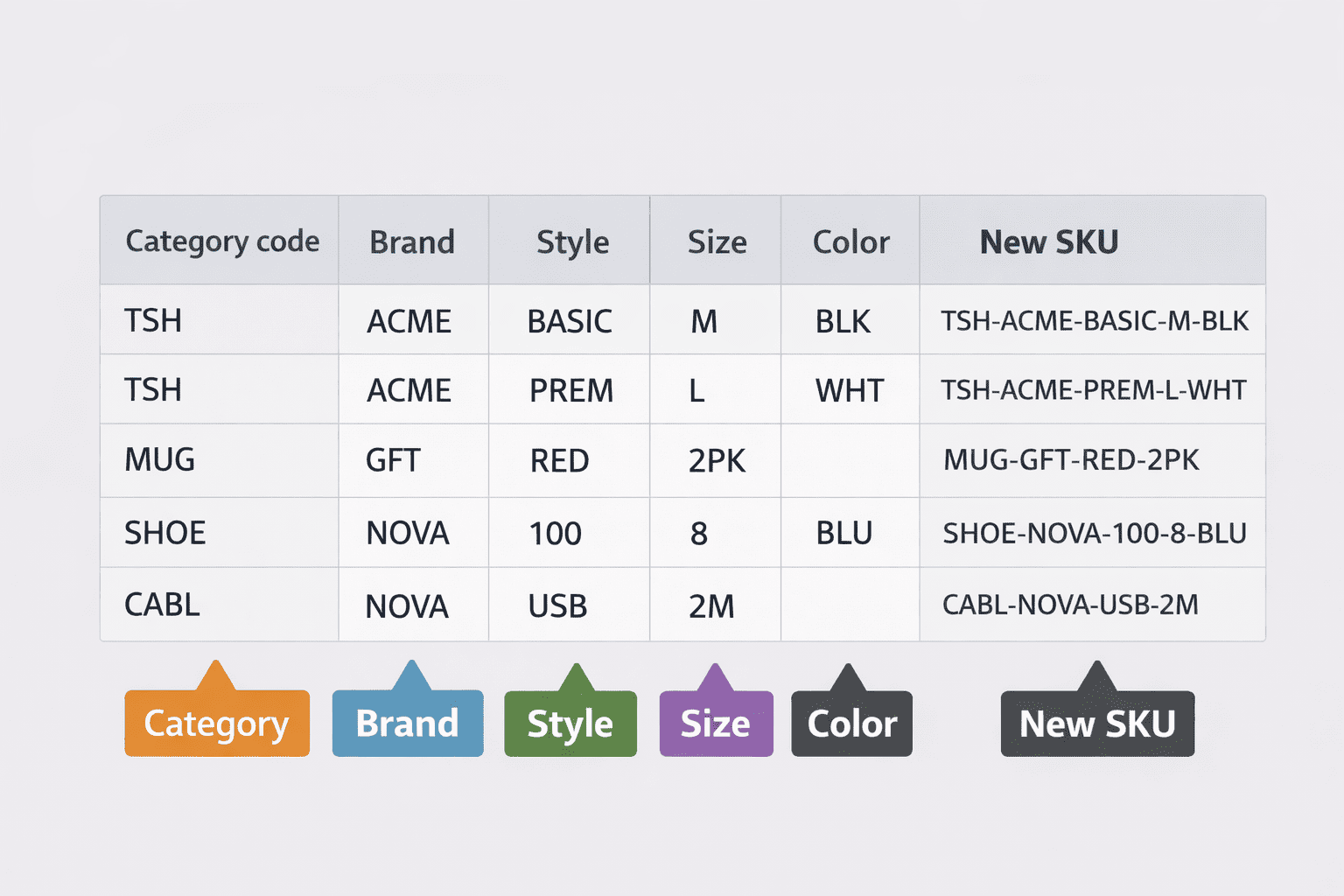
3) Catch duplicates before import
Sort by “New SKU” and check:
- Same SKU used twice
- Missing segment (blank size/color)
- Inconsistent codes (BLACK vs BLK)
Fix these now. It’s cheaper than fixing wrong shipments.
Step 3 — Use SKUs for Variants & Bundles
Variants and bundles are where SKU mess starts. The fix is simple: one base idea, then strict rules for how you mark differences.
Variant SKUs: base + variant code
Create a base pattern that never changes, then add variant segments at the end.
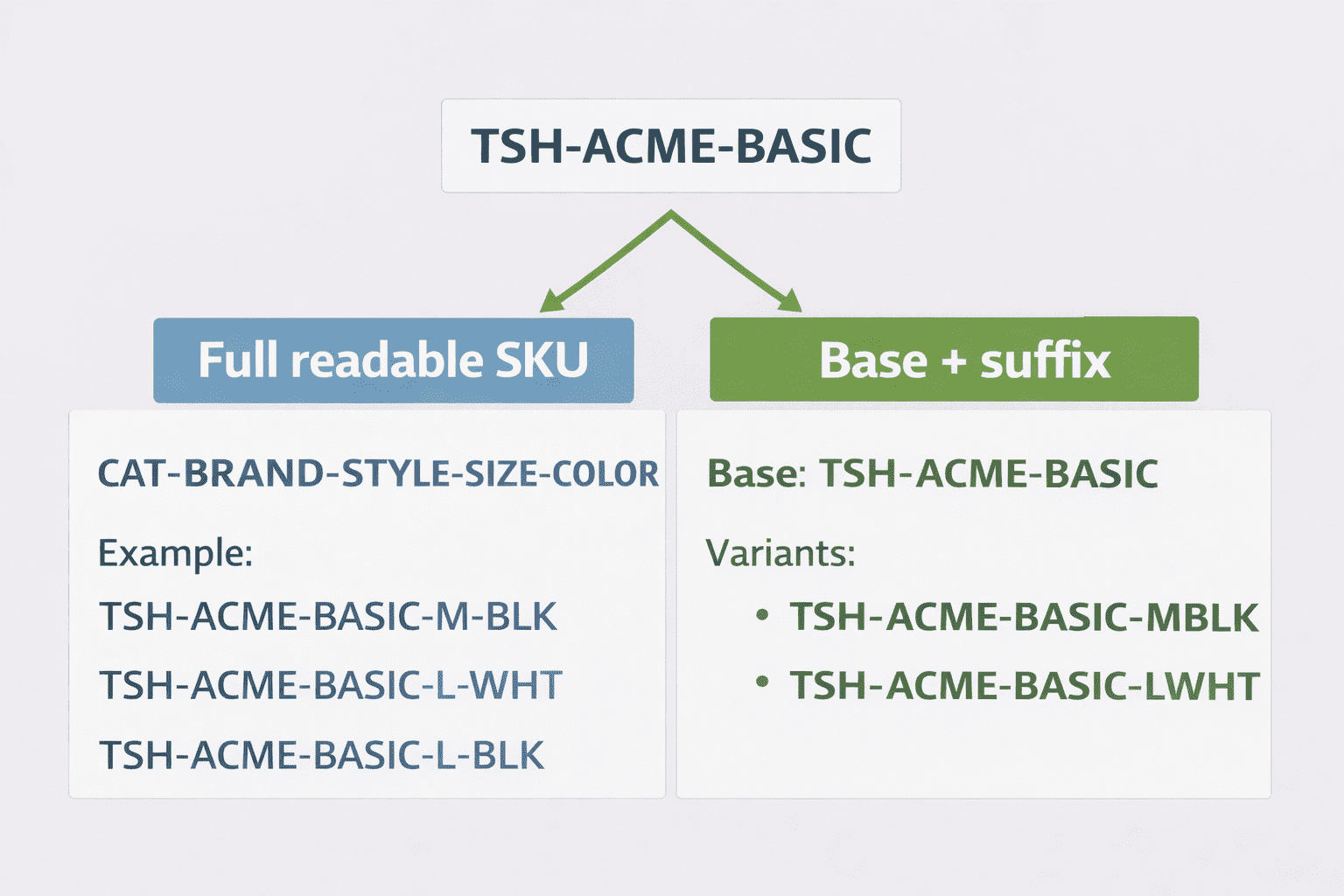
Two common approaches:
Option A: Full readable SKU
- CAT-BRAND-STYLE-SIZE-COLOR
- Example: TSH-ACME-BASIC-M-BLK
Best when your team reads SKUs during picking and receiving.
Option B: Base SKU + short suffix
- Base: TSH-ACME-BASIC
- Variants: TSH-ACME-BASIC-MBLK, TSH-ACME-BASIC-LWHT
Best when you need shorter codes and your team already knows the suffix map.
Rules for variants
- Put variant info in the same order every time (size before color, not random).
- Use fixed codes (BLK, not BLACK sometimes and BLK other times).
- Don’t put “NEW” or “SALE” into the SKU. Promotions change.
Bundle/kit SKU rules
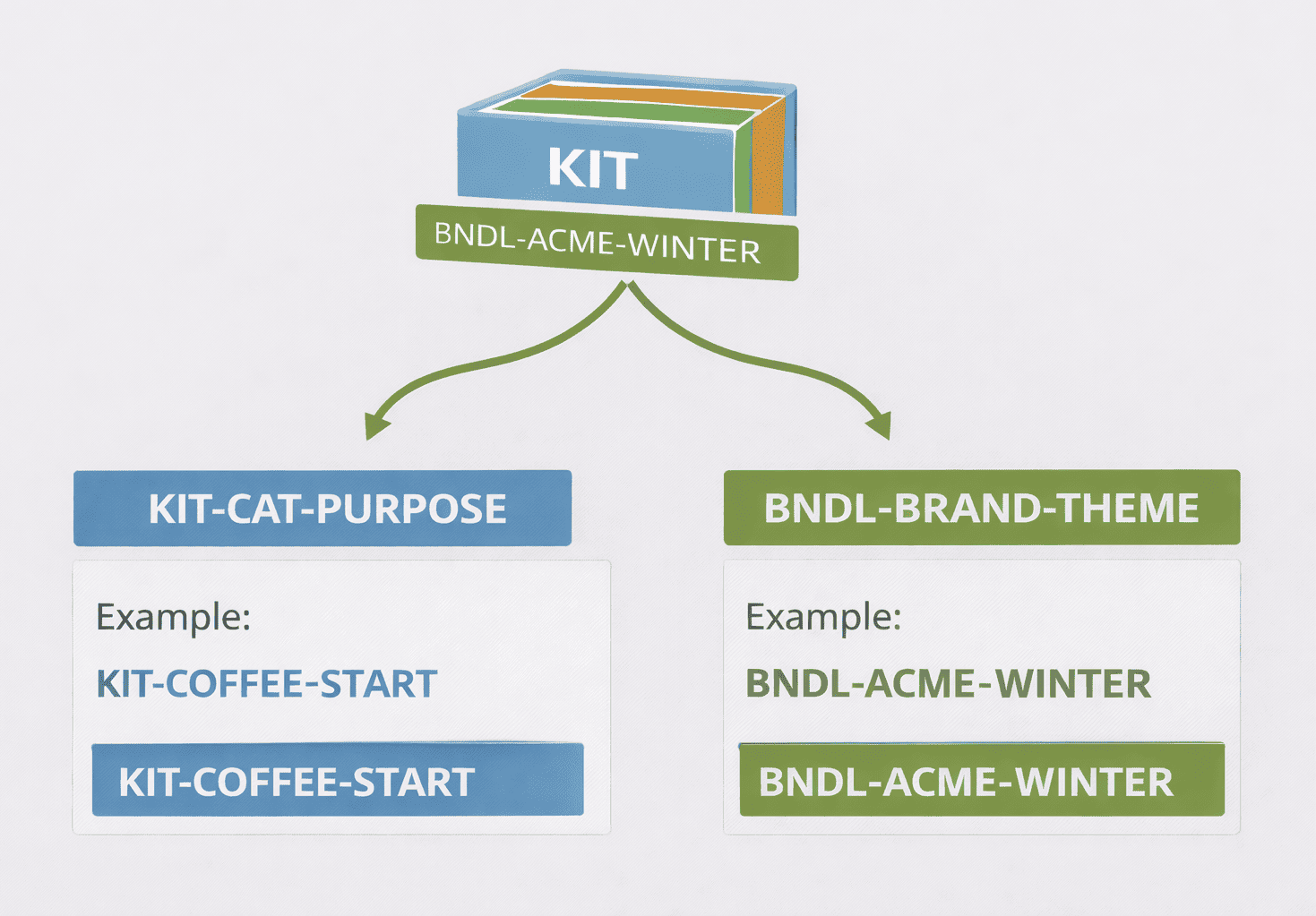
A bundle is a sellable item made from other items. Give it its own SKU. Don’t reuse a component SKU.
Good bundle SKU patterns:
- KIT-CAT-PURPOSE
Example: KIT-COFFEE-START - BNDL-BRAND-THEME
Example: BNDL-ACME-WINTER
Rules for bundles
- Keep bundle SKUs visually different from single items (KIT- or BNDL- prefix helps).
- Track components inside the bundle separately. The bundle SKU is for selling and reporting.
Step 4 — Enforce SKU Discipline Over Time
Your SKU system fails when people invent codes on the spot. You don’t need strict bureaucracy, just one short rule set that everyone follows.
Create a 1-page SKU rule sheet
Put this where your team can find it (shared doc, pinned note, SOP). Include:
- Your chosen SKU structure (example pattern)
- Approved codes for categories, colors, sizes, pack sizes
- The separator rule (- only)
- Who can create or change SKUs
Add “new SKU” checks to your daily work
When a new product is added, check these before it goes live:
- Is it unique (no duplicates)?
- Does it follow the same segment order?
- Are codes from the approved list?
- Is it short enough to read fast?
If you sell online, also check that the SKU matches what your store and warehouse use. One catalog should not have three different product codes.
Avoid ad hoc codes
These are common traps:
- Copying a supplier’s internal code without checking format
- Adding random digits to “make it unique”
- Creating a new style of SKU for one special product
When you see a special case, update the rule sheet. Don’t let exceptions grow silently.
Review and audit SKUs
Set a simple schedule:
- Small catalog: review once per quarter
- Growing catalog: review monthly
Audit checklist:
- Duplicates
- Missing segments
- Mixed code styles (BLK vs BLACK)
- “Temporary” words in SKUs (TEST, NEW, TMP)
How SKUs Help with Searching, Picking & Reporting
A clean SKU system saves time in three places: finding items, picking orders, and understanding what sells. Product names are often long and inconsistent. SKUs are short and stable. That makes them better for daily operations.
Faster search and lookup
When your SKU structure is consistent, you can search by just one part:
- Type TSH-ACME to see all ACME T-shirts
- Type -BLK to find all black variants
- Type -6PK to list all 6-pack items
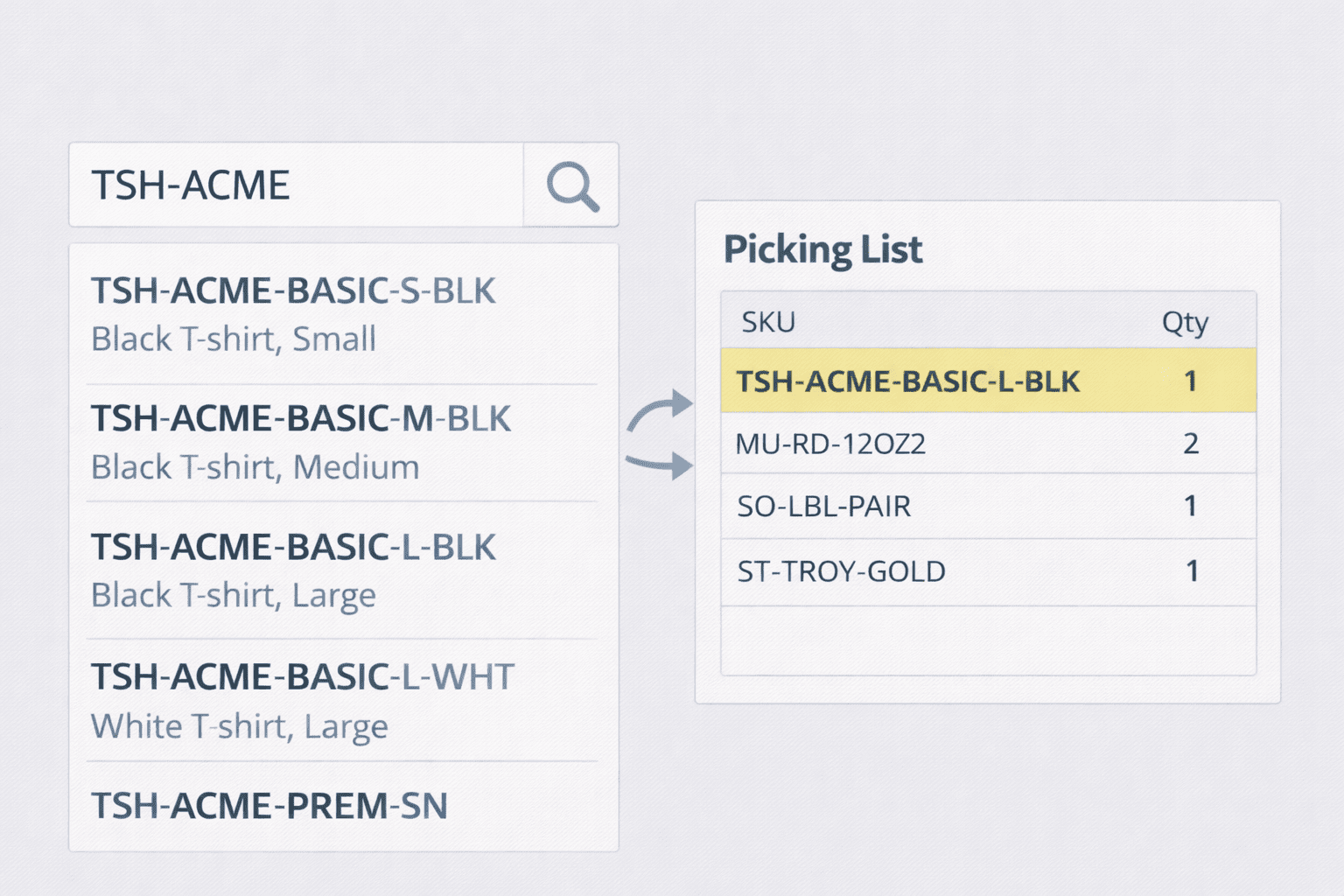
This is also useful when a customer sends a photo and you need to find the exact variant fast.
Fewer picking errors
Pickers often work under pressure. Similar items look the same on a shelf. A readable SKU helps confirm the right variant:
- TSH-ACME-BASIC-M-BLK vs TSH-ACME-BASIC-L-BLK
- CABL-NOVA-USBCA-1M-BLK vs CABL-NOVA-USBCA-2M-BLK
If you print pick lists, SKUs make the “double-check” step quick.
Cleaner reports
Once SKUs follow rules, your reports become easier to trust:
- Group sales by category prefix (TSH, CABL, MUG)
- Compare variants by suffix (size/color)
- Spot slow movers fast because sorting is consistent
Why Kladana Makes SKU Management Easy
A SKU system works only if you can maintain it without extra effort. Kladana helps here because you can create, clean up, and control SKUs without technical setup.
Import/export for spreadsheet work
Many small teams prefer spreadsheets for cleanup. With Kladana, you can export your catalog, generate SKUs in a table, then import updates back. This makes it easier to:
- build SKUs for hundreds of items
- check duplicates before changes go live
- keep one format across warehouses and sales channels
Search that works the way you think
When your SKU structure uses meaningful segments, you can search and filter by parts of the code. That helps during receiving, picking, stock counts, and customer support.
Keeps SKUs connected to daily documents
A product code is useful only if it shows up where work happens: orders, stock moves, and reports. Kladana keeps SKUs tied to items across these flows, so your team uses one identifier everywhere.
In Kladana, SKUs help you:
- Find items quickly in the catalog
- Keep the same code across stock movements and sales documents
- Export lists, sort them in a spreadsheet, and import updates without breaking the format
Frequently Asked Questions on SKU Management for Beginners
SKUs sound like a small detail, but they affect picking, returns, and reporting every day. These quick answers cover the questions small teams ask most often when they set up a consistent SKU format.
What is a SKU and why do I need it?
A SKU is your internal product code. You need it to identify items fast, prevent picking errors, and keep inventory and reports consistent.
How many characters should a SKU have?
Keep it as short as possible while still readable. Many small catalogs do well with 8–20 characters, using 3–5 segments.
Should I use letters or numbers in SKUs?
Use both if it helps readability. Letters are good for categories and colors. Numbers are good for sizes, capacity, or model series.
How do I add variant SKUs (size, color)?
Use a base SKU and add variant segments in a fixed order, such as SIZE-COLOR. Example: TSH-ACME-BASIC-M-BLK.
Can I reuse SKUs later?
Avoid reusing SKUs. Old orders, returns, and reports may still reference the previous item. Reuse creates confusion.
How do I change SKUs safely?
Do it in bulk with a plan. Keep a mapping of old SKU → new SKU. Apply changes once, then stop using old codes.
Should bundles have their own SKUs?
Yes. Give every bundle or kit its own SKU, often with a KIT- or BNDL- prefix, and track components separately.
Do SKUs conflict with barcodes?
No. SKUs are internal codes. Barcodes usually encode a GTIN (like UPC/EAN) or sometimes your own code if you print internal labels.
How to import SKUs in bulk?
Prepare a spreadsheet with a SKU column, check duplicates, then import the updated list into your system (or export → edit → import).
Can SKU changes break past orders?
Past orders usually stay linked to the product record, but changes can confuse reporting and returns if you reuse SKUs or change them often. Keep a change log.