
When your best-selling products run out, sales drop instantly, customers switch to competitors, and the team scrambles to place urgent replenishment orders. Manual stock checks rarely help — mistakes still happen.
Low stock alerts fix this. They notify you automatically when an item reaches its minimum level, so you can reorder on time. No constant warehouse checks, no spreadsheets, no guesswork — the system monitors inventory for you.
This guide shows how to set up low-stock alerts, calculate a simple reorder point, and keep fast-moving products always available.
- Why Low Stock Alerts Are Essential
- Understanding Key Terms (Reorder Point & Safety Stock)
- Step 1 — Identify Your Fast-Moving Products
- Step 2 — Calculate Basic Reorder Points
- Step 3 — Set Low Stock Alerts in the Software
- Step 4 — Adjust for Seasonality and Growth
- Step 5 — Keep Monitoring and Fine-Tuning
- Summary
- Frequently Asked Questions about Low Stock Alerts
- List of Resources
Why Low Stock Alerts Are Essential
Low stock alerts help you avoid the typical inventory blind spots — products selling out faster than expected, delayed supplier deliveries, and missed reorder moments. They give you early visibility into fast-moving items so you can replenish stock before it becomes a problem.
Lost Sales and Unhappy Customers from Stockouts
Running out of a fast-moving item has an immediate cost:
- Customers leave without buying
- Repeat buyers switch to another store
- Ads and promotions stop converting
- You lose revenue on both the missed sale and the potential future orders
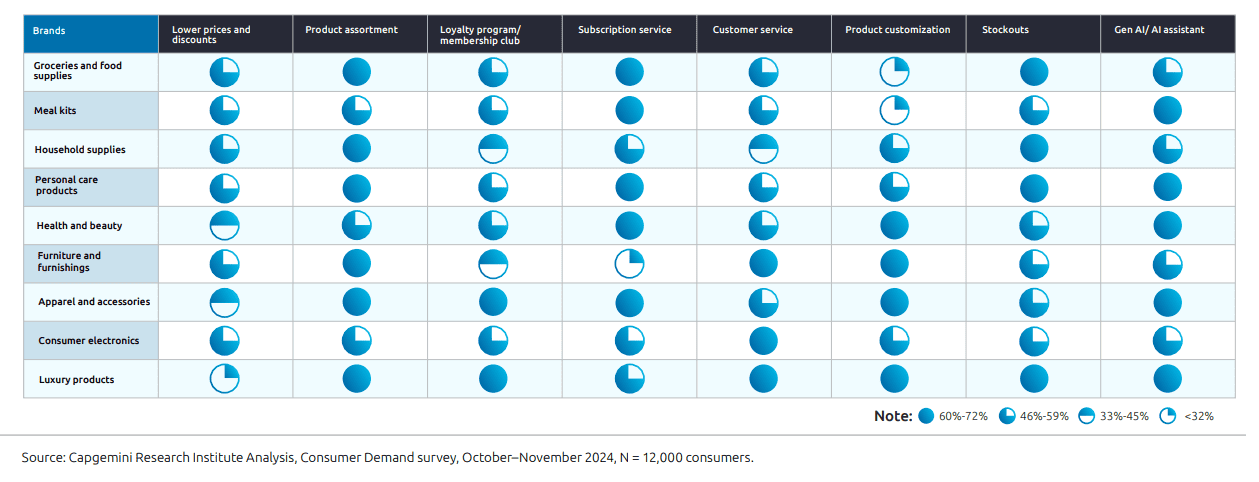
According to Capgemini’s 2024 Consumer Demand Survey (12,000 consumers globally), stockouts are a key decision factor for shoppers. In grocery and food categories, 60–72% of consumers say product unavailability directly influences whether they stay with a brand or switch to another.
Low stock alerts help you notice the issue early and reorder before shelves hit zero.
Overbuying vs. Underbuying — Finding the Balance
Avoiding stockouts is important, but overstocking is just as expensive:
- Cash gets tied up in slow-moving items
- Storage costs increase
- Products risk becoming obsolete or expiring
- Discounts eat into margin
The goal is to maintain a balanced inventory — enough to meet demand, but not so much that stock piles up. Low stock alerts act as a simple control mechanism. They notify you when inventory drops below the level you’re comfortable with, so you can reorder at the right moment instead of buying “just in case” or waiting too long.

Understanding Key Terms (Reorder Point & Safety Stock)
Before setting up alerts, it helps to know two basic terms — they explain when to reorder and how much buffer you need. These two metrics form the foundation of every low-stock alert and ensure that notifications are tied to real demand, not guesswork.
Reorder point (ROP)
This is the inventory level at which you should place a new purchase order. When the shelf gets this low, it’s time to restock to avoid hitting zero.
Safety stock
This is your “backup stash” — extra units you keep just in case sales spike or the supplier delivers late. It’s a small emergency reserve so you don’t run out.
You’ll use both terms in the next step when calculating when alerts should trigger.
Step 1 — Identify Your Fast-Moving Products
Before setting any alerts, you need to know which items actually drive your sales. These are the products that sell quickly, run out first, and cause the biggest losses when they hit zero.
Start with two simple checks:
1. Sales reports: find items with the highest sales volume or revenue over the past 30–90 days.
2. ABC analysis:
- A-items — top 20% of SKUs generating ~70–80% of revenue (your priority for alerts)
- B-items — medium demand
- C-items — long-tail products with low turnover
Fast-moving A-items should be the first to get accurate reorder points and low-stock alerts — even a short stockout here is costly.
Step 2 — Calculate Basic Reorder Points
Once you know your fast-moving products, the next step is to calculate when exactly you should reorder them. The goal is simple: place a purchase order early enough so stock never reaches zero.
The simplest way to calculate it:
Reorder point = (average daily sales × lead time) + safety stock
- Average daily sales — how many units you sell per day
- Lead time — how many days it takes the supplier to deliver
- Safety stock — your buffer for surprises
A simple example
- Imagine you sell 10 units per day of a popular item.
- Your supplier delivers in 5 days.
- You keep 20 units as safety stock.
Calculations:
- Average daily sales × lead time → 10 × 5 = 50 units
- Add safety stock → 50 + 20 = 70 units
- Your reorder point is 70 units.
It means when you have 70 units on hand, it’s time to make a purchase order.
📘 Recommended Read:
🔹 Stock Replenishment Basics — how to plan restocking cycles and avoid last-minute orders
🔹 Lead Time in Inventory Management — calculate supplier lead time and make your reorder points accurate
🔹 ABC Analysis Guide — identify fast-moving A-items that need priority low-stock alerts
🔹 Sales Report Template — analyze sales trends and forecast demand using a ready-made spreadsheet
Step 3 — Set Low Stock Alerts in the Software
Once you know your reorder points, the next step is to tell the system when to warn you. Low stock alerts work by comparing your current inventory to a minimum threshold — when the balance drops below this number, the software sends a notification.
Where to Add Minimum Quantity Thresholds
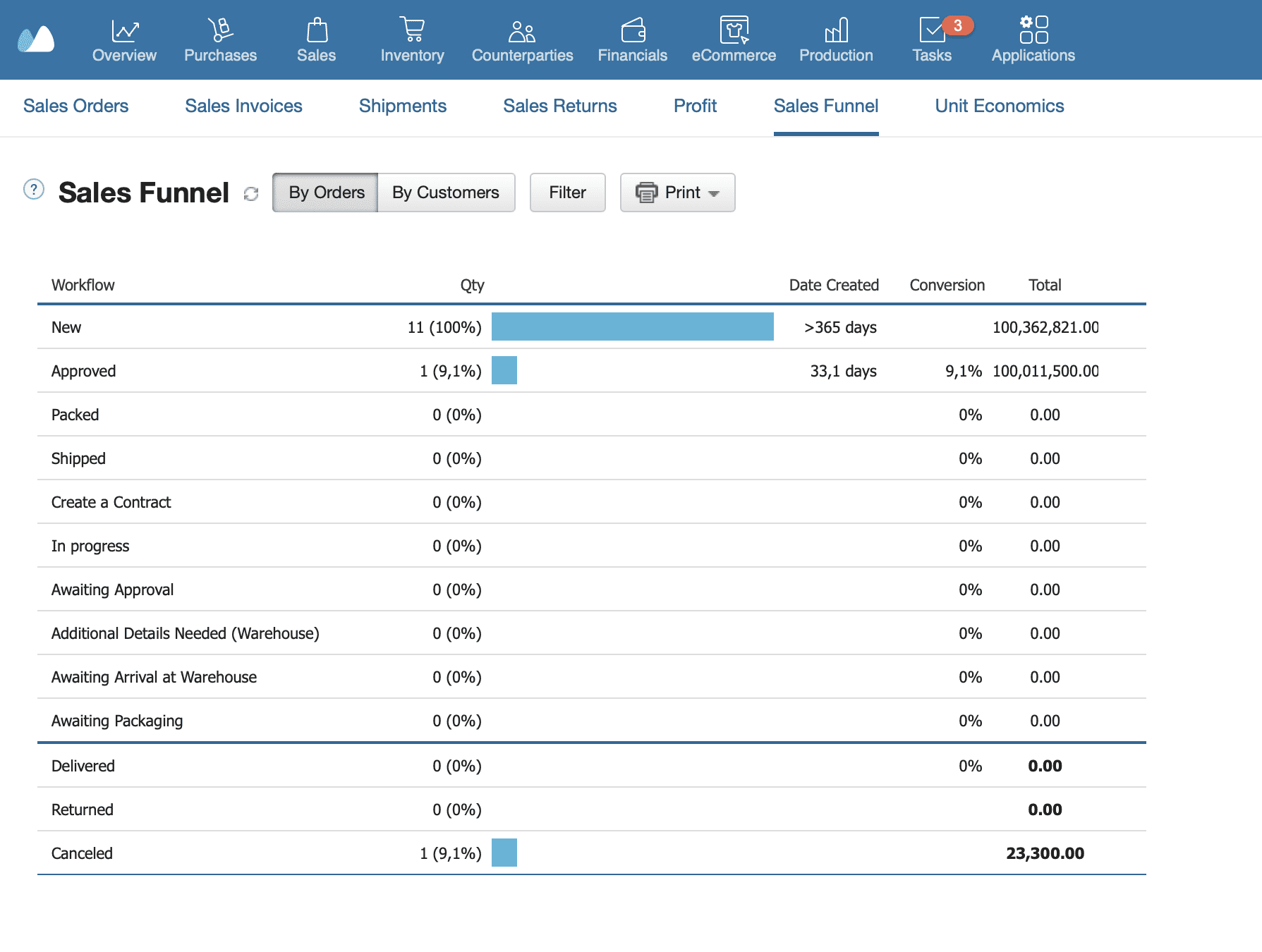
Most inventory systems (including Kladana) let you set a minimum stock level directly inside each product or variant card. Typically you will find it in:
- Product settings → Inventory / Stock tab
- A field labeled “Minimum quantity”, “Low stock threshold”, or “Reorder level”
For every fast-moving SKU, enter the number you calculated in the previous step. This ensures the system knows the exact point at which it should trigger the alert.
How Notifications Work
When stock reaches or falls below the minimum level, the software:
- Flags the product as Low Stock in your inventory list
- Adds it to a Reorder or To Purchase report
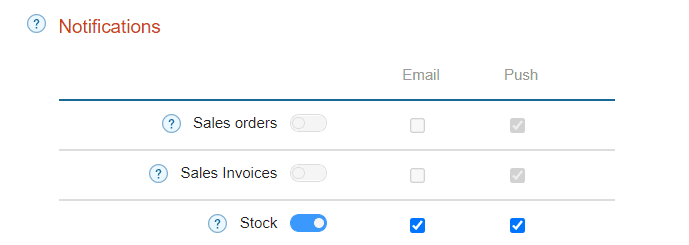
- Sends an automatic email, in-app, or mobile notification (depending on settings)
- Helps you generate a purchase order with one click
This eliminates manual checks and makes it impossible to miss a critical reorder moment.
Low Stock Alerts without the Software
If you’re not using inventory software, you can still set basic reorder alerts with simple tools:
- Spreadsheets — add a “Current stock” and “Reorder point” column, then apply conditional formatting:
if Current stock ≤ Reorder point → highlight the row in red
Check the file daily or weekly, depending on sales speed. - Calendar reminders (Google/Outlook) to check fast-moving SKUs regularly.
- A manual Kanban card system for small shops and cafés — create a card for each SKU with product name, supplier, and reorder point.
When the bin or shelf reaches its minimum level, move the card to a“To Order” column. - Mobile checklists (Trello, Notion, Google Keep) for quick “Low stock” lists you can update from your phone.
- Vendor reminders, if suppliers notify you when it’s time to restock.
- Barcode scanning apps to quickly check quantities and flag low-stock items during routine shelf checks.
These methods aren’t fully automated, but they still prevent most avoidable stockouts.
Step 4 — Adjust for Seasonality and Growth
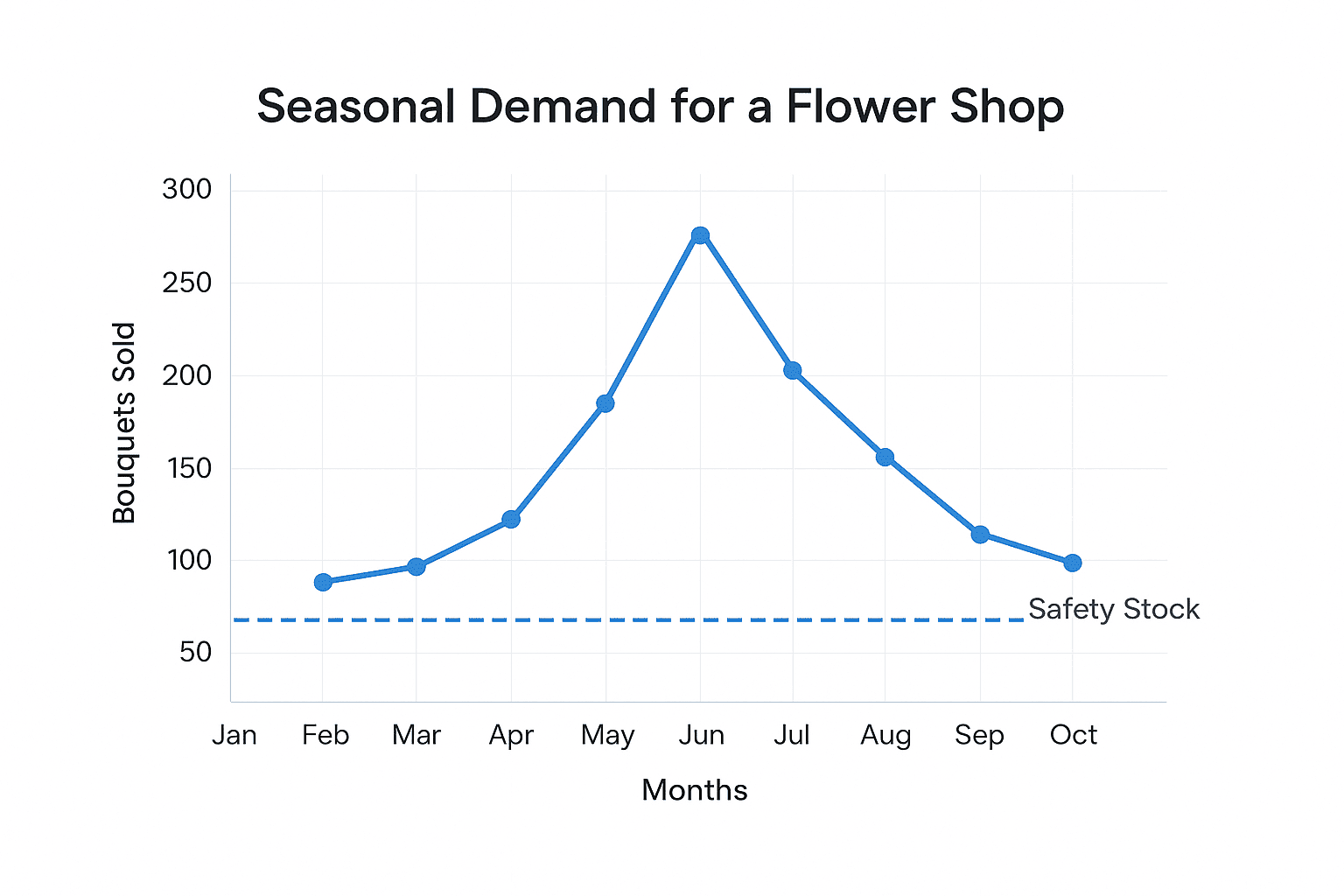
Once your alerts are set, they shouldn’t stay frozen forever. Sales patterns change — especially during holidays, promotions, and business growth. Small adjustments at the right time keep your reorder points accurate.
Manual Tweaks for High-Demand Periods
During seasonal spikes or planned promotions, products sell faster than usual.
Review your fast-moving SKUs and temporarily increase:
- Average daily sales (e.g.,+20–50% for holiday weeks)
- Safety stock to cover sudden demand
- Minimum quantity thresholds so alerts trigger earlier
Good examples: festive seasons, school openings, summer demand, influencer features, local events.
Periodic Review of Thresholds
Even outside peak periods, reorder points should be reviewed regularly:
- Monthly for A-items
- Quarterly for B-items
- Biannual for long-tail C-items
Check whether:
- Lead times have changed
- Customer demand has grown
- Suppliers are slower/faster
- Safety stock still matches real volatility
Small businesses often discover that thresholds set a year ago no longer reflect their current sales volume.
Step 5 — Keep Monitoring and Fine-Tuning
Low stock alerts work best when they reflect your current sales patterns and supplier performance. Even simple adjustments keep your inventory accurate and prevent accidental stockouts.
Weekly Check-Ins
For fast-moving items, review your inventory reports at least once a week:
- See which products hit their reorder point
- Check sales spikes or unusual drops
- Confirm that stock movements (sales, returns, transfers) were recorded correctly
- Add missing safety stock if demand looks unstable
A quick weekly review helps you catch potential issues before alerts start firing.
Align with Supplier Lead Times
Reorder points are only accurate if your lead times are accurate.
Revisit them whenever:
- Suppliers start delivering slower or faster
- You add new vendors
- Logistics conditions change
- You see repeated delays during peak months
If lead times increase, raise your reorder point. If they improve, you can safely lower thresholds to reduce excess stock.
Summary
Low stock alerts help you prevent the most costly inventory issue — running out of products your customers want the most. By identifying fast-moving items, calculating simple reorder points, and adjusting thresholds as your business grows, you avoid stockouts, protect revenue, and keep customers happy.
To make alerts work consistently, revisit them regularly and keep an eye on demand changes, supplier lead times, and seasonal spikes.
Quick Checklist: Set Up Effective Low-Stock Alerts
1. Identify priority items
- Review sales reports
- Run a basic ABC analysis
- Mark fast-moving SKUs
2. Calculate reorder points
- Average daily sales × lead time
- Add safety stock
- Record thresholds per SKU
3. Set alerts in the system
- Add minimum quantities for each product
- Enable stock notifications (email/push)
- Check the “Low stock” list regularly
4. Adjust for seasonality
- Increase thresholds before peak periods
- Review after promotions and holidays
5. Monitor and fine-tune
- Weekly review of stock levels
- Update lead times when suppliers change
- Revisit safety stock for volatile items
Frequently Asked Questions about Low Stock Alerts
What is a low stock alert?
A low stock alert is a notification that warns you when a product’s inventory drops below a preset minimum level. It helps you reorder before the item runs out.
How do I know the right reorder point for my products?
Use a simple calculation: average daily sales × supplier lead time, then add safety stock. This number becomes your reorder point.
What is safety stock and why do I need it?
Safety stock is a small buffer of extra units kept to cover unexpected demand spikes or supplier delays. It prevents sudden stockouts.
Can I get alerts automatically when stock is low?
Yes. Most inventory systems, including Kladana, send automatic email or push notifications when a product reaches its minimum level.
How does lead time affect reorder points?
Longer lead times require higher reorder points. If your supplier takes more days to deliver, you must reorder earlier to avoid running out.
Should I set the same minimum level for all products?
No. Fast-moving items need higher thresholds, while slow sellers can have lower ones. Each SKU should have its own reorder point.
How do I adjust alerts for seasonal demand?
Increase thresholds before busy periods (holidays, events, promotions) and reduce them afterward. Review seasonal items monthly.
Can free software handle low stock alerts?
Yes. Some free inventory tools, including Kladana’s free plan, support basic low stock alerts and minimum quantity settings.
How often should I review my reorder points?
Check A-items monthly and other items every 1–3 months. Update thresholds if sales patterns or supplier lead times change.
What’s the difference between safety stock and minimum stock level?
Safety stock is your emergency reserve. Minimum stock level includes safety stock and signals the exact point when you must reorder.