A purchase order format in Excel with GST records taxable value, GST rates, HSN or SAC codes, and the expected total. It applies CGST and SGST to an intra‑state supply or IGST to an inter‑state supply.
This guide provides formulas, checks, an example, and GST‑ready templates. For PO basics and non‑GST formats, use Kladana’s general purchase order template guide.
Free GST Purchase Order Excel Workbook
Use three GST‑ready formats for manual orders, automatic tax calculations, and multi‑supplier invoice checks.
- How GST Works in Purchase Orders
- Essential Fields in a GST‑Ready Purchase Order Format
- How to Create a GST Purchase Order in Excel
- GST Tax Calculation Excel Formulas and Error Checks
- GST Calculation Example for an Indian Purchase Order
- Free GST Purchase Order Excel Templates
- GST Rules and Recommended PO Details in India
- Best Practices for GST Purchase Orders in Excel
- To Sum It Up
- Purchase Order GST FAQs
- Excel GST Template FAQs
- List of Resources
How GST Works in Purchase Orders
A purchase order records what the buyer plans to purchase. It is not a GST tax invoice and cannot support an input tax credit claim. Section 31 of the CGST Act places the tax‑invoice duty on the registered supplier.
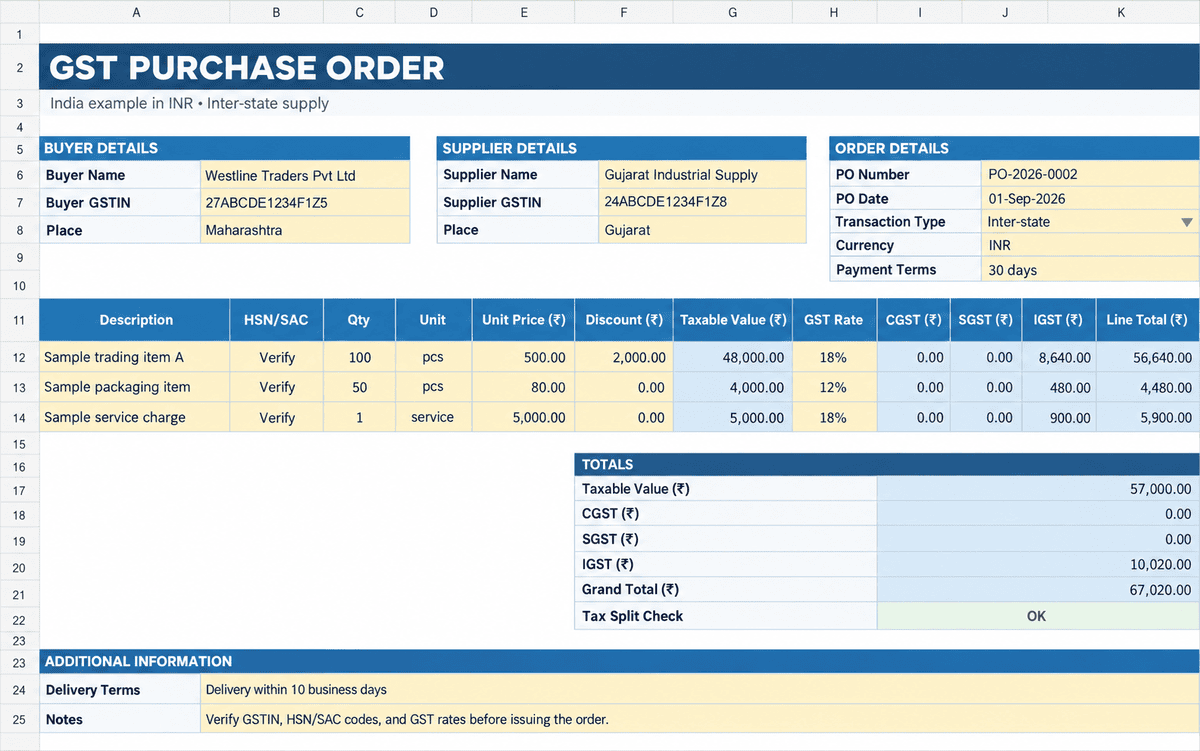
The tax type depends on the supplier’s location and the place of supply:
| Transaction | Tax shown | Example at 18% |
Intra‑state | CGST + SGST or UTGST | 9% + 9% |
Inter‑state | IGST | 18% |
Adding the expected split helps the supplier prepare the invoice and lets the buyer catch tax errors before payment. Check the product or service rate through the official CBIC rate resources. Do not rely on a rate saved in an old workbook.
Essential Fields in a GST‑Ready Purchase Order Format
A GST‑ready PO should give the supplier enough data to quote, dispatch, and invoice the order correctly. These are recommended PO fields, not a separate statutory form prescribed under GST law.
| Section | Fields to include |
Order | PO number, issue date, delivery date and currency |
Buyer and supplier | Legal name, address, contact details and GSTIN |
Tax location | Billing address, delivery address, place of supply and state code |
Items | Description, HSN or SAC, quantity, unit, rate, discount and taxable value |
GST | GST rate, CGST, SGST or UTGST, IGST and order total |
Terms | Payment, delivery, freight, insurance, warranty and approval |
The supplier’s final document must meet the separate rules explained in Kladana’s GST invoice template guide.
How to Create a GST Purchase Order in Excel
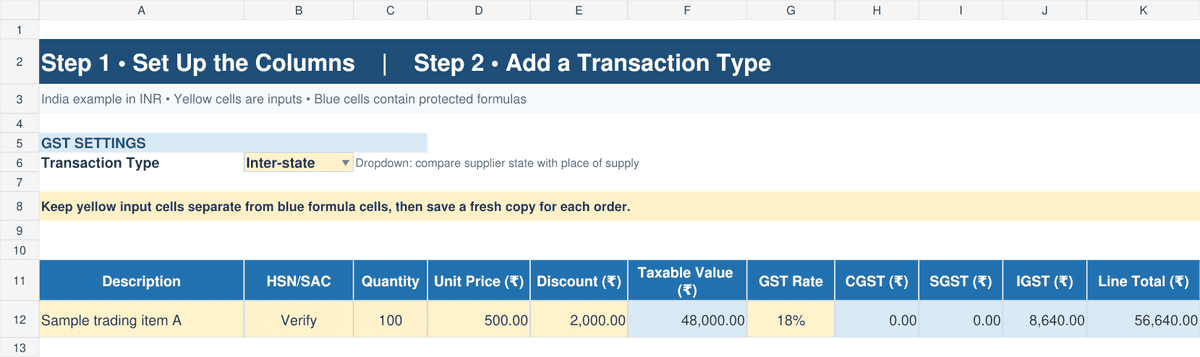
Build the sheet once, then save a fresh copy for every order. Keep input cells separate from formula cells.
Step 1 Set Up the Columns
Use Description, HSN/SAC, Quantity, Unit Price, Discount, Taxable Value, GST Rate, CGST, SGST, IGST, and Line Total.
Step 2 Add a Transaction Type
Create an Intra‑state or Inter‑state dropdown in B6. Compare the supplier’s location with the place of supply.
GST Tax Calculation Excel Formulas and Error Checks
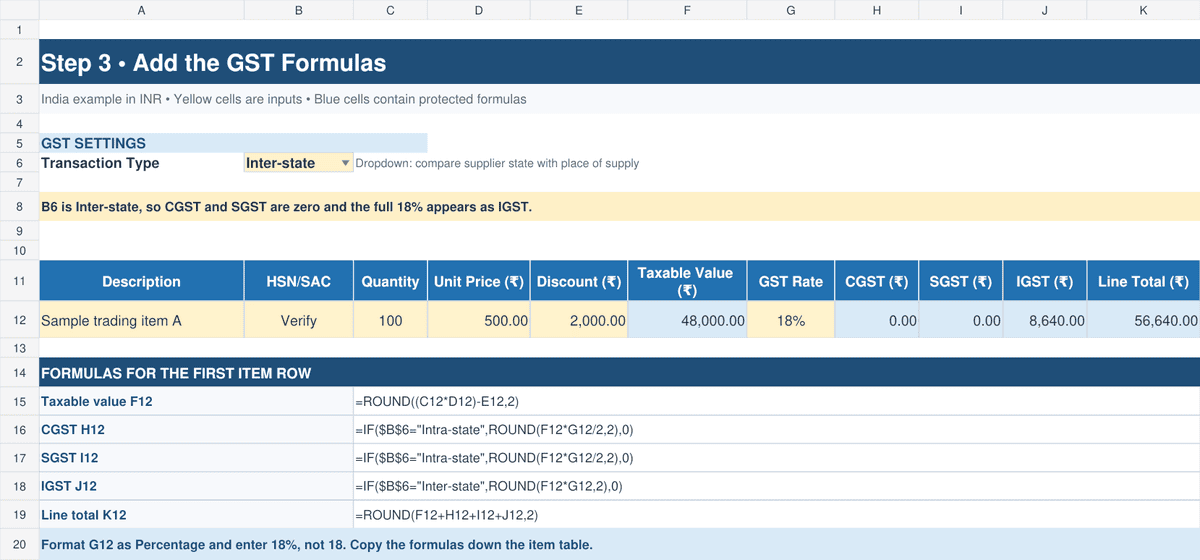
Use line‑level formulas so items with different GST rates are calculated correctly. The example below assumes row 12 is the first item row.
Step 3 Add the GST Formulas
Taxable value F12: =ROUND((C12*D12)-E12,2)
CGST H12: =IF($B$6=”Intra-state”,ROUND(F12*G12/2,2),0)
SGST I12: =IF($B$6=”Intra-state”,ROUND(F12*G12/2,2),0)
IGST J12: =IF($B$6=”Inter-state”,ROUND(F12*G12,2),0)
Line total K12: =ROUND(F12+H12+I12+J12,2)
Format G12 as Percentage and enter 18%, not 18. Copy the formulas down the item table.
Step 4 Add Checks and Protect Formulas
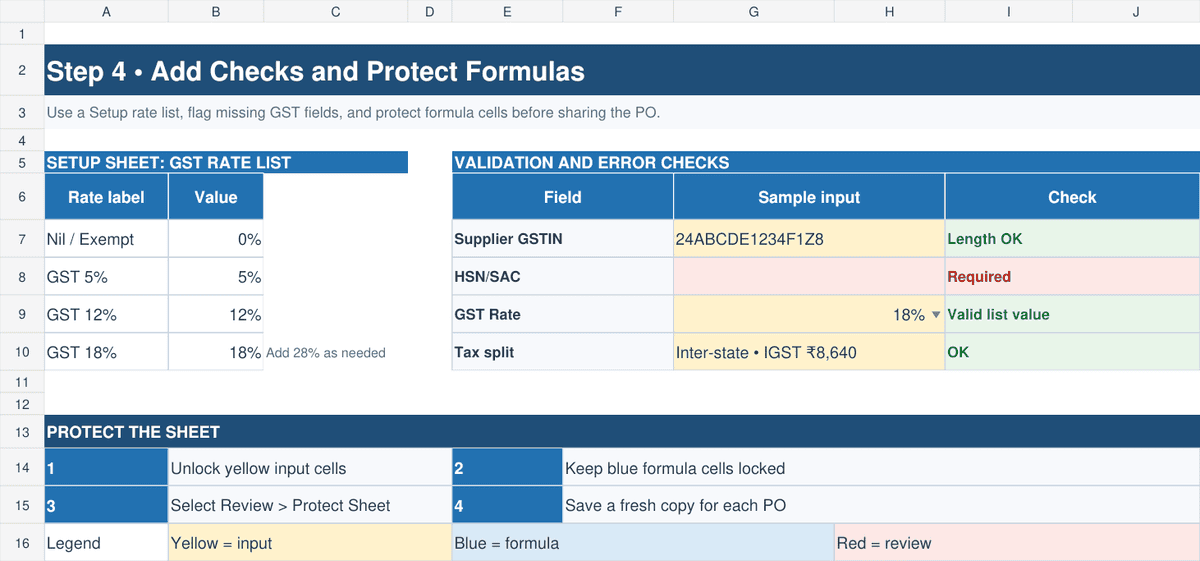
Use a rate list on a Setup sheet for data validation. Highlight blank GSTIN, HSN/SAC, or rate cells. Unlock input cells, lock formula cells, then select Review > Protect Sheet. Microsoft documents both data validation and cell protection.
If stock is also kept in spreadsheets, connect the item codes with your inventory management Excel file to reduce duplicate entry.
GST Calculation Example for an Indian Purchase Order
A Maharashtra buyer orders 100 units at ₹500 each. The discount is ₹2,000 and the GST rate is 18%.
| Calculation | Intra‑state | Inter‑state |
Taxable value | ₹48,000 | ₹48,000 |
CGST | ₹4,320 | ₹0 |
SGST | ₹4,320 | ₹0 |
IGST | ₹0 | ₹8,640 |
Order total | ₹56,640 | ₹56,640 |
Use the intra‑state result when the supplier location and place of supply are both Maharashtra. Use the inter‑state result if the supplier is in Gujarat and the place of supply is Maharashtra. Confirm the place‑of‑supply rule for unusual transactions with a tax adviser.
Free GST Purchase Order Excel Templates
The workbook focuses on GST purchase orders in India. It does not repeat the general Word, Excel, and Google Sheets formats in our main PO article.
Basic GST PO Format
Best for a small business that enters the transaction type and GST rate manually. The sheet calculates taxable value and tax totals.
Detailed PO with Automatic GST
Best for repeat orders. Dropdowns select the transaction type and GST rate. Formulas display either CGST and SGST or IGST.
Multi‑Supplier PO and Invoice Match
Best for procurement teams. A supplier register fills GSTIN and address fields. The match sheet compares PO value, received value, invoice value, and GST.
Each version includes sample data, rupee formatting, instructions, a print‑ready PO, and protected formula cells.
GST Rules and Recommended PO Details in India
GST law does not prescribe a separate PO format. Section 31 of the CGST Act and Rule 46 of the CGST Rules govern suppliers’ tax invoices. A buyer’s PO should mirror key invoice data for later checks.
- Use legal names and active GSTINs.
- State the delivery address and place of supply.
- Add HSN for goods or SAC for services.
- Show taxable value, rate, and the expected GST split.
- Record freight, discounts, payment, and delivery terms.
A PO does not replace the supplier’s tax invoice and does not support an input tax credit claim. GST law does not require a digital signature on a purchase order. Your approval policy or contract may still require an authorized signature or electronic approval.
Best Practices for GST Purchase Orders in Excel
Simple controls make an Excel PO easier to review and reduce tax errors.
- Use a unique PO series, such as PO‑2026‑0001.
- Check each GSTIN with the official Search Taxpayer service. A 15‑character check in Excel confirms length only.
- Keep approved GST rates on a Setup sheet. Update them after an official notification.
- Use one supplier GST registration per PO. Create another order if a different GSTIN will invoice the supply.
- Match the PO, goods receipt, and supplier invoice before payment. This three‑way check finds price, quantity, and tax differences.
- Save read‑only PDF copies and back up the Excel master.
For approvals, receipts, and supplier performance controls, read the purchase order management guide.
Replace Repeated Excel Entry with Kladana
Manage purchase orders, supplier records, stock receipts, and purchase history in one cloud ERP. Keep Excel templates for simple or occasional orders.
To Sum It Up
Before you send a GST purchase order, check these points:
- Buyer and supplier details are correct.
- GSTINs match the official GST portal.
- Place of supply selects the correct tax type.
- HSN or SAC and GST rate match the item or service.
- CGST plus SGST or IGST appears, never both.
- Formula cells are protected and totals are checked.
- The supplier invoice will be matched with the PO and receipt.
Excel works well for a small number of orders. As order volume grows, a purchase management system gives the team one supplier record, current stock data, approval history, and document status.
Purchase Order GST FAQs
These short answers cover the document and GST questions that buyers ask most often.
What Is Included in a GST Purchase Order Format
Include party details, GSTINs, place of supply, HSN or SAC, taxable value, GST rate, tax split, totals, and terms.
What Is the Difference Between a GST PO and GST Invoice
The buyer issues the PO to place an order. The supplier issues the tax invoice for the supply and input tax credit records.
Is a Digital Signature Required
GST law does not require one for a PO. A company policy or contract may require approval or a signature.
Can I Use One Template for Several Suppliers
Yes. Save a separate PO for each supplier and GSTIN. A supplier master can fill repeated details.
Are GST Fields Mandatory on Every PO
There is no prescribed GST PO form. Tax fields are recommended because they support correct invoicing and matching.
Excel GST Template FAQs
Excel can calculate tax and flag missing data, but it cannot decide tax treatment without correct source data.
How Do I Calculate CGST and SGST in Excel
For an 18% intra‑state supply, use Taxable Value x 18% / 2 for each tax.
Can Excel Select CGST SGST or IGST Automatically
Yes. Use an Intra‑state or Inter‑state dropdown with IF formulas. Inter‑state tax is IGST; it is not split.
How Do I Lock GST Formula Cells
Unlock input cells, keep formula cells locked, then choose Review > Protect Sheet.
Can Excel Validate a Supplier GSTIN
Excel can check length and pattern. Confirm registration status and legal name through the official GST portal or an authorized API.
How Often Should GST Rates Be Updated
Check rates before first use and after official GST notifications. Review the Setup sheet before ordering a new item category.
List of Resources
- Central Board of Indirect Taxes and Customs — Central Goods and Services Tax Act, 2017
- Central Board of Indirect Taxes and Customs — GST Goods and Services Rates
- GST Portal — Search Taxpayer
- Microsoft Support — Apply Data Validation to Cells
- Microsoft Support — Lock or Unlock Areas of a Protected Worksheet