
A monthly wages register is one of the simplest payroll records a business can keep. It shows who worked, what they earned, what was deducted, and how much was paid.
For small teams, Excel or Google Sheets may be enough. You can calculate gross pay, deductions, overtime, and net pay in one file. You can also print it, share it with the accounts team, and keep it ready for audits.
This guide explains what a wages register is, what to include, how to create one in Excel, and which free templates to use.
- What Is a Wages Register?
- Why Use Excel for a Wages Register?
- Key Components of a Monthly Wages Register Format
- How to Create a Monthly Wages Register in Excel
- Download Free Excel Wages Register Templates
- Compliance and Record-Keeping
- Best Practices for Maintaining a Wages Register
- Frequently Asked Questions on Monthly Wages Register Templates
- List of Resources
What Is a Wages Register?
A wages register is a monthly record of employee pay. It usually includes employee details, days worked, earnings, deductions, and final payable wages.
Its main job is simple: keep payroll clear and traceable. When someone asks, “How was this amount calculated?”, the register gives the answer in one place.
A wages register is not the same as:
- Salary sheet — a broad payroll sheet, often used for monthly processing;
- Attendance sheet — a record of presence, absence, leave, or hours worked; it tracks time, not final pay;
- Payslip — an individual employee document;
- Payroll register — often a wider report that may include employer taxes, payment status, and payroll totals.
Why Use Excel for a Wages Register?
Excel works well because it is simple, flexible, and familiar.
You can build a monthly wages register format in Excel with:
- attendance columns,
- pay component columns,
- deduction columns,
- formulas for totals,
- a monthly payroll summary row.
This helps small and mid-size companies avoid manual math in notebooks, chat messages, or loose files.
Excel is also useful because you can:
- customize the sheet for your pay structure,
- reuse the same format every month,
- print the register for approval,
- export it to PDF for records,
- keep separate tabs for each month.
Google Sheets gives you the same basic structure with easier sharing and cloud backup.
Key Components of a Monthly Wages Register Format
A good wages register format should stay short, readable, and complete. These are the core columns to include:
| Column | What it shows |
| Employee Name / ID | Identifies the worker |
| Department / Designation | Helps sort by team or role |
| Days Worked / Attendance | Links attendance to wages |
| Basic Pay | Main salary or wage amount |
| Allowances | Overtime, transport, incentives, meal allowance |
| Gross Wages | Total earnings before deductions |
| Statutory Deductions | Tax, social security, or local payroll deductions |
| Other Deductions | Loan recovery, advances, canteen, penalties if lawful |
| Net Pay | Gross wages minus total deductions |
| Signature / Remarks | Payment note, approval, or employee acknowledgment |
You can also add:
- bank account or payment mode,
- overtime hours,
- leave without pay,
- employer contribution columns,
- cost center or project code.
This structure supports both a simple employee wages register Excel sheet and a more detailed payroll register template Excel file.
How to Create a Monthly Wages Register in Excel
You can build a basic file in 20 to 30 minutes.
1. Add the column headers
Create columns for employee data, attendance, earnings, deductions, and net pay.
Example layout:
Employee ID | Name | Department | Days Worked | Basic Pay | Allowances | Gross Pay | Deductions | Net Pay | Remarks
2. Format cells
Use:
- date format for payroll month,
- number or currency format for pay columns,
- text format for IDs.
3. Add formulas
Use simple formulas first.
Gross Pay
=SUM (E2:F2)
Total Deductions
=SUM (H2:J2)
or, if you use one deduction column only, skip this and calculate net pay straight away.
Net Pay
=G2-K2
If your sheet has attendance-linked wages, use:
=(Monthly Rate/Total Days in Month)*Days Worked
4. Add drop-downs
Use data validation for:
- department,
- payment mode,
- attendance status,
- employee type.
This reduces typing errors.
5. Add totals at the bottom
Create a summary row for:
- total gross wages,
- total deductions,
- total net pay,
- employee count.
That turns the sheet into a monthly payroll summary.
6. Protect formula cells
Lock the formula columns so users can update attendance and allowances without breaking the sheet.
7. Save reusable versions
Save one file as:
- Excel template,
- Google Sheets template,
- PDF sample for preview on the article page.
Download Free Excel Wages Register Templates
Different teams need different levels of detail, so choose the template that fits your payroll process best.
Basic Wages Register Format
Best for small businesses with fixed monthly pay.
Includes employee details, gross wages, deductions, and net pay.
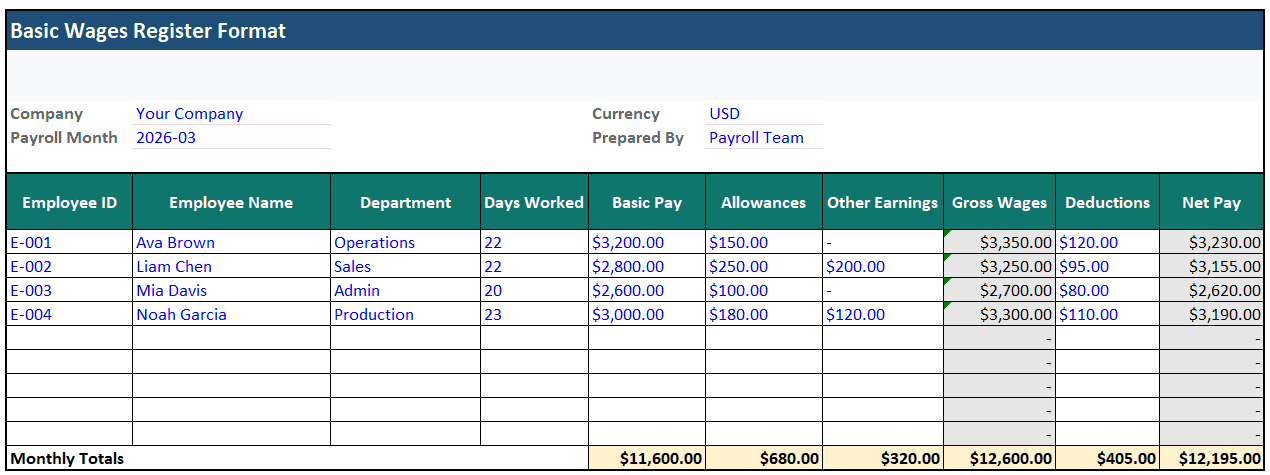
How to use the template:
Blue text = input | Black text = formula | Gray fill = calculated
Formula: Gross = Basic + Allowances + Other Earnings
Wages Register with PF, ESI, and Tax Columns
Best for teams that need India payroll fields. Includes gross wages, PF, ESI, TDS, other deductions, and net pay. Official Indian guidance still shows standard EPF contribution at 12% in the common case, while ESIC guidance shows 0.75% employee and 3.25% employer contribution. Salary TDS is handled under section 192.
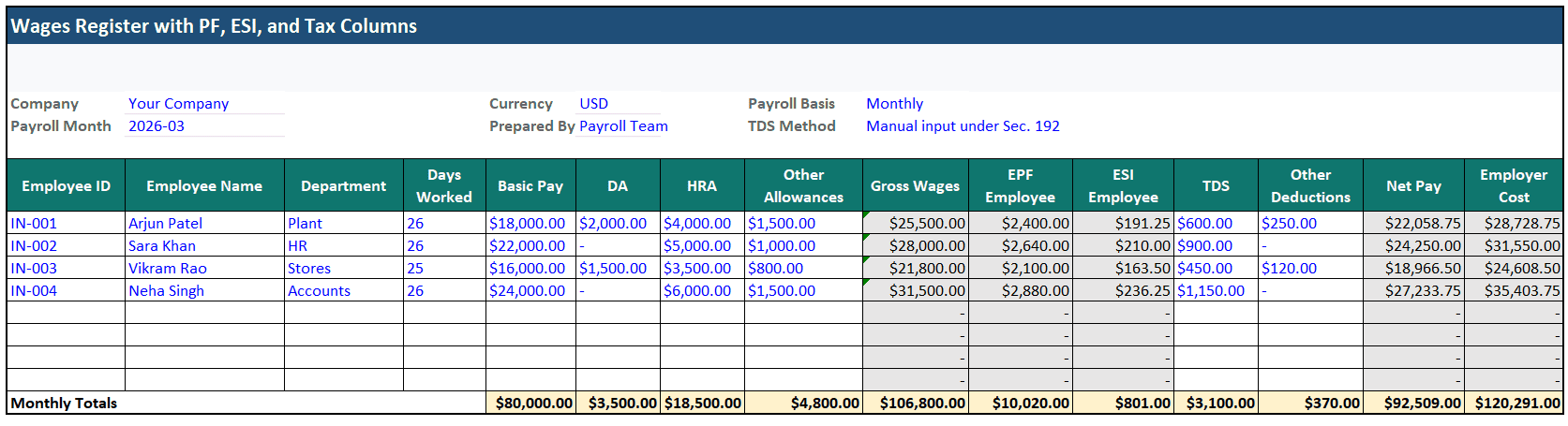
How to use the template:
Blue text = input | Black text = formula | Gray fill = calculated
EPF formula uses Basic + DA
Enter TDS manually
Other deductions: loans, meals, etc.
Multi-Department Wages Register
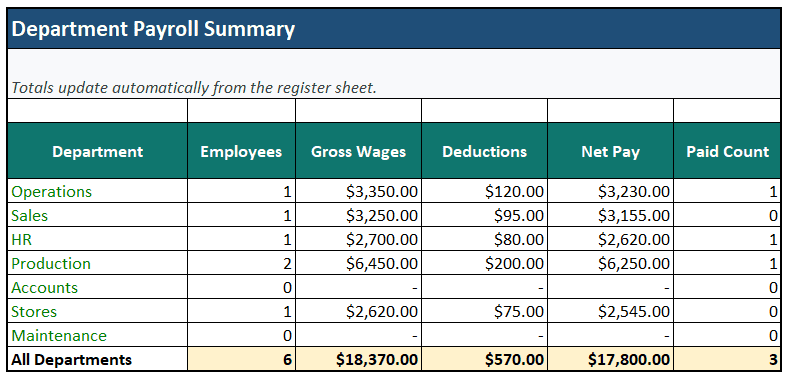
Best for HR and admin teams managing several departments or sites. Includes department filters, totals by team, and payroll summary.
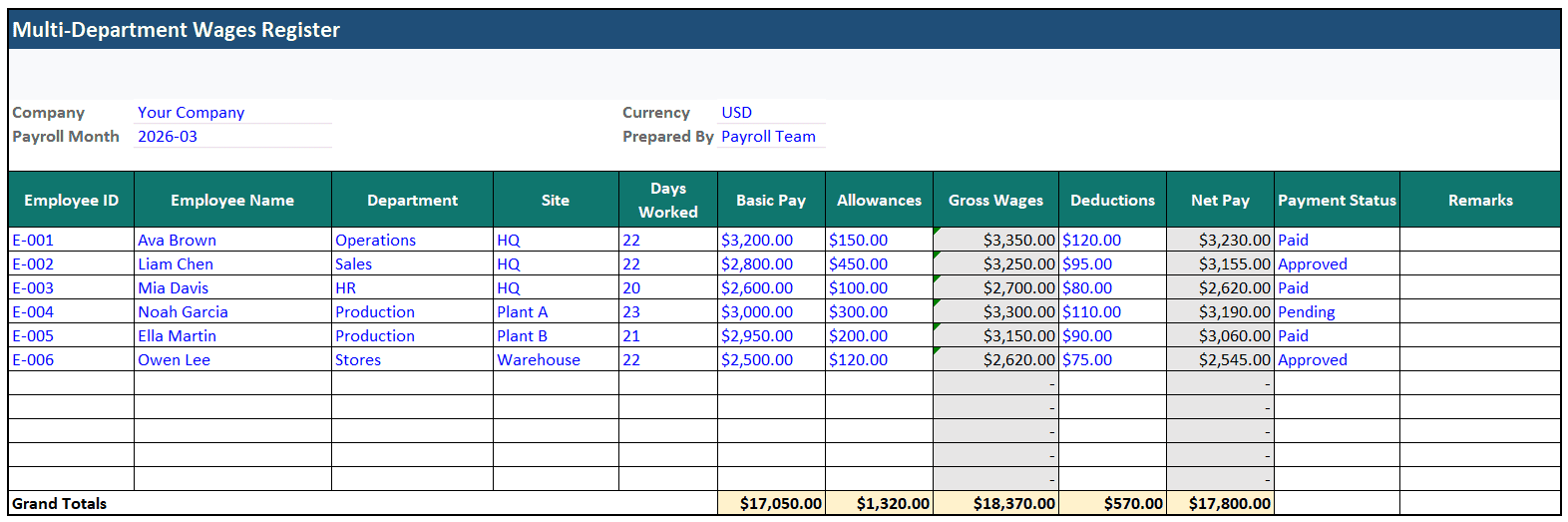
How to use the template:
Blue text = input | Black text = formula | Gray fill = calculated
Totals update automatically from the register sheet into the Payroll Summary sheet
Wages Register with Attendance Sheet
Best for factories, workshops, and field teams. Includes days worked, leave, overtime, and attendance-linked wages.
📖 Recommended Reads
Need more ready-to-use business templates? These Kladana downloads can help you organize related records beyond wages and payroll:
- Inventory Management Excel Template — useful if you also track stock issued to teams, raw materials, or finished goods alongside labor costs.
- Production Schedule Template — a practical option for manufacturers that need to connect staffing, output planning, and shift-based work.
- Daily Production Report Template — helps record actual output, downtime, and completed work by day, which is useful when wages depend on production results.
- Delivery Challan Template — useful for businesses that need cleaner dispatch records along with labor and payroll documents.
- Explore More Free Excel Templates — browse Kladana’s full templates section for inventory, manufacturing, invoicing, audit, and operations files.
Compliance and Record-Keeping
The exact fields in a wages register depend on your country, industry, and payroll rules.
At a minimum, your register should support:
- clear pay calculation,
- deduction tracking,
- payment proof,
- monthly record retention.
💡 Tip:
- check local labor rules before finalizing the format;
- store signed or approved records safely;
- keep monthly payroll documentation together with attendance and payslips;
- use digital files with backup and access control.
Best Practices for Maintaining a Wages Register
Use these habits to keep the register reliable:
- verify attendance before payroll day;
- keep one master employee list for names, IDs, and departments;
- separate earnings and deductions clearly;
- avoid editing formulas by hand;
- save one file per month;
- back up payroll records in the cloud;
- review deduction rules before each payroll cycle.
As your team grows, Excel starts to slow things down. You spend more time checking formulas, copying rows, and fixing version issues.
With Kladana, you can create payrolls for all employees, calculate base or piece-work salary, review earnings details, and print payroll records in Excel or PDF. It helps turn a simple wages register into a more organized payroll process.
Frequently Asked Questions on Monthly Wages Register Templates
These quick answers cover the questions readers ask most often when they set up a monthly wages register in Excel or Google Sheets.
What is included in a monthly wages register?
Employee details, attendance, earnings, deductions, and net pay. Some businesses also add overtime, employer contributions, and payment status.
How do I calculate deductions automatically in Excel?
Use formula cells for fixed percentages or linked deduction tables. For country-specific payroll items, keep the rates on a separate settings tab and refer to them with cell links.
Can Excel handle multiple employee wage records?
Yes. It works well for small and mid-size teams. Larger teams need stronger access control, automation, workflow approval, and audit history.
What is the difference between a wages register and a payroll sheet?
A wages register is usually the monthly record of wages paid. A payroll sheet may be wider and include more payroll processing details.
Is there a statutory format for a wages register?
That depends on local law. Some countries or sectors prescribe fields or forms. Others only require accurate wage records. Always check local payroll rules before using one template for all locations.
How to link attendance data to wage records?
The easiest way is to keep attendance and wages in the same workbook. You can store attendance on one sheet and pull total days worked, overtime hours, or leave days into the wages register with cell links or lookup formulas. This helps create attendance-linked wages without entering the same data twice.
Can I generate payslips from the same sheet?
Yes. You can use the same data source for both the wages register and payslips. The best method is to keep one master payroll sheet and create a separate payslip tab or template that pulls one employee’s data into a print-ready format.
How long should wage records be stored?
This depends on your country and payroll rules. A safe general rule is to keep them for at least 3 to 5 years unless local law requires longer retention. For example, U.S. federal wage-and-hour guidance requires at least 3 years for payroll records, while current Indian Labour Ministry guidance says wage records should be preserved for 5 years.
How to ensure audit compliance in Excel files?
Keep the structure consistent every month, lock formula cells, keep approval or signature fields, store files with clear month-wise names, and save PDF copies after final review. It also helps to maintain attendance records, deduction support, and payment proof in the same folder.
Are there free Excel templates for the wages register?
Yes. Many businesses start with a free wages register Excel download and then adjust it for their own pay structure. A useful template should include employee details, attendance, earnings, deductions, net pay, and a monthly summary. Offering both Excel and Google Sheets versions makes the template more practical for different teams.
List of Resources
- U.S. Department of Labor — Fact Sheet #21: Recordkeeping Requirements under the Fair Labor Standards Act
- Ministry of Labour and Employment of India — Compliance Handbook for Employers Under the Four Labour Codes
Read‑alikes
How to Estimate Manufacturing Costs: Methods, Tools, and Best Practices
Job Work Bill Format in Excel: Templates, Guide & Best Practices
Free Labour Contractor Bill Format in Excel: Templates and How to Create Yours
Direct vs Indirect Expenses: How to Classify Them Correctly in Accounting