
A messy product catalog leads to predictable issues: duplicate items, inconsistent names, slow searches, and constant SKU confusion. When your product catalog structure isn’t clear, staff waste time guessing, inventory updates become unreliable, and errors quickly multiply.
A clear, well-defined product catalog organization fixes this. Consistent naming, logical categories & subcategories, and well-organized variants turn your catalog into a tool you can rely on. Below is a practical step-by-step product categorization guide to help you clean up your digital catalog, improve inventory searchability, and prevent chaos — even as your assortment grows.
If you don’t have time for everything, start with the first three steps — they cover the essentials of SKU management basics, product grouping, and overall product data organization.
Here is the example of a well-structured product catalog for a furniture business:
| Name | SKU | Category | Subcategory | Variant | Attributes | Tags | Barcode |
| Dining Table | DT-001-OAK | Living Room Furniture | Tables | Oak | Material: Oak; Size: 180×90 cm | Bestseller | 8901000000012 |
| Dining Table | DT-001-WAL | Living Room Furniture | Tables | Walnut | Material: Walnut; Size: 180×90 cm | New Arrival | 8901000000013 |
| Wooden Chair | CH-015-BLK | Living Room Furniture | Chairs | Black | Material: Beech; Color: Black | Set Compatible | 8901000000020 |
| Wooden Chair | CH-015-NAT | Living Room Furniture | Chairs | Natural | Material: Beech; Color: Natural | Set Compatible | 8901000000021 |
| Sofa 3-Seater | SF-210-GRY | Living Room Furniture | Sofas | Grey | Fabric: Polyester; Size: 3-seater | Clearance | 8901000000101 |
| Sofa 3-Seater | SF-210-BLU | Living Room Furniture | Sofas | Blue | Fabric: Polyester; Size: 3-seater | Seasonal | 8901000000102 |
| Wardrobe | WD-080-2DR | Bedroom Furniture | Wardrobes | 2-Door | Material: MDF; Finish: Matte White | Top Rated | 8901000000205 |
| Wardrobe | WD-080-3DR | Bedroom Furniture | Wardrobes | 3-Door | Material: MDF; Finish: Matte White | Top Rated | 8901000000206 |
| Coffee Table | CT-300-WHT | Living Room Furniture | Coffee Tables | White | Material: MDF; Shape: Round | Bestseller | 8901000000301 |
| Coffee Table | CT-300-BLK | Living Room Furniture | Coffee Tables | Black | Material: MDF; Shape: Round | — | 8901000000302 |
- Why a Clean Product Catalog Matters
- If You Only Have Time for the Basics — Start With These Three Steps
- Step 1 — Define Clear Product Names and SKUs
- Step 2 — Build Categories and Subcategories
- Step 3 — Group Variants (Size, Color, Material)
- Step 4 — Use Tags for Easy Filtering
- Step 5 — Create Product Bundles
- Step 6 — Add Product Analogues
- Step 7 — Set Price Rules & Tiered Pricing
- Step 8 — Manage Barcodes for Items
- Step 9 — Handle Batches and Expiry Dates
- Step 10 — Use Serial Numbers for High-Value Items
- How Often Should You Update and Clean Your Product Catalog?
- Summary: Keep Your Product Catalog Clean and Easy to Navigate
- Frequently Asked Questions about Product Catalog
Why a Clean Product Catalog Matters
A well-organized product catalog is not optional — it’s the foundation of accurate inventory, predictable workflows, and smooth daily operations. When your product catalog structure is inconsistent, teams spend extra time searching, fixing errors, and correcting documents. A clean digital catalog prevents confusion, supports fast decision-making, and keeps your data reliable across all departments.
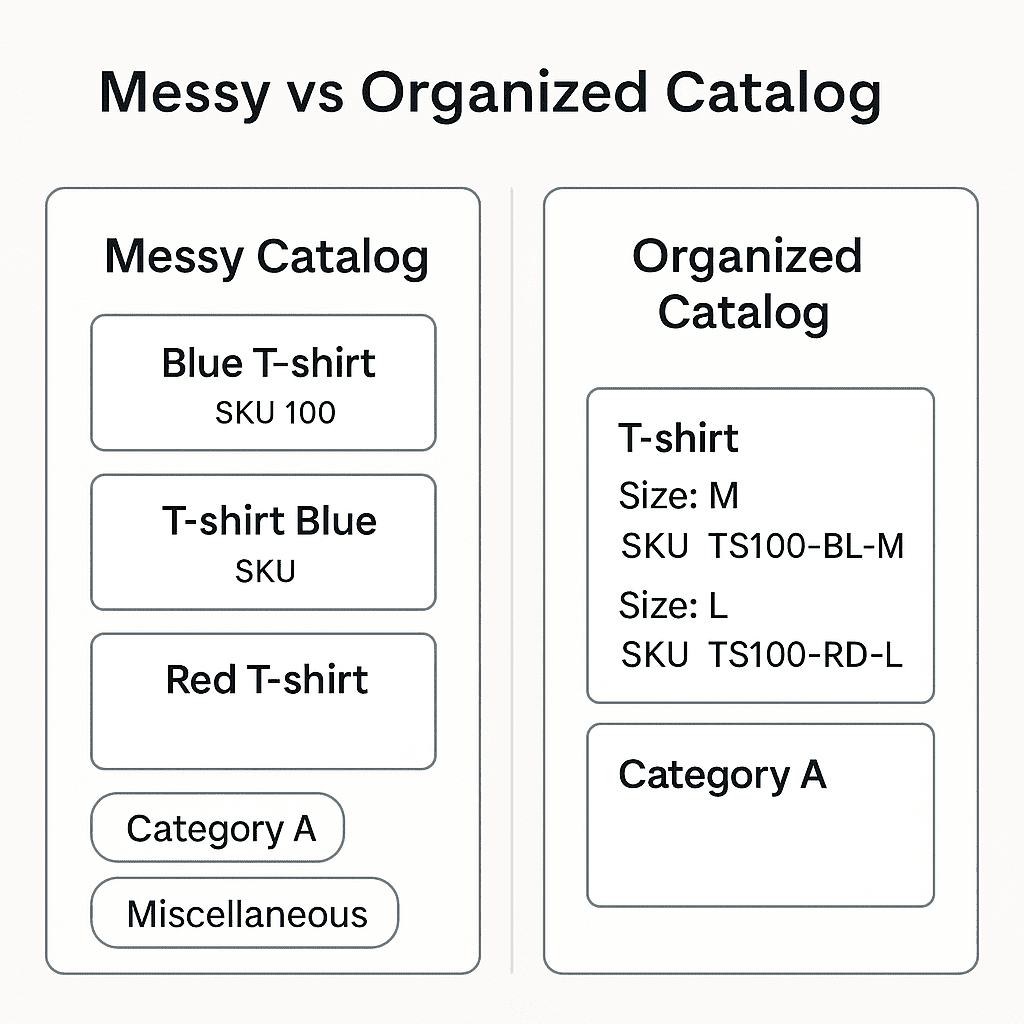
Two things drive most issues: duplicated products and poor searchability. Clean structure solves both.
Preventing Duplicate Products and Wrong SKUs
Duplicate items usually appear because:
- Names differ slightly (“T-shirt Blue” vs “Blue Tee”)
- SKUs are created ad-hoc
- There is no shared naming convention
- Categories and variants are not used correctly
This leads to predictable problems:
- Stock gets split between two items
- Reports become unreliable
- Staff pick the wrong product during sales or procurement
- Reordering decisions get distorted
A clean product catalog ensures each item — and each variant — has a single correct SKU. That means fewer errors and a clearer picture of available stock.
Faster Stock Searches and Fewer Mistakes
When product names, categories & subcategories, and variants follow a consistent logic, search becomes effortless:
- No more scrolling through long, messy lists
- Similar items stay grouped
- Staff quickly identify what they need without guessing
- Picking, packing, and counting become faster
This directly reduces human error: fewer mis-picks, fewer wrong entries, and fewer corrections later. Good product grouping also improves inventory searchability, making daily work smoother for the entire team.

If You Only Have Time for the Basics — Start With These Three Steps
When your product catalog is messy, the full cleanup can feel overwhelming. The good news: even three simple steps will already remove most confusion and prevent 80% of common errors.
Start with:
- Define clear product names and SKUs— this removes duplicates, improves searchability, and forms the base of your product data organization.
- Create categories and subcategories — this gives your product catalog structure a clear hierarchy.
- Group variants under one parent item — this keeps similar items together and avoids long, chaotic lists.
Once these three foundations are in place, the remaining steps — tags, bundles, pricing rules, barcodes, batches, serial numbers — become far easier to implement. And most importantly, your digital catalog stays clean and scalable as your business grows.
Step 1 — Define Clear Product Names and SKUs
Before building your product catalog structure, start with the foundation: clear, consistent names and predictable SKUs. This prevents duplicates, improves inventory searchability, and keeps the entire digital catalog readable for everyone on the team.
Naming Rules: Keep It Short, Unique, and Descriptive
A clear name helps your team immediately understand what the item is — and how it differs from similar products inside your item catalog.
Use a simple formula:
[Product Type] + [1–2 Key Attributes]
Choose attributes that actually matter for search, picking, and stock control.
Common key attributes include:
- Color (Blue, Black)
- Size (S/M/L, 20L, A5)
- Material (Cotton, Ceramic, Leather)
- Capacity/Volume (500 ml, 1 kg)
- Purpose/Use case (Kids, Travel, Office)
- Model/Series (Classic, Pro)
Examples:
- T-shirt Blue M
- Backpack 20L Black
- Mug Ceramic White
- Candle Soy Vanilla
- Notebook A5 Dotted
Avoid:
- Vague names: “Item 1,” “Product ABC”
- Overly long or overly technical descriptions
- Using three or more attributes — it clutters the catalog
Best practices:
- Use the same naming style across the catalog
- Keep names human-readable (avoid internal jargon)
- Always choose the main attribute to differentiate similar items
Clear naming is the first step to maintaining a clean product catalog and reducing catalog cleanup later.
SKUs Should Follow the Same Logic
Your SKU pattern doesn’t need to repeat the full name, but it must follow the same naming conventions and reflect the product hierarchy. Consistency — not complexity — is what prevents duplicates.
Example format:
TSH-001-BL-M
(Product type — model — color — size)
Avoid:
- Random sequences (ABX73920)
- SKUs created on the spot by different employees
- Repeated codes used for variants
A consistent SKU system is the backbone of SKU management basics. It keeps variants grouped correctly, prevents accidental duplication, and makes the entire product data organization much easier to maintain.
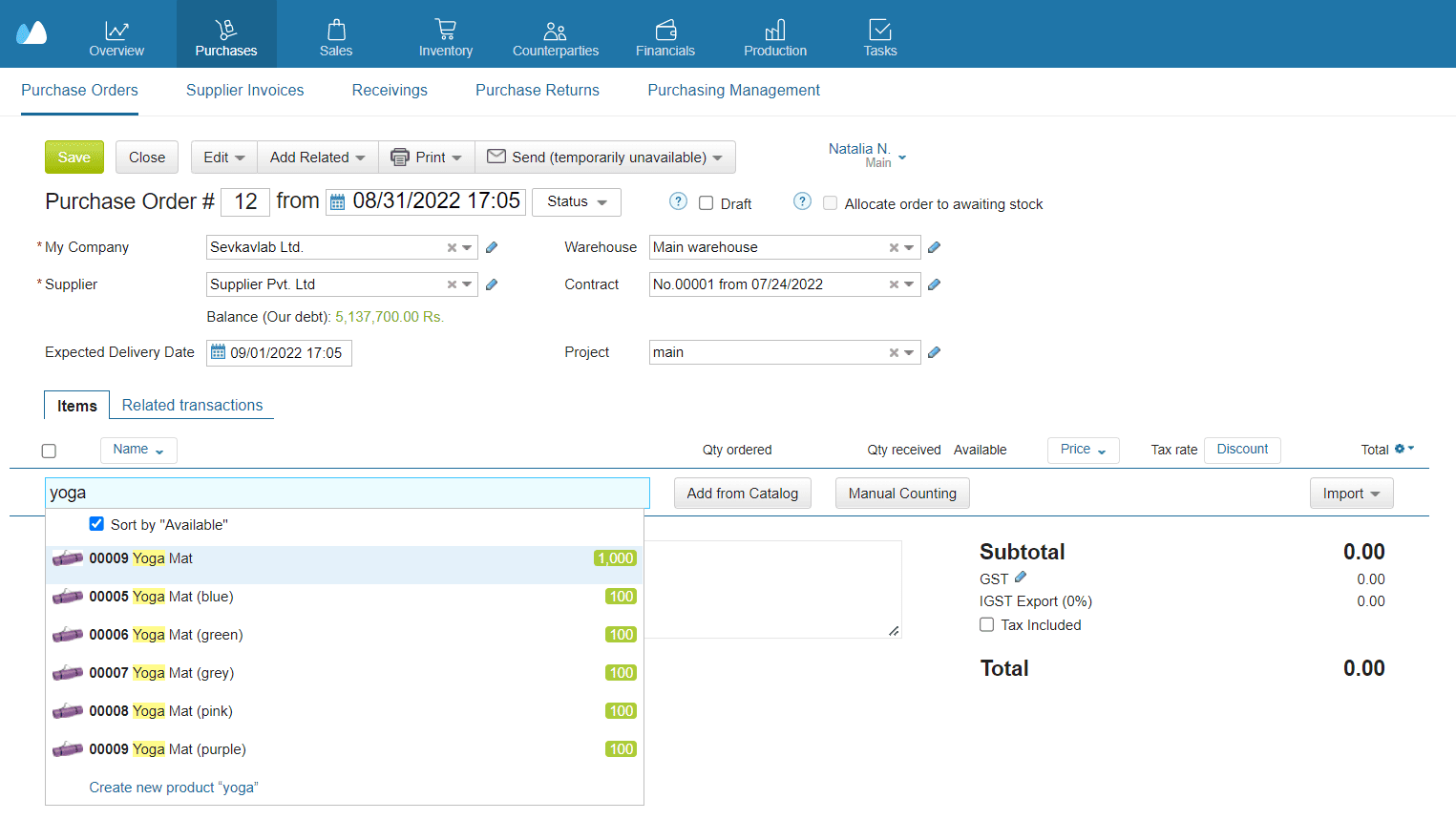
Step 2 — Build Categories and Subcategories
A clear product catalog structure helps your team instantly understand where each item belongs. When categories are logical and consistent, you avoid duplicates, improve inventory searchability, and make future scaling much easier.
📘 Recommended Read:
🔹 Inventory Management Excel Templates — ready-made spreadsheets to track stock, purchases, and sales
🔹 How to Maintain Stock in Excel — simple methods to keep your inventory up to date
🔹 Stock-Taking Guide — step-by-step instructions for accurate stock counts
🔹 Stock Tracking for Beginners — essential tools and methods to monitor inventory movement
🔹 Best Free Inventory Management Software — overview of free solutions for small businesses
When to Use Categories vs. Subcategories
Use categories for broad product groups — the main “buckets” in your catalog. Use subcategories when a group is too large or diverse and needs one extra level of structure.
Simple rule:
If a category has more than 20–30 items and they differ by type, purpose, or material → create subcategories.
Examples:
- Category: Accessories
Subcategories: Bags, Wallets, Belts - Category: Home & Living
Subcategories: Candles, Tableware, Storage - Category: Materials
Subcategories: Fabric, Leather, Hardware
Your product hierarchy should be deep enough to help, but not so detailed that employees get lost. Most SMEs manage perfectly with 1–2 levels.
Examples by Business Type
| Business Type | Categories | Subcategories (Examples) |
| Retail | Clothing | T-shirts, Hoodies, Pants |
| Footwear | Sneakers, Sandals, Boots | |
| Home Décor | Candles, Vases, Frames | |
| Manufacturing | Raw Materials | Fabric, Metal Parts, Paints |
| Components | Zippers, Buttons, Screws | |
| Finished Goods | Shirts, Bags, Furniture | |
| Wholesale | Electronics | Mobile Cases, Chargers, Cables |
| Kitchenware | Steel Utensils, Glassware, Storage | |
| Stationery | Notebooks, Pens, Organizers |
Each example shows how product grouping helps maintain a clean product catalog that’s easy to navigate and scale.
Step 3 — Group Variants (Size, Color, Material)
Grouping variants is one of the fastest ways to reduce catalog clutter and keep your product catalog structure clean. Instead of creating dozens of separate items for every size, color, or material, you store them under a single parent item. This improves product data organization, makes reports easier to read, and helps staff avoid confusion.
Group All Variants Under a Single Parent Item
A parent item is the “main product,” while variants represent its differences:
- Color (Blue, Green, Grey)
- Size (S/M/L, 2m/3m)
- Material (Cotton, Leather, Wood)
- Pattern/Finish (Matte, Glossy, Striped)
Why this matters:
- The item catalog stays compact and much easier to navigate
- Sales and warehouse teams instantly see all options in one place
- Reports for the whole product line are grouped and consistent
- All variants inherit the same photos, category, and base information
- You avoid fragmentation and accidental duplicates
Example:
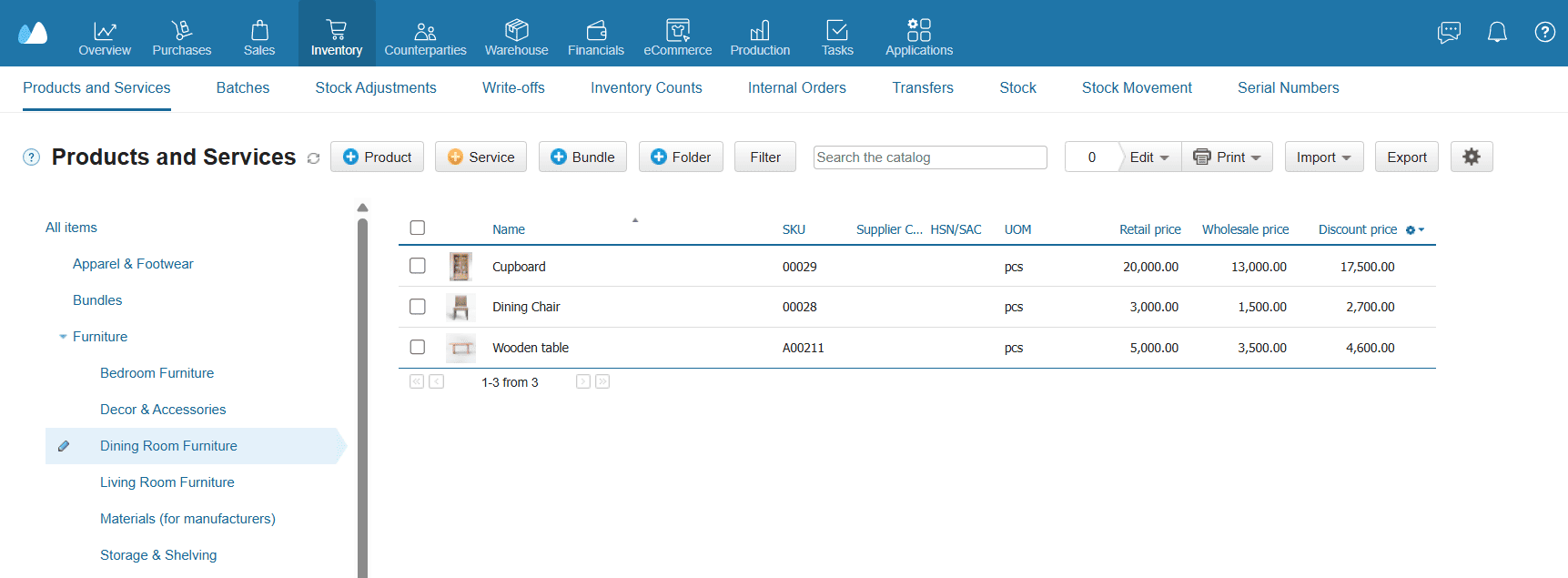
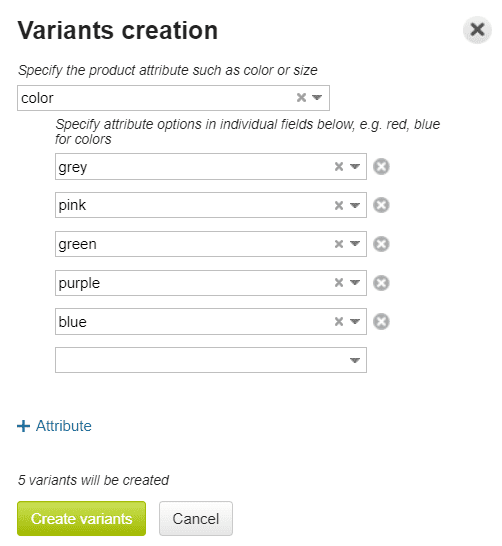
Parent item: Yoga Mat
Variants: Blue, Green, Grey, Pink, Purple
Without proper product grouping, these would appear as six separate items — creating a messy catalog. With variants, they stay together.
Prevent SKU Duplication for Variants
Many catalog issues come from incorrectly assigned or duplicated SKUs. Variants help enforce SKU management basics, but only if SKUs follow a clear system.
To prevent this:
- Set a clear SKU pattern for variants
- Build SKUs so each variant changes only the last part
- Never create variants as standalone items
Example SKU logic:
- YGM-001-BL
- YGM-001-GR
- YGM-001-PK
This instantly signals that all SKUs belong to the same parent product — essential for both inventory searchability and catalog cleanup. A well-maintained variant system strengthens the entire digital catalog, making it easier for teams to search, pick, update, and maintain items without errors.
Step 4 — Use Tags for Easy Filtering
Tags make your product catalog easier to search, filter, and manage, especially when you have many similar items. They act as flexible labels you can use for internal workflows, seasonal tasks, or quick reporting — without changing your main catalog structure.
Use Tags for Quick Grouping and Custom Filters
Tags are perfect for internal labels or temporary workflows. They work well when you want to group products across categories without creating unnecessary subfolders.
Useful tag examples:
- “Bestseller”
- “New Arrival”
- “Discontinued”
- “Gift Set”
- “Custom Order”
- “Low Margin”
- “Urgent Reorder”
How Tags Improve Daily Work
- Staff can find important groups in seconds
- You can run instant checks (e.g., all “Low Stock” or “Clearance” items)
- Sales, warehouse, and purchasing teams use the same labels → fewer mistakes
- No need to create temporary categories to group items
- Reporting becomes cleaner (e.g., sales by seasonal tags, stock by bestseller status)
Tags complement your categories, attributes, and variants, helping you organize your product catalog without adding structural complexity.
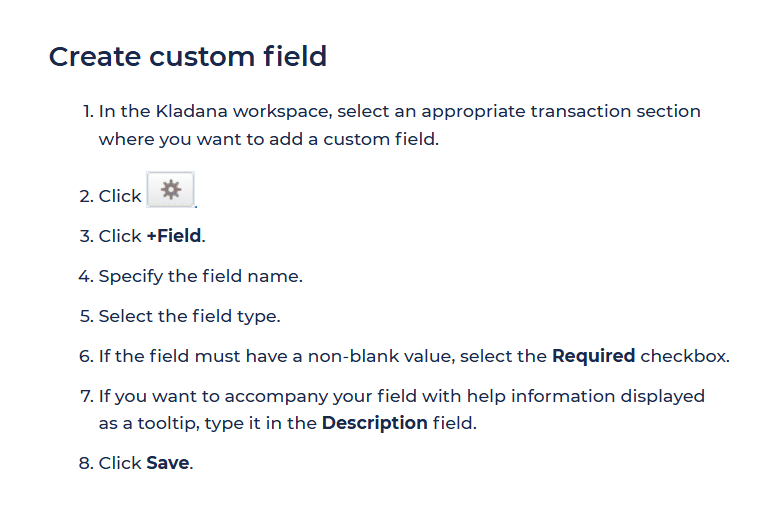
Step 5 — Create Product Bundles
Bundles let you combine several products — and even services — into a single ready-to-sell item. This is especially useful for product grouping, furniture sets, gift packs, kits, or any combinations that are regularly purchased together. Bundles help keep your product catalog structure clean while ensuring correct stock deduction for each component.
When to Use Bundles
Bundles work best when you want to sell multiple items as one unit without duplicating products in the catalog.
Common scenarios:
- Furniture sets: Dining table + 4 chairs
- Starter kits: Assembly kit + screws + protective pads
- Gift sets: Candle + holder + matches
- Product + service: Wardrobe + installation service
- Accessory packs: Office desk + cable organizer + drawer unit
This approach keeps product data organization consistent and prevents the creation of “kit versions” of the same products.
Why Bundles Improve Catalog Organization
- No duplicate products— no need to create a “kit version” of each item
- Clean structure — one parent item represents the entire set
- Accurate inventory — components are tracked individually
- Faster sales — staff add one bundle instead of selecting multiple items
- Better reporting — you can track bundle sales vs. individual items
Bundles are especially helpful for retail, wholesale, production, and any business that assembles fixed sets.
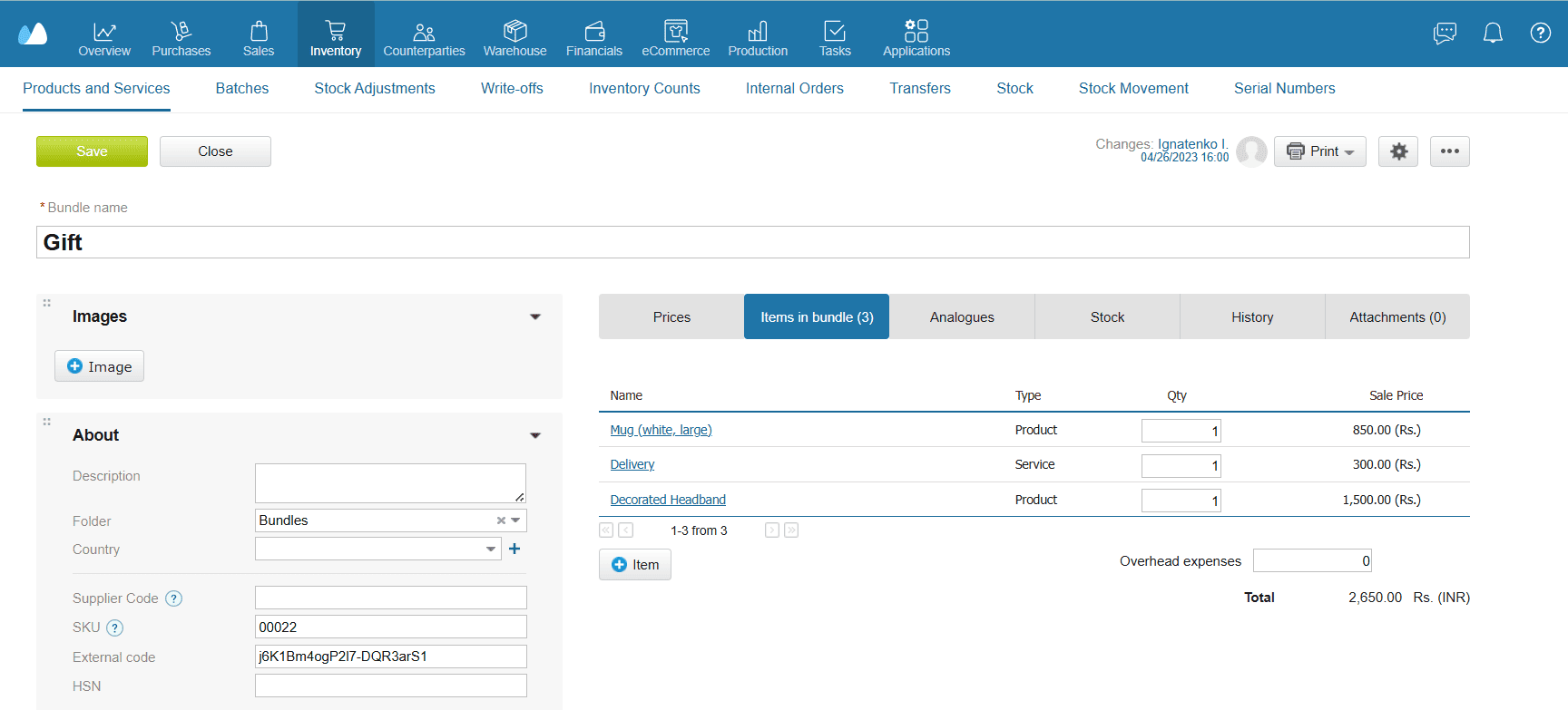
Step 6 — Add Product Analogues
Analogues help you connect items that can be used instead of each other — similar models, alternative suppliers, or interchangeable materials. This keeps the product catalog structure clean and prevents the creation of unnecessary duplicates.
Why Analogues Improve Catalog Organization
When your catalog includes many items with slight differences, duplicates often appear simply because employees cannot find a suitable product fast enough.
Adding analogues solves this by:
- Grouping similar products without merging them
- Preventing accidental duplication
- Speeding up purchasing and sales decisions
- Reducing errors caused by choosing the wrong item
- Improving catalog navigation for large assortments — overall inventory searchability
With analogues, employees always see valid alternatives without cluttering the main item catalog.
What Counts as a Good Analogue?
Use analogues for items that can replace each other in real workflows.
Same product type, different variations:
- Two models of a chair with similar dimensions
- Different brands of the same tool
- Two types of fabric with similar density or composition
Alternatives from different suppliers:
- Supplier A and Supplier B versions of the same raw material
- Equivalent hardware components
- Replacement packaging materials
Functional substitutes:
- Lamp A (LED) and Lamp B (similar brightness)
- Storage bins of different brands but same capacity
The key rule: an analogue must genuinely work as a replacement in your business process.
How Analogues Improve Daily Operations
- Purchasing teams quickly switch to another product when the main SKU is out of stock
- Sales teams always have a replacement to offer customers
- Warehouse staff avoid confusion when picking similar items
- Planning becomes smoother — alternatives are visible at a glance
Analogues act as a safety net against delays, shortages, and catalog clutter.
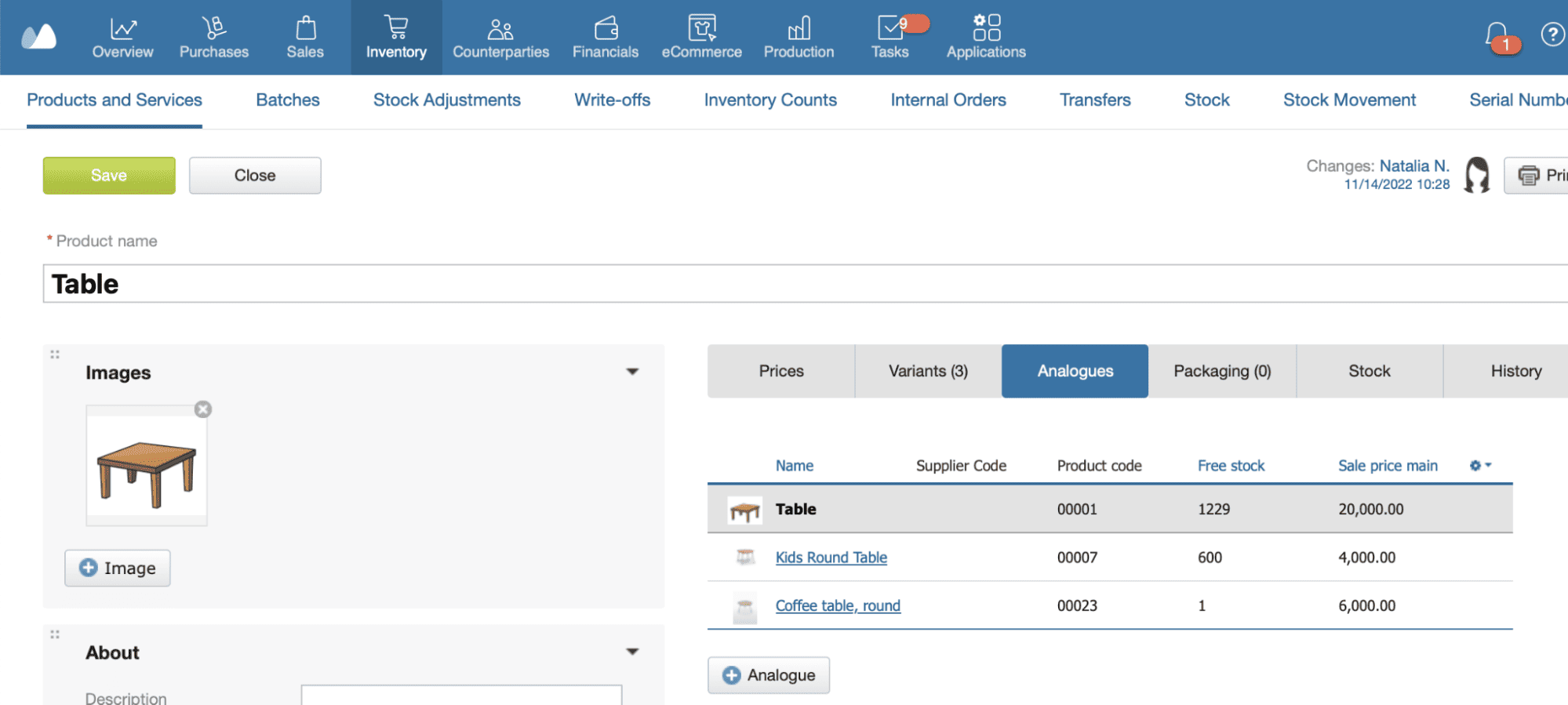
Step 7 — Set Price Rules & Tiered Pricing
A clean product catalog structure isn’t only about names, categories, and variants — pricing rules are part of your overall product data organization. When prices follow consistent rules, your team avoids mistakes, reports stay accurate, and customers receive the correct pricing across all sales channels.
Use a Consistent Price Structure
Most businesses rely on several price levels. To keep your item catalog organized, define your pricing logic once and apply it everywhere — for every SKU, variant, and product group.
Typical price types include:
- Base price — standard retail selling price
- Wholesale price — for bulk buyers or B2B partners
- Discount price — for promotions, clearance, loyalty programs
- Channel-specific prices — e-commerce, offline store, marketplace
- Customer group pricing— VIP clients, distributors, long-term partners
Keeping these levels structured prevents confusion when items appear in multiple channels or when the same SKU is sold to different types of customers.
Why Pricing Rules Matter for Catalog Organization
A well-organized catalog relies on predictable pricing. Inconsistent prices quickly destabilize your digital catalog. Without rules, employees create ad-hoc prices, leading to inconsistencies and reporting errors.
Clear pricing rules help you:
- Avoid duplicate products created only because “prices were different”
- Reduce manual changes — all prices update from one place
- Keep customer quotes consistent across the team
- Maintain clean financial reports for revenue, margin, and profitability
- Simplify inventory valuation — especially if using FIFO, batches, or serial numbers
Pricing is part of SKU management basics — predictable, structured, and aligned with your catalog hierarchy.
How Tiered Pricing Helps Your Business
Tiered pricing allows you to set different prices based on quantity or customer segment. This is especially useful for wholesale and manufacturing.
Examples:
- Buy 1–9 chairs → $50 each
- Buy 10–49 → $45 each
- Buy 50+ → $40 each
- Distributors → $35 each regardless of volume
Tiered pricing helps:
- Encourage larger orders
- Reduce negotiation time (rules are visible and consistent)
- Keep your product catalog organization simple (no need for duplicate items)
A structured price model helps every SKU behave predictably — which is essential for a clean, scalable catalog.
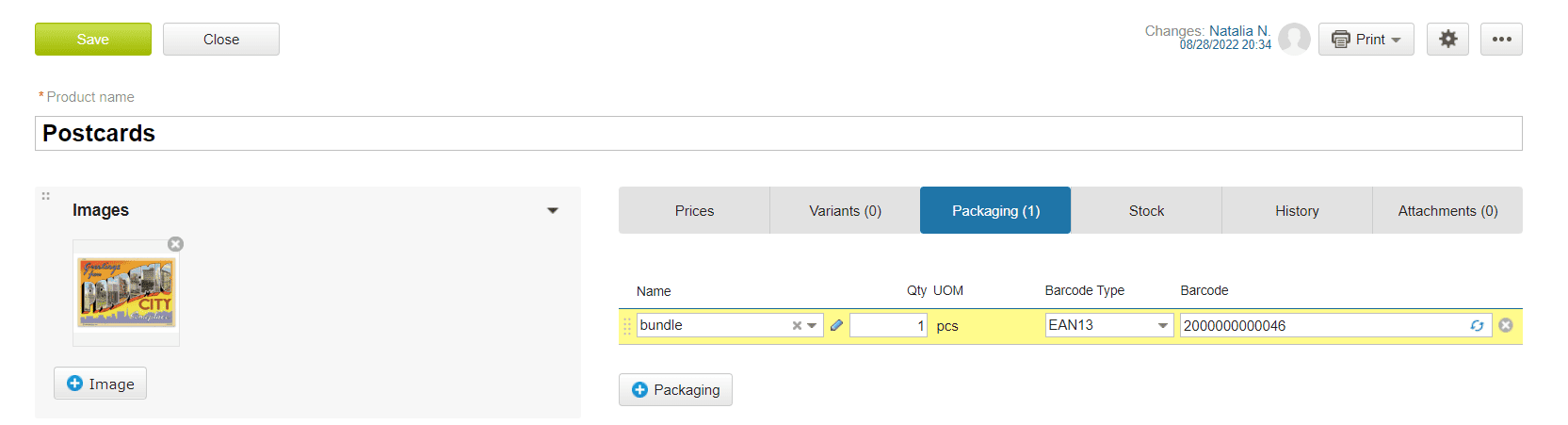
Step 8 — Manage Barcodes for Items
Barcodes make even a small digital catalog dramatically easier to navigate. They speed up search, receiving, picking, and any stock movement — while reducing human errors to nearly zero. Whether you have 50 SKUs or 5,000, barcodes help keep a clean product catalog and ensure every item is quickly identifiable.
Why Barcodes Matter for Catalog Organization
Barcodes turn every item (and variant) into a machine-readable identifier.
This helps your team:
- Find products instantly by scanning instead of typing
- Avoid selecting the wrong SKU from long lists
- Speed up stock in/out documentation
- Reduce duplicate items — each barcode links to one SKU
- Maintain more accurate inventory across warehouses
- Improve overall inventory searchability
In short: fewer mistakes, faster work, and a more reliable product catalog structure.
How to Use Barcodes Effectively
To keep your product data organization consistent and error-free, apply barcodes across all products and variants.
1. Assign a unique barcode to each SKU
Each variant needs its own code — e.g., Blue/M, Blue/L, Black/M should not share the same barcode. This prevents mix-ups and supports proper SKU management basics.
2. Print and attach barcodes to physical items
Place labels where staff can scan them easily:
- Packaging
- Shelves
- Storage bins
- Finished products
Clear labeling improves inventory searchability and speeds up warehouse tasks.
3. Scan items during key warehouse operations
Scanning accelerates:
- Receiving
- Stock adjustments
- Transfers
- Picking for orders
- Stock counts
This eliminates manual entry errors and keeps data clean.
4. Use barcodes to validate items during sales or picking
A quick scan ensures the operator selects the correct SKU, especially when products look similar (e.g., same chair model in different colors).
Practical examples:
- Furniture: sofas, chairs, drawers, tables — barcodes help differentiate similar models or finishes
- Apparel: size + color variants — barcode prevents mixing up items on a busy shelf
- Handmade goods: each piece gets a code to track individual batches or materials
- Warehouse bins: scanning bin labels ensures items are placed and picked from the correct location
Barcodes are one of the simplest ways to keep a clean product catalog and support a scalable product hierarchy without overcomplicating your structure.
Step 9 — Handle Batches and Expiry Dates
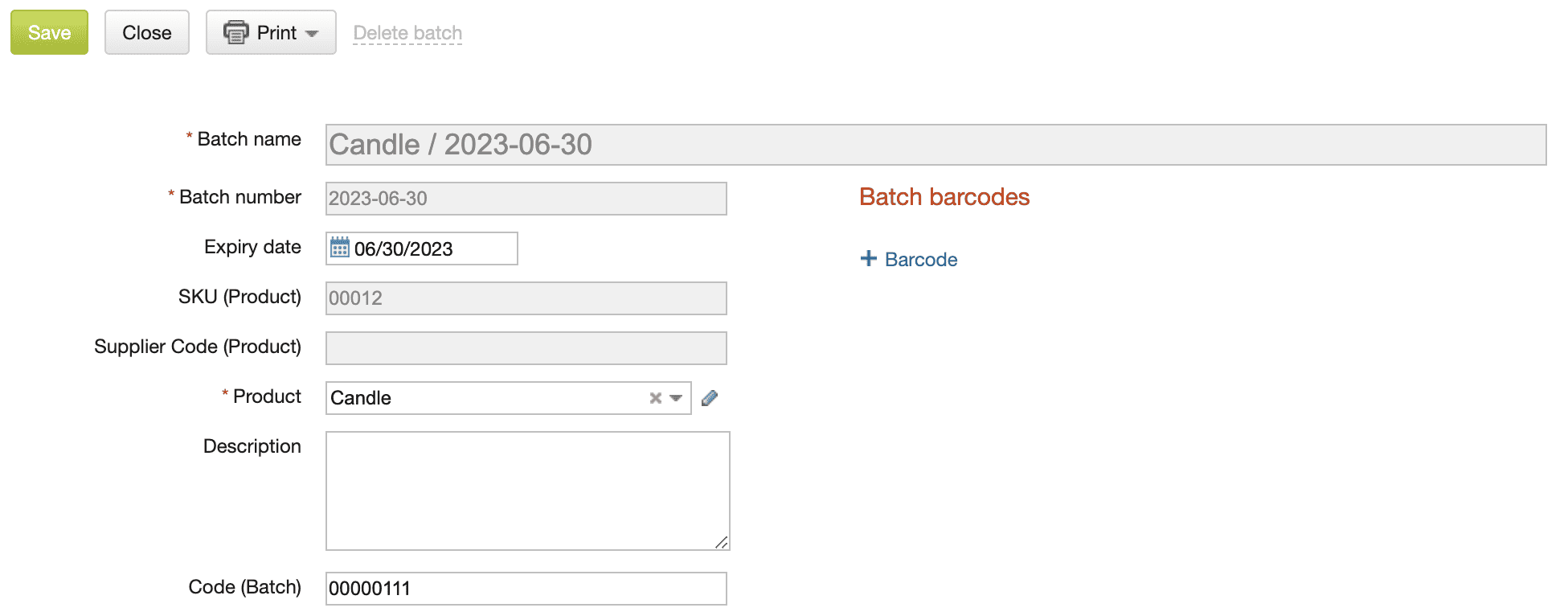
If your business works with items that come in batches, production lots, or have limited shelf life, keeping this information organized is essential. Even in non-FMCG industries — such as furniture production, upholstery, or finished goods with coatings — batches help track material origins, manage quality issues, and avoid stock discrepancies.
Clear batch tracking means fewer write-offs, fewer surprises during audits, and a more accurate understanding of what you can actually sell or use in production.
Why Batches Matter in Catalog Organization
Batch tracking adds a layer of structure to your catalog:
- Each batch has its own quantity, production date, and supplier info
- You always know which materials or goods are from which shipment
- You can trace issues back to a specific delivery or production run
- You maintain accurate costs when different batches have different purchase prices
This prevents mixing items that may look identical but differ in age, quality, or source.
When to Use Expiry or Production Dates
Use expiry dates or production dates when products decline in quality or usability over time.
Examples:
- Upholstery foam or adhesives
- Paint, varnish, finishing materials
- Fabric rolls with treatment chemicals
- Cleaning products or maintenance supplies
- Handcrafted items with limited safe storage time
- Anything with recommended “use by” or “best before” guidelines
Even if items don’t expire in the FMCG sense, tracking production dates helps prioritize older batches and keeps stock fresh.
How Batches Improve Daily Operations
A structured batch system helps you:
- Sales: choose exactly which unit was sold
- Warehouse: scan serials during receiving, picking, dispatch
- Customer service: identify unit history instantly
- Inventory audits: verify stock without confusion
- Management: see performance of specific product batches or models
With batches, your catalog becomes more than a list — it becomes a traceable record of product history.
Step 10 — Use Serial Numbers for High-Value Items
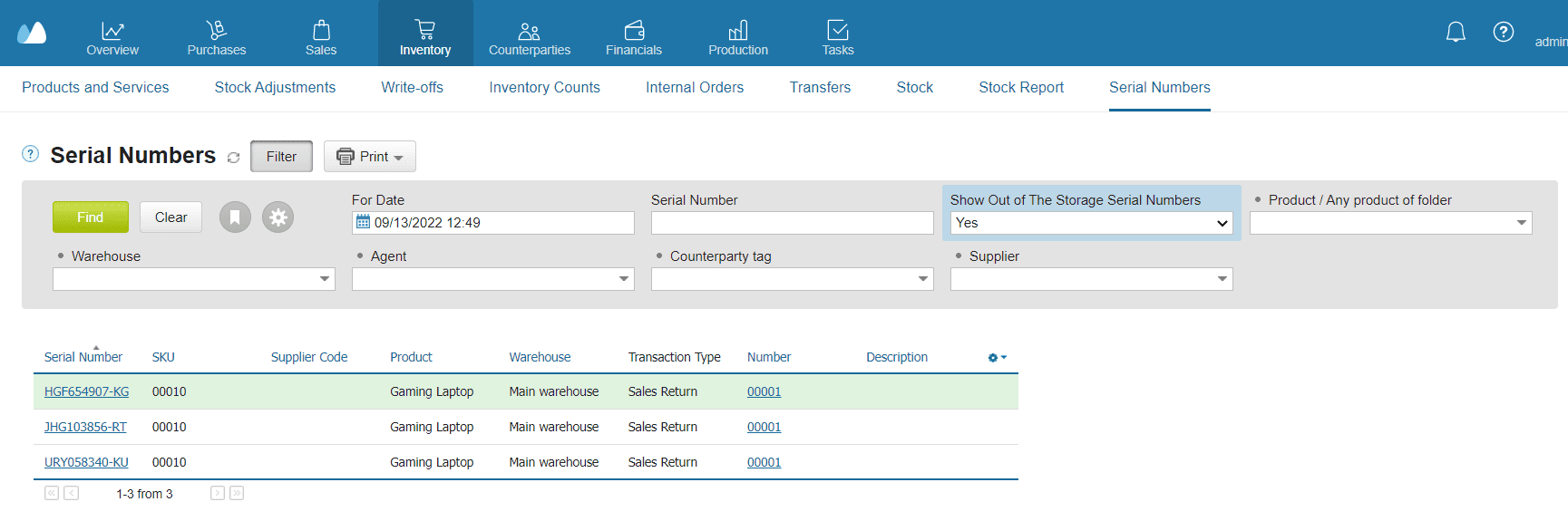
Serial numbers help you track every individual unit of a product. They are essential when your business sells items with warranties, unique identifiers, expensive components, or anything that requires precise traceability.
Instead of treating all units as identical stock, serial numbers let you follow each piece through its entire lifecycle — from purchase to sale to possible return.
When Serial Numbers Make Sense
Use serial numbers when products are:
- High-value (premium furniture, electronics, machinery)
- Custom-made or handcrafted
- Sold with warranties
- Sensitive to quality control
- Regulated or require individual tracking (e.g., medical, safety-certified items)
Examples from retail and manufacturing:
- Luxury chairs with individual build labels
- Limited-edition décor pieces
- Electrical components or lighting fixtures
- Smart furniture with electronic parts
- Branded items with authenticity certificates
Why Serial Numbers Improve Catalog Organization
Serial numbers prevent the most common problems with expensive or unique items:
- No mix-ups between similar products — each unit is identified separately
- Easier warranty and service tracking — you know exactly which customer received which piece
- Faster returns and repairs — staff immediately find the unit’s history
- Better quality control — trace issues to specific production batches or suppliers
- Accurate stock movements — each serialised item has its own record
Instead of guessing which item was sold, you always have the exact serial number linked to the invoice or shipping document.
How Serial Numbers Support Daily Operations
- Sales teams select the correct unit during invoicing
- Warehouse staff scan serial numbers during picking and dispatch
- Customer support checks serial numbers to handle warranty cases
- Inventory audits become more accurate — no missing or duplicate entries
- Management gets clear insights into the performance of specific models or production runs
Serialisation adds structure and reliability — especially for businesses where every unit matters.
How Often Should You Update and Clean Your Product Catalog?
A product catalog is never truly “finished.” Your assortment evolves, suppliers change, and new variants appear — and over time, even a well-structured digital catalog can drift away from your original rules. A regular review schedule keeps your product catalog organization predictable, accurate, and easy for your team to work with.
Monthly Review (Recommended for Most SMEs)
A short monthly cleanup helps prevent 80% of catalog issues.
Focus on:
- Merging accidentally created duplicates
- Archiving discontinued or inactive items
- Checking naming conventions and correcting inconsistencies
- Verifying SKU format to spot irregular or ad-hoc entries
- Ensuring attributes, variants, and tags follow your rules
- Removing outdated images or mismatched descriptions
A small monthly effort keeps your clean product catalog stable and prevents chaotic rebuilds later.
Review After Major Stock Events
Run an additional check whenever you have:
- A major delivery or supplier shipment
- A seasonal assortment update
- A new supplier or new product line
- A full stock count or warehouse audit
These periods often generate new variants or temporary naming shortcuts — a cleanup helps keep everything aligned.
Why Regular Catalog Maintenance Matters
Consistent maintenance protects both your product data organization and your operations:
- Reduces search errors
- Keeps reports accurate
- Helps staff avoid creating duplicates
- Protects data quality as your product range grows
A clean catalog is an ongoing process, not a one-time task — and consistency is what makes it work.
Summary: Keep Your Product Catalog Clean and Easy to Navigate
A well-organized product catalog saves time, prevents errors, and gives your whole team a single source of truth. Clear names, consistent SKUs, a structured product catalog hierarchy (categories, subcategories, variants), and additional tools like bundles, analogues, barcodes, batches, and serial numbers help you maintain a clean product catalog even as your assortment grows.
Below is a practical checklist you can use to review any catalog — or to clean up an existing one. This supports ongoing product catalog organization, improves inventory searchability, and keeps your digital catalog easy to navigate.
Product Catalog Organization Checklist
Names & SKUs
- Product names follow a clear naming convention (Type + 1–2 key attributes)
- SKUs follow a consistent format (SKU management basics)
- No random or duplicated SKUs
- Variants inherit the same naming logic
Categories & Subcategories
- Categories are broad, subcategories are narrow
- No overly deep or confusing structures
- Every item belongs to the correct folder
- Frequently expanded categories are reviewed regularly (product categorization guide)
Variants
- All size/color/material variations are grouped under a parent item (product grouping)
- Variant-level SKUs follow a predictable pattern
- No standalone items that should be variants
Tags
- Tags support internal workflows (bestseller, discontinued, seasonal)
- No tag duplication (tags & filters)
Bundles
- Sets and kits are created as bundles, not separate products
- Components and quantities are defined clearly
- Stock deduction is linked to bundle components
Analogues
- Functionally similar products are linked as analogues
- Teams know which alternatives to offer or purchase
- No duplicates created due to “can’t find the right item”
Pricing Structure
- Main, wholesale, and special prices are defined
- Price rules follow one logic across the catalog
- No outdated or mismatched price fields
Barcodes
- Every product or packaging unit has a barcode
- Barcode type is consistent (EAN-13, Code-128, etc.)
- Barcodes are linked to SKUs correctly
Batches & Expiry Dates
- Batch numbers and expiry dates are used where relevant
- No items with missing or incorrect batch information
- Expiring batches are easy to track
Serial Numbers
- High-value or unique items have serial numbers
- Returns, warranty cases, and repairs are easy to trace
- No duplicate serials in the system
Frequently Asked Questions about Product Catalog
How do I organize a product catalog for a small business?
Start with clear names and SKUs, add categories and subcategories, group variants under one parent item, and use attributes and tags for filtering. Keep the product catalog structure simple — 1–2 levels max.
What’s the difference between categories and groups?
- Categories classify products by type (e.g., Furniture → Dining Room Furniture).
- Groups/variants represent differences within the same product (color, size, material).
Categories build the product hierarchy, while groups keep similar items together.
How do I choose a good SKU format?
Use a consistent pattern based on product type + key attributes. SKUs should be unique, readable, and aligned with your naming conventions (e.g., TBL-001-BRN-L).
Can I track product variants without creating separate items?
Yes. Create one parent item and add variants for attributes like color, size, or material. This keeps the item catalog clean and prevents duplication.
How do I prevent duplicate SKUs?
Set a fixed SKU structure, avoid manual ad-hoc codes, group variants correctly, and use catalog search before adding a new product to ensure it doesn’t already exist.
Should I use tags or categories for filtering?
- Use categories for catalog structure.
- Use tags for flexible grouping (e.g., “bestseller,” “new arrival,” “low stock”), temporary tasks, or reporting filters.
How often should I clean and update my product catalog?
Review it monthly or after major stock updates. Merge duplicates, archive inactive items, and check that names, SKUs, and product attributes follow your rules.
What’s the simplest way to migrate a messy spreadsheet catalog?
Clean data first: unify names, standardize SKUs, define categories, and remove duplicates. Then import the corrected file into your digital catalog or inventory system.
Can a free inventory tool help keep my catalog organized?
Yes — even basic tools offer categories, variants, tags, and barcode support, which dramatically reduces chaos compared to spreadsheets.
How does a clean catalog improve inventory accuracy and sales?
A structured catalog reduces search time, prevents wrong item selection, improves inventory searchability, and ensures staff always pick the correct SKU.