
Customer complaints can arrive through calls, emails, social media, or store conversations. Without one record, details get lost, responsibilities remain unclear, and customers wait longer for answers.
A customer complaint form template in Excel keeps each issue in one structured file. You can record the customer, complaint type, responsible employee, status, deadline, and final solution. The free templates in this guide also help you find repeat problems and measure resolution times.
Choose a basic form, a complaint register, or an automated tracker based on how many cases your team handles.
- What Is a Customer Complaint Form?
- Why Use Excel for Complaint Management?
- Key Elements of a Customer Complaint Form
- Types of Customer Complaint Forms in Excel
- How to Create a Customer Complaint Form in Excel
- Download Free Customer Complaint Form Templates
- Best Practices for Using Customer Complaint Forms
- To Sum It Up
- Frequently Asked Questions
- List of Resources
Free Customer Complaint Form Excel Workbook
Record, assign, resolve, and analyze customer complaints with four ready-to-use tools:
- Basic Customer Complaint Form
- Complaint Register with Status Tracker
- Automated Complaint Log
- Customer Complaint Dashboard
The workbook includes sample complaint records, dropdown lists, resolution-time formulas, editable lists, instructions, and KPI charts.
Or
What Is a Customer Complaint Form?
A customer complaint form is a document used to record a problem with a product, order, delivery, or service. It gives employees the facts they need to investigate the issue and respond to the customer.
Manufacturers can record defects, batch numbers, or packaging problems. Retailers and online sellers can log wrong items, damaged parcels, and delayed deliveries. Service companies can document missed appointments, billing errors, and poor service.
The form becomes more useful when each submission enters a customer complaint log in Excel. The log shows who owns the case, its status, the target response date, and the action taken. It also helps managers find repeat issues and add them to a quality control log.
A structured complaint process can support ISO 9001 quality management practices. It creates documented information for review and improvement. It does not, by itself, make a company ISO 9001 compliant. Read the ISO 9001 overview.
Why Use Excel for Complaint Management?
Excel is a practical starting point for small teams that do not have complaint management software. It is widely available and easy to adjust for retail, manufacturing, e-commerce, or service operations.
A customer complaint log in Excel lets employees:
- record cases in one place;
- filter open complaints;
- sort cases by priority;
- assign responsible employees;
- highlight overdue responses;
- calculate resolution time;
- count repeat issues.
Dropdown lists keep categories and statuses consistent. Conditional formatting highlights overdue or high-priority cases. PivotTables can summarize complaints by product, cause, month, owner, or status. Microsoft explains how to create dropdown lists and PivotTables.
Pro Tip: Convert the range into an Excel Table. New rows will inherit filters, formulas, and formatting.
Key Elements of a Customer Complaint Form
Capture enough information to investigate the issue without making the form difficult to complete.
| Field | What to record |
Complaint ID |
Permanent unique reference |
Date received |
Fixed submission date |
Customer details |
Name and contact |
Order or invoice |
Related transaction number |
Product or service |
Item, batch, or service involved |
Channel |
Email, phone, store, website, or marketplace |
Category |
Defect, delivery, billing, or service |
Issue description |
Facts, impact, and supporting evidence |
Priority |
Low, medium, high, or urgent |
Assigned team |
Complaint owner or department |
Status |
Open, In Progress, Resolved, or Closed |
Target date |
Promised response or resolution date |
Root cause |
Confirmed reason for the problem |
Resolution |
Action taken and date resolved |
Customer feedback |
Rating or follow-up comment |
Keep personal data to the minimum needed for contact and investigation. Define who may view or edit the register.
Types of Customer Complaint Forms in Excel
Choose a format that matches complaint volume and reporting needs.
Basic Complaint Form
A printable Excel form for one complaint. It suits stores, workshops, and small service teams that need consistent intake.
Complaint Register
A multi-row service complaint register for several cases. Filters show complaints by month, category, owner, priority, or status.
Automated Complaint Tracker
An issue tracking spreadsheet with dropdowns, formulas, alerts, and a customer experience dashboard. Use it when managers need response and resolution KPIs.
Service Complaint Sheet
An after-sales feedback sheet for repairs or field service. Add asset ID, technician, visit date, work completed, parts used, and customer approval.
For repair records, pair it with a service report format in Excel.
How to Create a Customer Complaint Form in Excel
Build a usable Excel complaint management system in six steps:
- Add columns. Include the fields listed above. Format the range as a Table.
- Create dropdowns. Use Data Validation for category, priority, department, and status.
- Add status colors. Apply conditional formatting: red for overdue, amber for In Progress, and green for Resolved.
- Set dates. Enter fixed dates with Ctrl+;. Use TODAY() and NOW() only for live calculations because they change when Excel recalculates.
- Calculate resolution time. If B2 is Date Received and C2 is Date Resolved, use:
=IF(OR(B2=””,C2=””),””,C2-B2)
- Build a summary. Create PivotTables for complaint volume, open cases, common categories, average resolution days, and satisfaction score.
Pro Tip: Add slicers for status, owner, and complaint type. Managers can filter a PivotTable without editing the source data.
Download Free Customer Complaint Form Templates
Each template includes instructions and sample complaint records. Download the Excel file or make a Google Sheets copy.
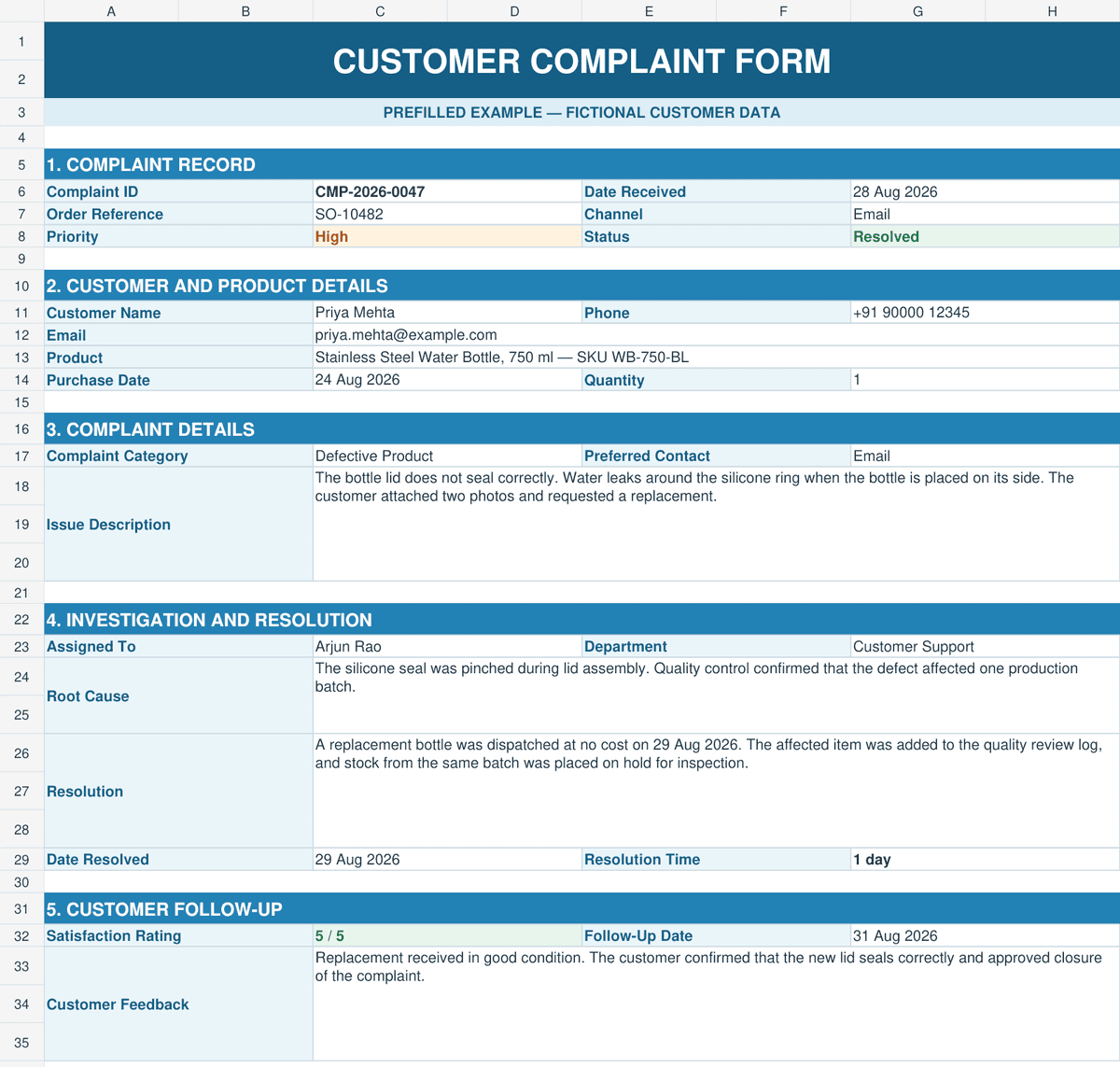
Basic Customer Complaint Form
Best for collecting one complaint in a printable format.
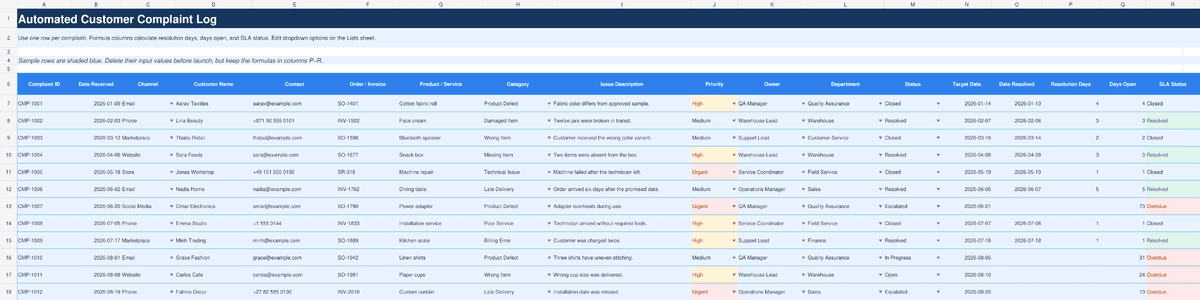
Complaint Register with Status Tracker
Best for support and QA teams that need one searchable complaint tracking sheet.

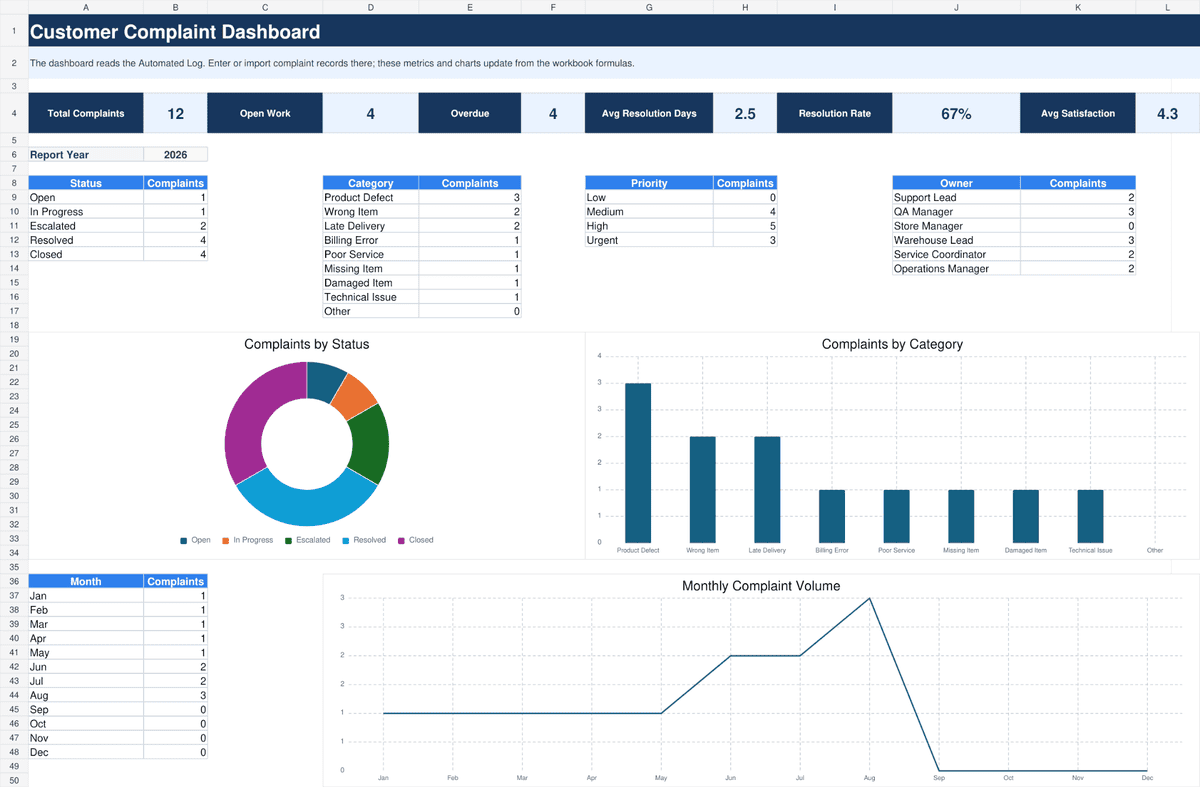
Automated Complaint Log and Dashboard
Best for monthly analysis. It contains dropdowns, due-date alerts, resolution formulas, PivotTables, charts, and sample data.
Delete the example rows before use. Keep one untouched master copy so formulas and validation rules can be restored.
Recommended Reads
Continue building your business records with these free Excel templates:
- Free Excel Inventory Management Template with a Full Guide
- Quality Inspection Report Format in Excel: Templates, Guide & Best Practices
- Incoming Inspection Report Format in Excel: Templates, Guide & Best Practices
- Internal Audit Report Format in Excel: Templates, Guide & Best Practices
- Sales Report Templates for Small Businesses
Best Practices for Using Customer Complaint Forms
A reliable complaint resolution tracker depends on clear rules as much as spreadsheet features.
- Assign permanent IDs. Never reuse a reference number.
- Record facts early. Add order numbers, dates, photos, and customer statements.
- Set one owner. A department may help, but one person should control follow-up.
- Define deadlines. Set response and resolution targets by priority.
- Use fixed categories. Consistent labels produce reliable reports.
- Escalate overdue cases. Review open and urgent complaints at least weekly.
- Close the loop. Record the solution and ask whether it solved the problem.
- Review root causes. Compare complaints with your quality inspection records to find product or process failures.
Move customer follow-ups out of separate files
Kladana connects customer profiles with orders, tasks, comments, and transaction history. Start a free 14‑day trial. No credit card is required.
To Sum It Up
A customer complaint form captures one issue. A complaint register tracks every case. An automated tracker adds alerts, calculations, and reports.
Start with Excel if your team handles a manageable number of complaints and one person controls the file. Use the same categories, owners, and status rules for every record.
Check that your process includes:
- a unique complaint ID;
- customer and order details;
- category and priority;
- an assigned owner;
- response and resolution dates;
- root cause and corrective action;
- customer follow-up;
- regular trend reviews.
Move to a CRM or helpdesk when several employees edit the file, cases are missed, access control is weak, or managers need automatic reminders. Kladana users can keep customer cards, orders, tasks, and comments connected in the CRM workspace.
Frequently Asked Questions
These short answers cover common setup and reporting questions.
- What should a customer complaint form include? Customer, order, issue, owner, status, dates, resolution, and feedback.
- Can Excel track complaint status? Yes. Use dropdowns and conditional formatting.
- How do I analyze complaint trends? Build a PivotTable by category, product, owner, or month.
- Can Excel integrate with CRM tools? Many systems accept XLSX or CSV imports.
- How do I calculate resolution time? Subtract Date Received from Date Resolved.
- Complaint form or feedback form? A complaint requires action. Feedback may only measure opinion.
- Can Excel create dashboards? Yes. Use PivotTables, PivotCharts, slicers, and KPI cells.
- Is a free complaint log available? Yes. Use the downloads above.
- How do I secure complaint data? Restrict access, encrypt the file, and collect less personal data.
- How often should reports be reviewed? Review open cases weekly and trends monthly.