
A vehicle maintenance report records service dates, mileage, repairs, replaced parts, costs, and the next maintenance deadline. It helps car owners, workshops, and fleet managers keep vehicles safe and control operating expenses.
A vehicle maintenance report format in Excel is a practical option for small fleets and individual vehicles. You can track service history, calculate repair costs, monitor mileage, and flag overdue work in one file.
This guide includes four free Excel templates, working formulas, sample records, dropdown lists, service alerts, and a fleet summary dashboard.
- What Is Included in the Vehicle Maintenance Workbook?
- What Is a Vehicle Maintenance Report?
- Why Use Excel for Vehicle Maintenance Reports?
- Key Elements of a Vehicle Maintenance Report Format
- Types of Vehicle Maintenance Reports in Excel
- How to Create a Vehicle Maintenance Report in Excel
- Download Free Vehicle Maintenance Report Templates
- Best Practices for Maintaining Vehicle Reports
Free Vehicle Maintenance Excel Workbook
Track one vehicle or a full fleet with four ready-to-use templates:
- Single Vehicle Maintenance Log
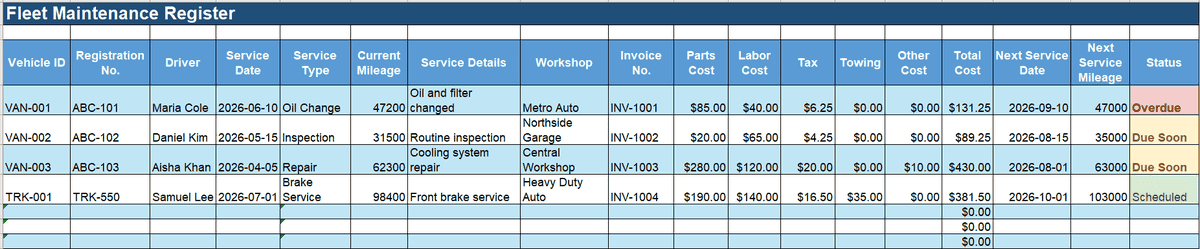
- Fleet Maintenance Register
- Vehicle Repair Cost Report
- Preventive Maintenance Tracker
The workbook includes sample data, dropdown lists, automatic cost calculations, service status alerts, and a summary sheet.
Or
What Is Included in the Vehicle Maintenance Workbook?
The workbook combines four types of maintenance records in one file. This lets users choose a simple log or manage several vehicles without building a spreadsheet from scratch.
| Template | Best For | Main Functions |
Single Vehicle Log |
Car owners and small businesses |
Service history, mileage, costs |
Fleet Register |
Delivery and transport teams |
Multiple vehicles, drivers, service status |
Repair Cost Report |
Workshops and fleet managers |
Parts, labor, tax, repair comparison |
Preventive Tracker |
Maintenance planners |
Date and mileage reminders |
A Summary sheet shows key figures across all records. An Instructions sheet explains how to add vehicles, extend formulas, change service intervals, and update dropdown lists.
What Is a Vehicle Maintenance Report?
A vehicle maintenance report is a record of inspections, servicing, repairs, mileage, replaced parts, costs, and future service dates. It shows what work was completed, when it was done, and what action is due next.
Businesses use these reports to keep vehicles available for daily work. The records also help managers compare costs, find repeated faults, and plan service before a breakdown occurs.

A typical report tracks:
- Vehicle ID
- Driver or operator
- Service date
- Odometer reading
- Work completed
- Parts replaced
- Labor and parts costs
- Next service date
- Next service mileage
- Follow-up notes
The same format can support delivery vans, rental cars, trucks, buses, construction vehicles, and company cars.
Why Use Excel for Vehicle Maintenance Reports?
Excel works well for small fleets, workshops, and car owners who need a low-cost tracking tool. Users can record maintenance activities, service dates, mileage, parts, labor costs, and repair notes in one file.
A vehicle maintenance log template can calculate total costs, mileage between services, and future service dates. Conditional formatting can mark overdue work or service due soon.
Filters help users find records for one vehicle, driver, service type, or date range. PivotTables can summarize annual costs by vehicle or repair category.
Excel is most suitable when the fleet is small and only a few people edit the file.
Key Elements of a Vehicle Maintenance Report Format
A useful report should identify the vehicle, explain the work, show the cost, and state what is due next.
| Field | Description |
Vehicle Number or ID |
Registration number or fleet ID |
Model or Type |
Make, model, year, or category |
Driver or Operator |
Person responsible for the vehicle |
Service Date |
Date when work was completed |
Service Type |
Inspection, routine service, or repair |
Mileage |
Odometer reading at service |
Service Details |
Work completed |
Parts Replaced |
Parts, quantities, and costs |
Labor Cost |
Workshop or technician charge |
Total Cost |
Sum of all expenses |
Next Service Date |
Planned service date |
Next Service Mileage |
Future odometer target |
Status |
Scheduled, due soon, or overdue |
Remarks |
Faults and follow-up actions |
Vehicle Maintenance Report Example
A delivery company tracks three vans in its Fleet Register.
| Vehicle | Current Mileage | Next Service Mileage | Monthly Cost | Status |
Van 01 |
47,200 km |
47,000 km |
$245 |
Overdue |
Van 02 |
31,500 km |
35,000 km |
$120 |
Scheduled |
Van 03 |
62,300 km |
63,000 km |
$410 |
Due Soon |
Van 01 has passed its mileage limit and should be booked for service. Van 03 is close to its limit and has the highest repair cost. The manager can review its service history before assigning another long route.
This example shows how mileage, cost, and status fields support one clear decision.
Types of Vehicle Maintenance Reports in Excel
Different templates support different tracking tasks.
Basic Vehicle Maintenance Log
This format is suitable for one car, van, or truck. It records service dates, mileage, repairs, parts, costs, and notes.
Fleet Maintenance Tracker
A fleet maintenance report stores records for several vehicles in one sheet. Managers can filter by vehicle ID, driver, service status, or due date.
Repair and Service Cost Register
This vehicle repair tracker in Excel separates parts, labor, tax, towing, and other charges. It helps managers identify vehicles with high repair costs.

Preventive Maintenance Schedule
This template tracks oil changes, brake checks, tire rotation, fluid replacement, and inspections. It uses dates and mileage limits to show when service is due.

Which Vehicle Maintenance Template Should You Use?
- One car or van: Single Vehicle Log
- Several vehicles: Fleet Maintenance Register
- High repair spending: Repair Cost Report
- Planned servicing: Preventive Maintenance Tracker
- Need all records: Complete workbook
How to Create a Vehicle Maintenance Report in Excel
Use these steps to create or customize the report.
Step 1. Add the Main Columns
Create fields for vehicle ID, service date, service type, mileage, costs, next service date, and remarks.
Step 2. Create Dropdown Lists
Use Data Validation for service types and statuses. Dropdowns reduce spelling differences and make filters more accurate.
Step 3. Add Excel Formulas
Next monthly service date:
=EDATE(B2,1)
Use this when B2 contains the last service date and the interval is one month.
Total maintenance cost:
=SUM(F2:J2)
Use this when columns F to J contain parts, labor, tax, towing, and other costs.
Service status:
=IF(I2=””,””,IF(TODAY()>I2,”Overdue”,IF(I2-TODAY()<=30,”Due Soon”,”Scheduled”)))
This formula separates overdue work, service due within 30 days, and later appointments.
Date and mileage check:
=IF(OR(TODAY()>=I2,D2>=J2),”Service Due”,”OK”)
This formula flags service when either the date or mileage limit is reached.
Step 4. Format and Analyze the Data
Use Format as Table, Conditional Formatting, filters, and a PivotTable. Compare cost by vehicle, month, service type, or workshop.
📚 Recommended Read: More Free Excel Templates
Keep maintenance, asset, and service records organized with these related templates:
- Monthly Maintenance Report Format in Excel — track monthly repairs, inspections, costs, downtime, pending tasks, and upcoming maintenance in one report.
- Daily Maintenance Report Format in Excel — record daily maintenance work, completed tasks, downtime, technicians, and follow-up actions.
- Service Report Format in Excel — document completed service work, customer or asset details, parts used, costs, and results.
- Fixed Assets Register Format in Excel — keep records of business vehicles and other fixed assets, including purchase data, condition, depreciation, and asset IDs.
- Inventory Management Excel Template — track spare parts, consumables, stock balances, and inventory movements in Excel.
Download Free Vehicle Maintenance Report Templates
The complete workbook contains four templates and supporting sheets. Each main template includes a filled sample row that shows how the fields work.
Single Vehicle Maintenance Log
Use this sheet for one car, van, or truck. Track mileage, service work, costs, and future maintenance.
Or
Fleet Maintenance Register
Use this sheet for several vehicles. Filter records by vehicle, driver, date, or service status.
Or
Vehicle Repair Cost Report
Use this sheet to compare parts, labor, tax, towing, and other expenses.
Or
Preventive Maintenance Tracker
Use this sheet for planned inspections and service intervals based on dates and mileage.
Or
All four templates are included in one printable workbook. The file can also be stored in OneDrive, Google Drive, or another cloud service.
Or
Best Practices for Maintaining Vehicle Reports
A maintenance sheet works only when records stay accurate.
- Record work at once. Add each inspection, service, or repair on the same day.
- Use standard fields. Separate parts, labor, tax, and other charges.
- Check due work weekly. Review service dates and mileage targets.
- Store proof. Record invoice numbers and links to scanned receipts.
- Use one vehicle ID. Do not enter the same vehicle under different names.
- Review yearly costs. Compare spending across vehicles.
- Back up the workbook. Store a monthly copy in the cloud.
When Is Excel No Longer Enough?
Excel works well for a small fleet and simple service records. It becomes harder to manage when many drivers, locations, or employees use the same file.
| Need | Excel Template | Fleet or ERP Software |
One or several vehicles |
Suitable |
Suitable |
Automatic formulas |
Yes |
Yes |
Live multi-user work |
Limited |
Yes |
Spare parts inventory |
Manual |
Connected |
Purchase orders |
Separate file |
Connected |
User history |
Limited |
Available |
Large fleet reports |
Harder |
Easier |
Warning signs include missed reminders, duplicate files, inconsistent vehicle names, and missing receipts.
Fleet software may suit businesses that need telematics, driver inspections, or live vehicle location. ERP software can help connect spare parts, suppliers, purchases, costs, documents, and staff tasks.
Replace Separate Inventory and Purchase Files
Vehicle maintenance affects stock, suppliers, purchasing, expenses, and employee tasks.
Kladana connects these records in one cloud ERP. Businesses can manage spare parts, purchase orders, supplier documents, costs, and reports without maintaining several separate spreadsheets.
To Sum It Up
A vehicle maintenance report tracks service dates, mileage, repairs, parts, costs, and future maintenance.
Excel is a practical choice for small fleets, workshops, and individual vehicles. The free workbook includes:
- Four maintenance templates
- Sample records
- Cost formulas
- Date and mileage alerts
- Dropdown lists
- A summary sheet
- Setup instructions
Update the workbook after every service or repair. Review due dates and mileage each week. Store invoices and keep a regular backup.
Move to fleet or ERP software once several users, locations, or connected business records become hard to manage in one workbook.
Frequently Asked Questions
These answers cover common questions about vehicle maintenance reports in Excel.
What Should a Vehicle Maintenance Report Include?
It should include vehicle ID, model, driver, service date, mileage, work completed, parts, labor cost, total cost, next service date, next service mileage, status, and remarks.
How Do I Calculate the Next Vehicle Service Date in Excel?
Use:
=EDATE(B2,1)
This adds one month to the date in B2. Replace 1 with the required number of months.
How Do I Track Maintenance by Mileage?
Add current mileage and next service mileage columns. Use:
=IF(D2>=J2,”Service Due”,”OK”)
Can I Manage Several Vehicles in One Workbook?
Yes. Use one row for each service event and assign a unique vehicle ID. Filters and PivotTables can separate records by vehicle.
How Do I Calculate Yearly Maintenance Cost per Vehicle?
Create a PivotTable with vehicle ID in Rows, service date grouped by year, and total cost in Values.
Can Excel Support Vehicle Maintenance Audits?
Excel can support internal reviews when records are complete, dated, consistent, and supported by invoices or inspection files. Larger fleets may need stronger access controls and user history.