
An order cancellation may look simple: stop the order and send the money back. In practice, the request can affect sales, warehouse stock, delivery, payments, and accounting.
Without a clear order cancellation and refund management process, teams may refund the same order twice, restock damaged goods, or lose payment records. Customers then wait while employees search through emails and spreadsheets.
This guide explains how to manage cancellations, returns, and refunds through one clear workflow. You will also find a policy matrix, a refund log, and ready-to-use customer messages.
- Why Cancellations, Returns, and Refunds Get Messy
- Step 1 — Define Your Cancellation, Return, and Refund Rules
- Step 2 — Record the Cancellation Before Taking Other Actions
- Step 3 — Create a Return Record for Shipped Goods
- Step 4 — Inspect Returned Goods and Adjust Inventory
- Step 5 — Issue a Full or Partial Refund
- Step 6 — Confirm the Result with the Customer
- Step 7 — Reconcile Refunds with Accounting
- Refund Tracking Log Template
- Best Practices to Keep Refunds Organized
- How Kladana Connects Orders, Returns, Stock, and Payments
- To Sum It Up
- Frequently Asked Questions
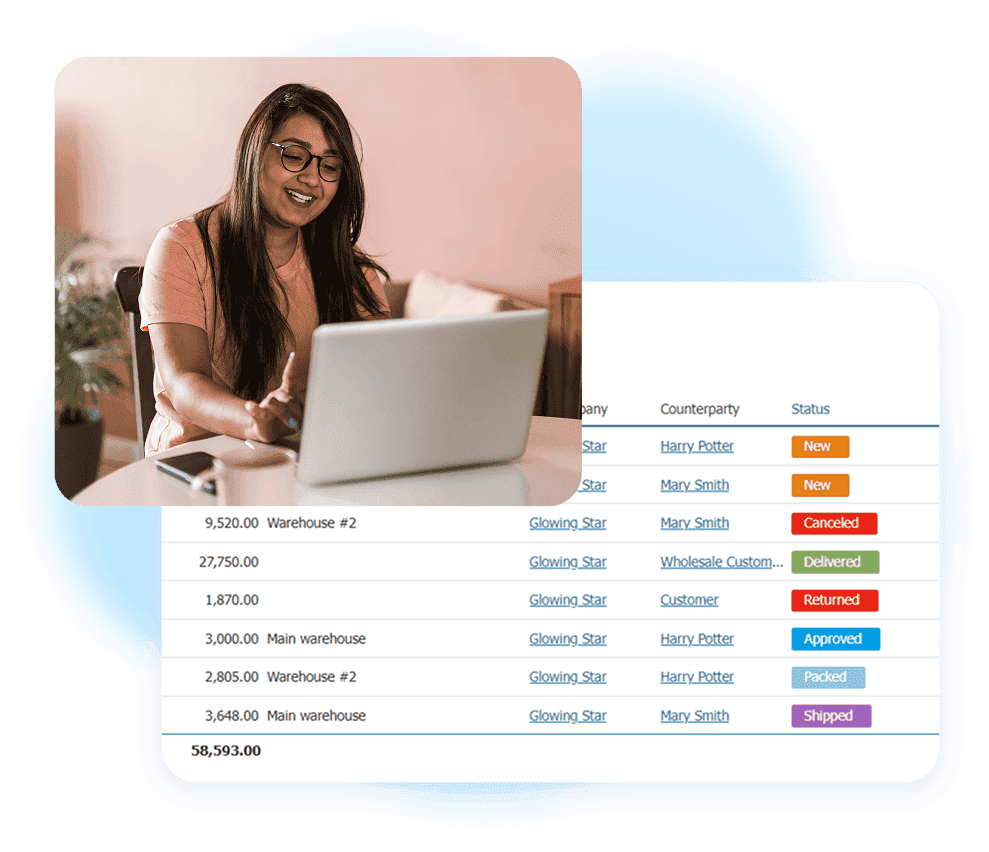
Why Cancellations, Returns, and Refunds Get Messy
These terms describe different actions:
- Cancellation: The business stops an order before it is completed.
- Return: The customer sends a delivered product back.
- Refund: The business sends money back to the customer.
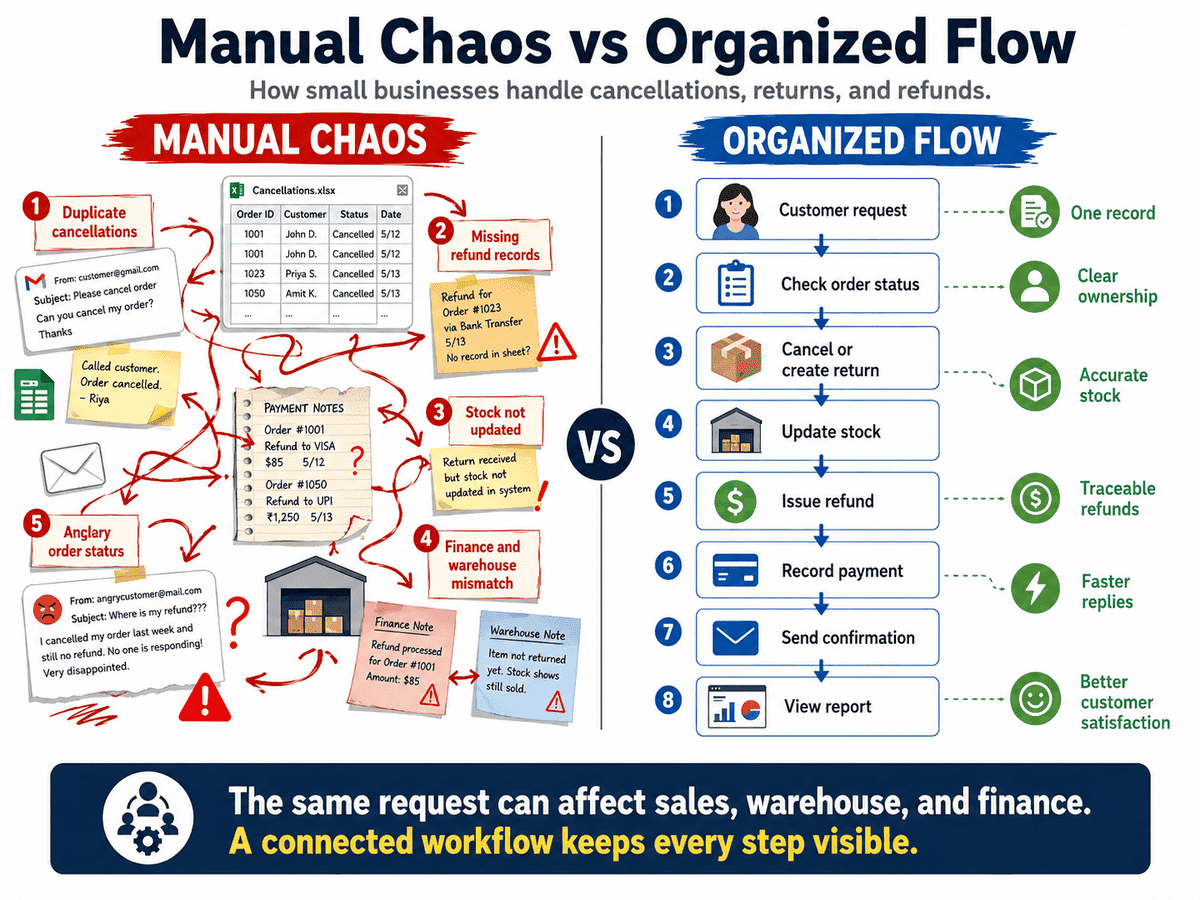
One request may require all three actions. For example, a customer may cancel one item after the rest of the order has shipped. The business must adjust the order, process a partial refund, and decide whether any goods need to return.
Problems start when each team keeps separate records. Customer service records the request in email. The warehouse changes stock in a spreadsheet. Finance sends the refund but cannot see why it was approved.
A structured return and refund workflow gives each request one owner, one reference number, and one current status.
Step 1 — Define Your Cancellation, Return, and Refund Rules
Write a simple policy before the first request arrives. It should explain which requests you accept, who approves them, and what happens to the goods and payment.
Use this policy matrix as a starting point:
| Situation | Available Action | Deadline | Approval | Stock Action | Payment Action |
Not shipped |
Cancel order |
Before dispatch |
Sales team |
Release reserved stock |
Full refund |
Partly shipped |
Cancel remaining items |
Before next dispatch |
Sales manager |
Release unshipped stock |
Partial refund |
Unwanted item |
Return |
14–30 days |
Standard check |
Inspect first |
Refund or credit |
Damaged item |
Return or replace |
Policy period |
Warehouse check |
Write off or quarantine |
Refund or replacement |
Custom product |
Case review |
Set by policy |
Manager |
Case-specific |
Case-specific |
Also define rules for delivery fees, discounts, exchanges, and non-returnable products.
Step 2 — Record the Cancellation Before Taking Other Actions
When a cancellation request arrives, find the original order and check its fulfillment status.
If the order has not shipped:
- Change its status to Cancelled.
- Record the cancellation reason.
- Add the request date.
- Record who approved it.
- Release any reserved inventory.
- Flag whether a refund is still due.
Do not delete the order. A deleted record removes useful history and makes refund reconciliation harder.
For partly shipped orders, cancel only the unshipped quantity. Keep a record of the goods already sent.
Use fixed cancellation reasons such as:
- Customer changed mind
- Payment issue
- Product unavailable
- Duplicate order
- Delivery delay
- Incorrect order details
A consistent cancellation management system helps prevent duplicate work and shows why orders are being lost.
Step 3 — Create a Return Record for Shipped Goods
Do not treat a shipped order as a simple cancellation. Once goods have left the warehouse, create a return record.
The record should contain:
- Original order or shipment
- Customer name
- Returned products
- Quantities
- Return reason
- Return date
- Receiving warehouse
- Product condition
- Requested result
The requested result may be a refund, replacement, repair, or store credit.
Linking the return to the original shipment reduces errors. It also shows whether the returned quantity matches what the customer bought. Give every return a clear status, such as Requested, Approved, In Transit, Received, Inspected, and Closed.
In Kladana, a referenced Sales Return can be created from a shipment. An unreferenced Sales Return may include goods from several orders.
Step-by-step video showing how to create sales orders and record sales returns in Kladana, connect it with the original shipment, update stock, and keep return documents organized.
Step 4 — Inspect Returned Goods and Adjust Inventory
Returned goods should not move straight back into available stock. Inspect them first.
Choose one of three outcomes:
- Return to stock: The item is complete, unused, and ready to sell.
- Move to damaged stock: The item needs repair, repacking, or a separate review.
- Write off: The item cannot be sold or used.
Record the item condition, inspection date, and employee responsible. This keeps damaged items away from new customer orders. For replacements, create a separate replacement order. Link it to the return request so the warehouse can see why the new item is being sent.
Step 5 — Issue a Full or Partial Refund
After approval, select the correct refund type. A full refund reverses the full amount paid. A partial refund covers only selected products, quantities, fees, or discounts.
For example, a customer returns one $20 item from a $55 order. Record a $20 refund rather than reversing the full $55 payment.
Your refund record should show:
- Original order number
- Refund amount
- Refund method
- Approval date
- Payment reference
- Employee responsible
- Current refund status
The payment method may be cash, bank transfer, card refund, store credit, or another method supported by your business.
Step 6 — Confirm the Result with the Customer
Send a confirmation as soon as you approve a cancellation or refund. Clear communication reduces repeat messages and protects customer satisfaction.
Cancellation Confirmation Template
Subject: Order [number] has been cancelled
Your order [number] has been cancelled as requested. We will refund [amount] through [payment method]. Your refund reference is [reference]. Please allow [timeframe] for the funds to appear.
Return and Refund Confirmation Template
Subject: Refund confirmed for order [number]
We received your returned item on [date]. A refund of [amount] has been approved through [payment method]. The refund reference is [reference]. The funds should appear within [timeframe].
❗ Do not promise an instant payment unless your payment provider supports it. State both the internal processing time and the possible bank processing time.
📚 Recommended Reads
Tracking Expiry Dates for Food and Cosmetics
Learn how to record batches, set expiry alerts, use FEFO or FIFO, and write off products that can no longer be sold.
Stocktaking Without Closing Your Store
See how to plan a stock count while sales continue, control inventory movements, and reduce differences between physical and recorded stock.
Barcode Order Picking for Beginners
Follow a clear barcode picking process to reduce wrong-item shipments, improve packing accuracy, and prevent avoidable returns.
Step 7 — Reconcile Refunds with Accounting
A completed refund must appear in both the operational record and the payment record.
Check these fields each week:
- Order or return number
- Approved refund amount
- Actual payment amount
- Payment date
- Payment reference
- Credit note, if required
- Refund status
Recorded refunds − confirmed payment outflows = unresolved difference
A result above or below zero means that at least one record needs attention.
The exact accounting documents depend on your country, tax rules, and transaction type. A credit note may be needed in some cases, but it is not the same as the payment itself.
A weekly refund reconciliation catches missing payments early. A monthly report can show total refunds, partial refunds, unpaid refunds, and refunds by reason.
Refund Tracking Log Template
Use one shared log until your business moves the full process into an order management system.
| Field | Example |
Request ID |
REF-1048 |
Order number |
SO-2871 |
Request type |
Partial refund |
Reason |
Damaged item |
Amount |
$20 |
Return status |
Inspected |
Stock action |
Write-off |
Payment method |
Card |
Refund reference |
PAY-7462 |
Owner |
Maria |
Completion date |
July 31, 2026 |
Add filters for status, owner, reason, and overdue date. Do not create separate spreadsheets for warehouse, sales, and finance.
Best Practices to Keep Refunds Organized
Use these rules to keep return order handling consistent:
- Assign one request owner.
- Use fixed reason codes.
- Keep the original order record.
- Link every return to its shipment.
- Separate damaged stock.
- Require approval above a set amount.
- Record every payment reference.
- Review unresolved requests weekly.
- Track refund rates by product.
- Review preventable reasons monthly.
Refund data can also show problems before they grow. Frequent “wrong item” returns may point to picking errors. Repeated “not as described” requests may mean that product content needs changes. Stock-related cancellations may show that sales channels and warehouse balances are not aligned.
Returns should not be treated only as a customer service issue. They are also a source of inventory, fulfillment, and product data.
How Kladana Connects Orders, Returns, Stock, and Payments
Kladana’s order management system keeps sales orders, shipments, payments, inventory, returns, and related documents in one workspace.
Teams can create order statuses, track payment status, view related documents, create Sales Returns, record Cash Vouchers, and write off defective goods. This gives sales, warehouse, and finance employees access to the same order history.
It also removes the need to copy order numbers and refund amounts between several spreadsheets. Employees can follow the path from the original order to the return, stock change, and payment record.
Return Defective Supplies Without Losing Stock Records
Create a Purchase Return from the original receiving document. Product details and quantities are copied into the return, which reduces repeated data entry. Select the items and quantities being sent back, then save the return to adjust stock.
To Sum It Up
Cancellations and returns are normal parts of selling. Manual confusion is not.
A reliable process should:
- Keep the original order
- Record the request reason
- Separate cancellations from returns
- Inspect goods before restocking
- Link every refund to a payment
- Keep the customer informed
- Reconcile records each week
A shared process protects stock accuracy, payment records, and customer trust.
Frequently Asked Questions
Here are short answers to common questions about cancellation and refund management.
What Is the Difference Between a Cancellation and a Refund?
A cancellation stops an order. A refund returns money. An order may be cancelled before payment, so not every cancellation needs a refund.
How Do I Issue a Partial Refund?
Select the affected item, quantity, or fee. Calculate the approved amount and record it against the original order without reversing the full payment.
How Should I Record Refund Reasons?
Use a fixed list of reason codes. Add notes only when the standard reason does not explain the case.
How Can I Prevent Duplicate Refund Entries?
Give each request one ID. Check the original order, refund status, and payment reference before creating another payment.
How Can I Track Refund Status in One Place?
Keep the cancellation, return, approval, stock action, and payment record linked under the same order or request ID.
Can a Return Adjust Inventory Automatically?
Inventory software can update stock after a return is saved. Goods should still pass inspection before they become available for sale.
How Do I Handle an Exchange or Replacement?
Create a return for the original item and a separate replacement order. Link both records and state whether any price difference is due.
How Long Should Refund Records Be Kept?
Follow the accounting, tax, payment, and consumer rules that apply in your country. Your accountant can confirm the required period.
Which Reports Show Total Refunded Orders?
Use reports grouped by refund date, amount, product, reason, employee, and payment status. Include unresolved refunds in a separate view.
Can Part of the Workflow Be Automated?
Yes. Software can apply statuses, update stock, connect related documents, assign tasks, and create reports. Approval and inspection rules may still need employee input.